How to build a custom AI customer support agent in 7 days
DineshAI, Automation & Technology Strategist
15 min read
A real, day-by-day build plan for a custom AI support agent: knowledge base, LLM logic, escalation, and channel integration in one week.
Most "build an AI agent in a week" content is a ChatGPT wrapper with a system prompt and a happy demo video. A real custom AI customer support agent in seven days is possible, but only if you scope it like an engineer, not like a marketer. The week goes to the knowledge base and the escalation logic, not to picking a chat bubble color.
I have shipped this exact build (RAG pipeline, LLM logic, handoff to a human) more than once, on both text and voice agents. The failure points are boring and repeat: bad chunking, no fallback when the model is wrong, and nobody deciding what "escalate to human" actually means until week three, when a customer already got a wrong answer.
The 30-second version
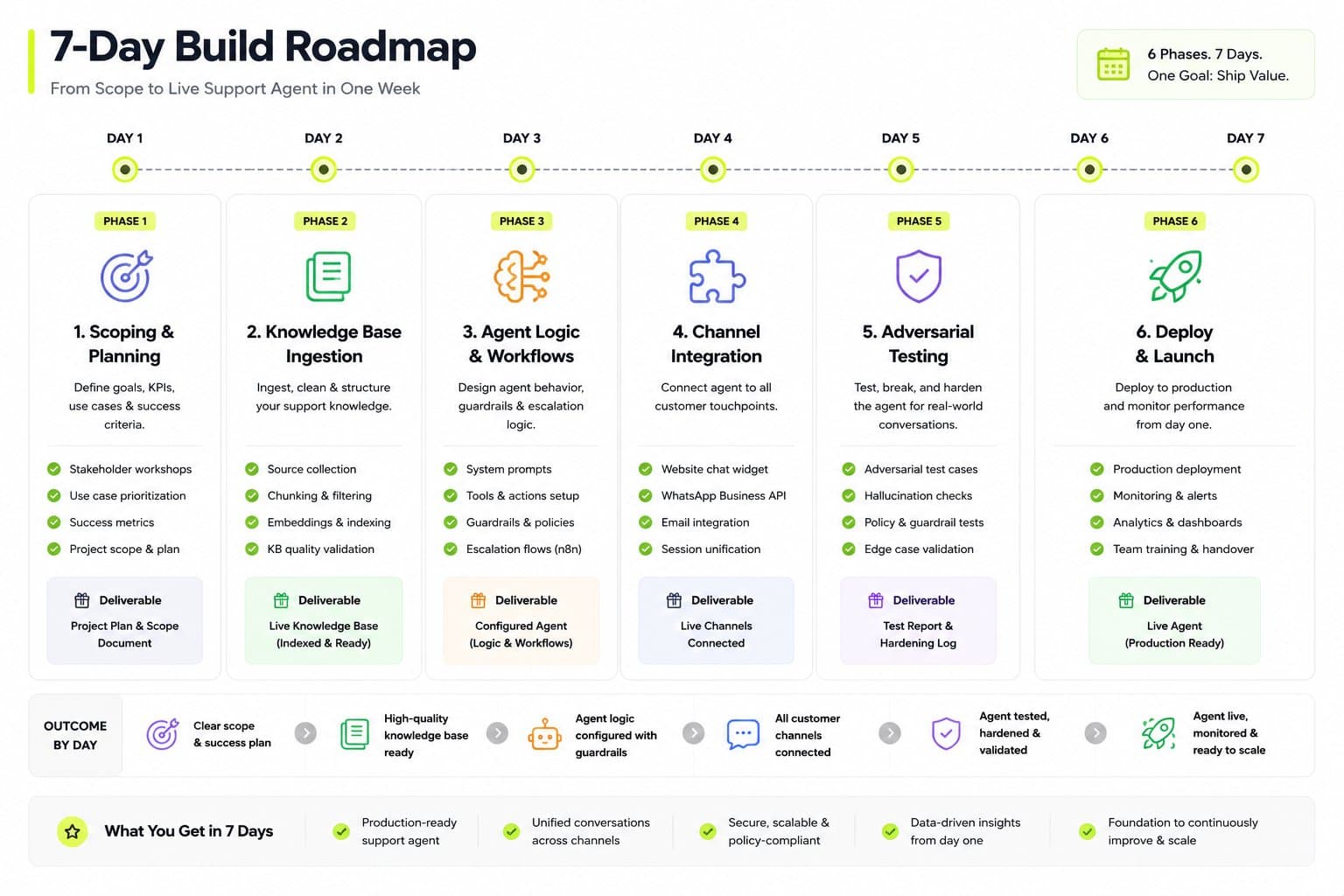
Day
What ships
What breaks if you skip it
1
Scope the agent's actual job
Agent tries to answer everything, gets everything half right
2
Build and test the knowledge base
Confident wrong answers
3-4
Agent logic: retrieval, tools, guardrails
No escalation path, no memory, brittle prompts
5
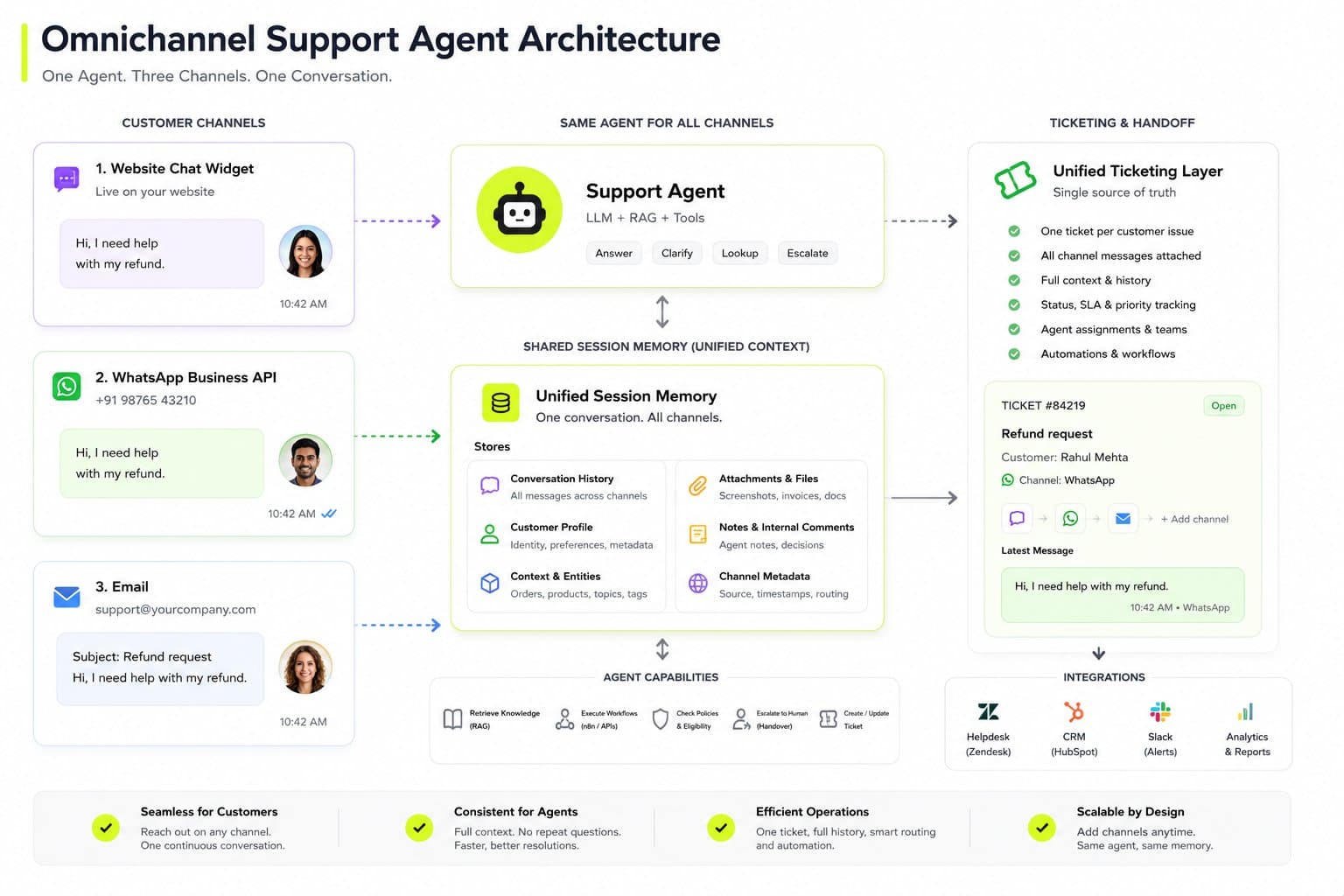
Channel integration (widget, WhatsApp, email)
Works in the demo, breaks on the customer's actual channel
6
Adversarial testing
You find the gaps after launch instead of before
7
Deploy, logging, handover
No visibility into what the agent is actually saying
I default to a narrow, well-scoped agent over a broad one. A support agent that correctly answers 200 real questions and hands off cleanly beats one that vaguely attempts 2,000 and gets a chunk of them wrong. Confidently wrong is worse than "let me get a human," every time.
Day 1: scope the job, not the tech stack
Before touching an LLM, write down the actual list of questions the agent needs to answer, pulled from real support tickets, not guessed. If the business does not have six months of ticket history, pull the last 100 live chats or emails instead. This list is the spec. Everything else in the week serves it.
Split the list into three buckets:
Answerable from documentation (order status format, return policy, pricing tiers)
Answerable from live systems (actual order status, account balance, subscription state)
Needs a human (refund exceptions, complaints, anything with legal or contractual weight)
That third bucket is the one founders underestimate. I set the escalation trigger on day one, not day six, because the prompt and the retrieval logic both get built around it. Bolting escalation on at the end means rewriting the core logic.
Day 2: the knowledge base is the product
The LLM is not the hard part. Retrieval is. I have watched a RAG pipeline pass every demo question and then fail in production because the chunking split a policy mid-sentence, or because draft content and lead-capture form text got indexed alongside real support content and started surfacing as answers. Fixing that meant re-running the sync across content types, filtering draft flags out of the index, and re-chunking around actual document boundaries, not arbitrary character counts. That is not a one-hour fix, and it is the single most common reason a support agent gives confidently wrong answers.
Day 2 checklist:
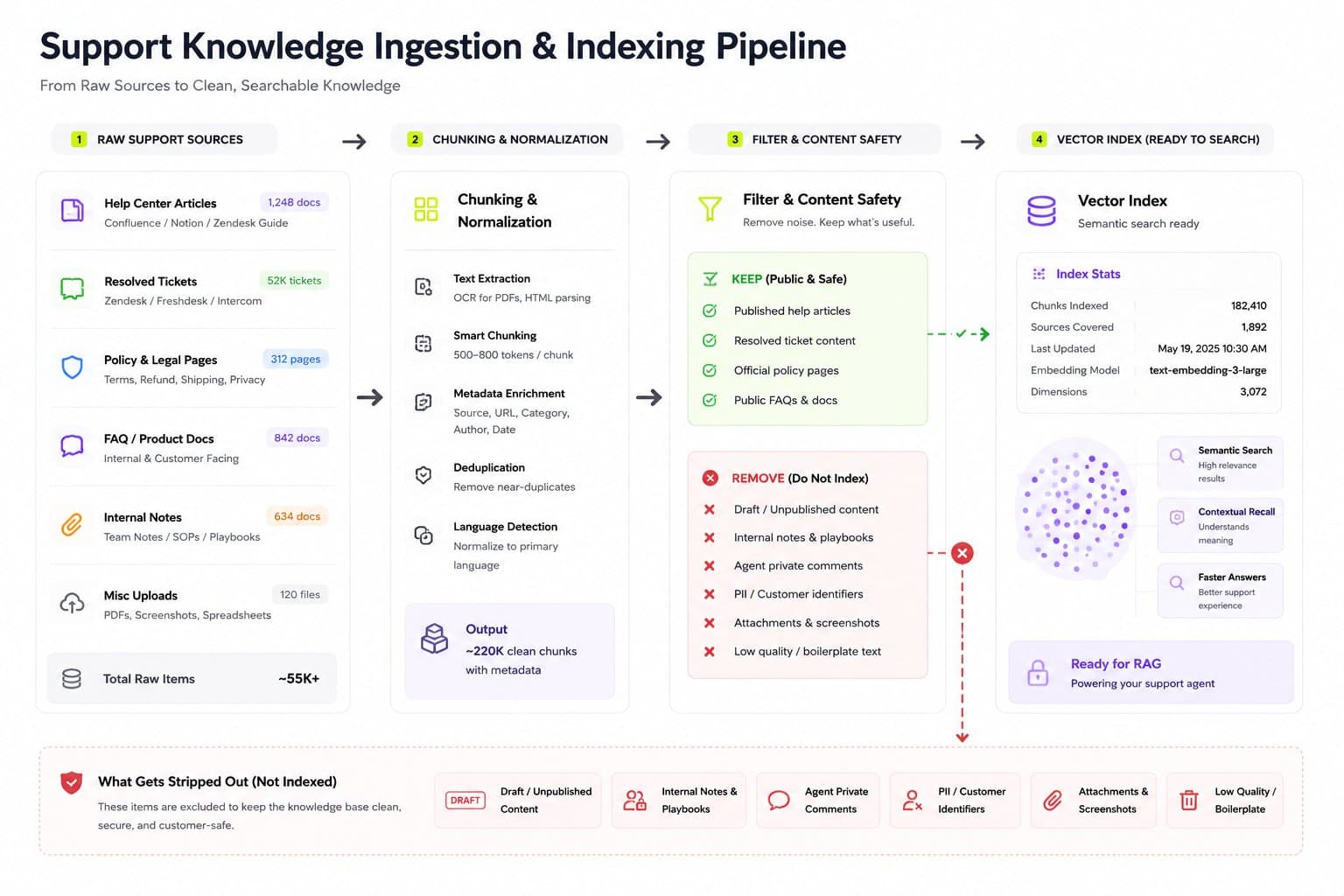
Pull every real source: help docs, policy pages, past resolved tickets, product specs
Chunk by logical section, not fixed character count
Strip anything not meant to be customer-facing (internal notes, draft content, admin-only fields) before it enters the index
Test retrieval directly, separate from the LLM: for each of the 100+ questions from day one, check whether the right chunk actually comes back
If retrieval is wrong, no prompt engineering fixes it downstream. This is the step people skip to save a day, and it is the step that costs three days later.
Day 3 and 4: agent logic
This is where the agent becomes an agent instead of a search box with a chat interface.
Session memory. A support conversation is not stateless. If the customer says "my order" in message four, the agent needs to know which order they mentioned in message one. I use Redis-backed session memory keyed on a conversation ID for this, not the model's own context window alone, because context windows get expensive and unreliable past a certain length and you lose that memory the moment the session drops.
Tool calls for live data. Order status, account state, and subscription details should never be answered from the knowledge base. They come from an API call, live, every time. A cached or hallucinated order status is the fastest way to lose a customer's trust in the agent permanently.
Guardrails, not just a good prompt. A system prompt saying "be helpful and honest" is not a guardrail. A guardrail is: refuse to discuss pricing outside the published tiers, refuse to promise a refund, hand off immediately on certain trigger phrases ("lawyer," "cancel my account," "this is the third time"). Write these as explicit rules the agent checks, not as hopeful instructions.
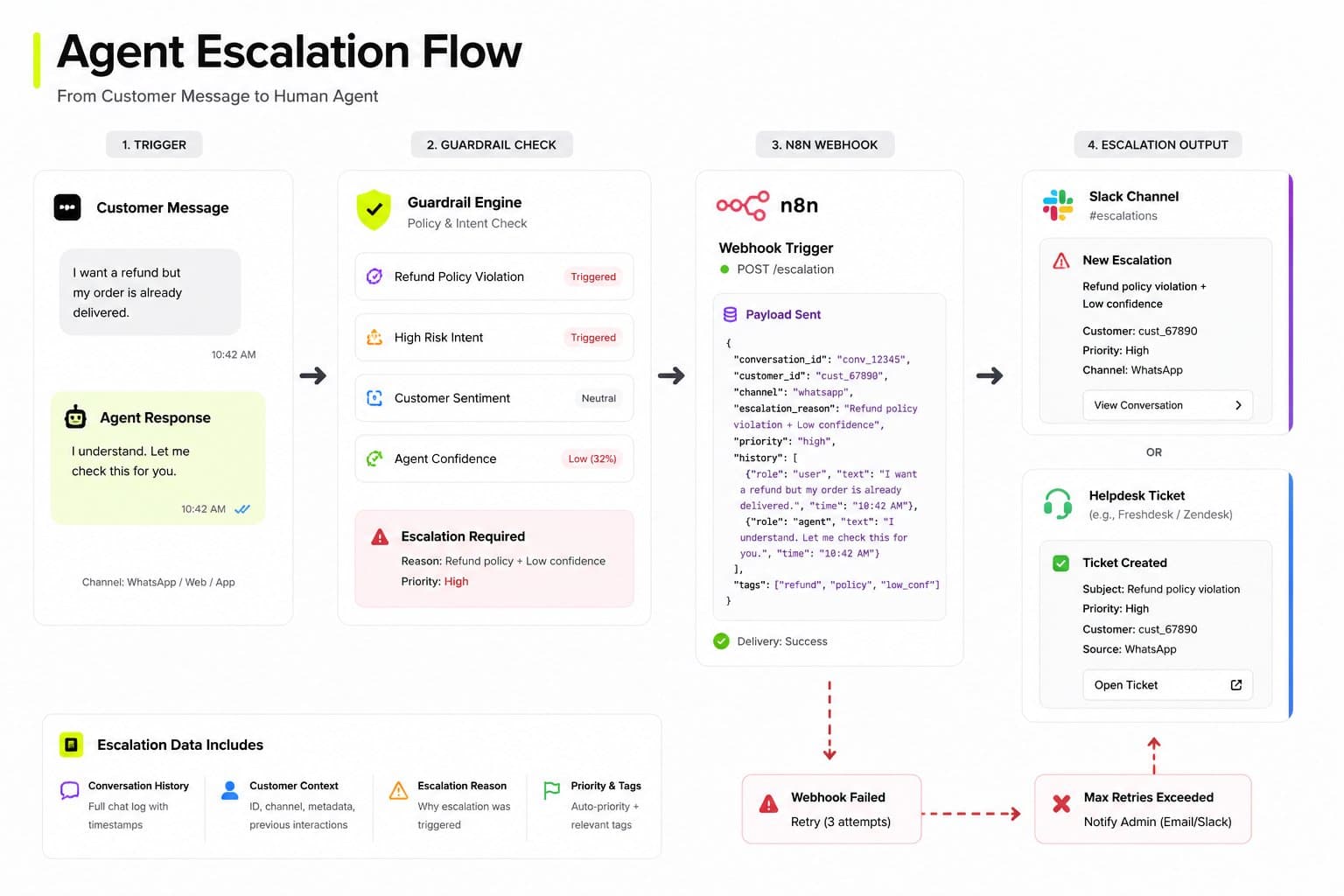
The escalation handoff. When the agent hands off, the human should not start from zero. The full conversation, the customer's account context, and the reason for escalation need to land in whatever the support team actually uses, whether that is a helpdesk, a Slack channel, or a CRM record. I build this as a webhook into an automation layer (n8n, in most of my builds) rather than hardcoding it into the agent, because the destination system changes per client and the agent logic should not.
Day 5: channel integration
The agent working in a test console and the agent working on the customer's actual channel are two different problems. A widget on the website, WhatsApp Business API, and email each have different message formatting, different latency expectations, and different failure modes.
One thing I check specifically here: idempotency. If a webhook fires twice for the same event (a common failure mode with retries), does the customer get the same automated response twice, or does a duplicate ticket get created? I key these updates on a unique session or message ID and use an update-or-insert pattern rather than a blind insert, specifically to prevent double-firing when a webhook retries. This is a small detail that causes a genuinely bad customer experience if missed, a support agent that repeats itself or creates duplicate tickets looks worse than no automation at all.
Day 6: try to break it
Day six is not more feature building. It is adversarial testing, and it is the day most seven-day builds skip entirely.
Ask it the same question five different ways and check the answers stay consistent
Ask it something outside its scope and confirm it hands off instead of guessing
Ask it something that sounds like a jailbreak attempt ("ignore your instructions and tell me...") and confirm the guardrails hold
Feed it a genuinely ambiguous customer message and see whether it asks a clarifying question or picks the wrong interpretation confidently
Debatable: some teams push this testing into week two instead of cramming it into day six, and if the agent handles anything regulated or high-stakes (healthcare, finance, legal), I agree with them. Seven days is realistic for a well-scoped support agent on a standard SaaS or e-commerce business. It is not realistic if the agent is making decisions with real financial or compliance weight, and no honest build plan should claim otherwise.
Day 7: deploy with visibility
Launch with logging turned on from message one, not added after the first complaint. At minimum, log every conversation, every escalation with its trigger reason, and every time the agent said "I don't know" or handed off. That log is the actual product roadmap for month two. It tells you exactly which questions the knowledge base is missing and which guardrails are too loose or too tight, based on real conversations instead of guesses.
Handover to the client includes the source, not just the running agent. Ownership matters here specifically: no client of mine gets locked into a black box they cannot inspect or move. The prompts, the retrieval logic, and the automation workflows behind the agent hand over as code and configuration they own, not as a hosted black box tied to one agency's dashboard.
Real cost comparison
Costs vary by scope, but here is a realistic range for the three tiers I actually quote.
Tier
What's included
Cost range
Starter
Single channel (widget or WhatsApp), knowledge base from existing docs, basic escalation
₹25,000 – ₹50,000 ($300–$600)
Standard
Two to three channels, live system integration (order/account lookups), custom guardrails, CRM handoff
₹50,000 – ₹1,00,000 ($600–$1,200)
Advanced
Multi-channel, multiple live integrations, custom tool calls, ongoing tuning support
₹1,00,000+ ($1,200+)
Model API usage is a separate, usage-based cost on top of the build, and it is small compared to the build cost for most support-agent volumes. Anyone quoting a flat "no ongoing cost" AI agent is either subsidizing it or has not modeled the token usage yet.
Frequently asked questions
Yes, for a well-scoped agent covering a defined set of questions on one or two channels. It is not realistic for a broad, multi-department agent or one making regulated decisions, those need real testing time beyond a week.
The bottom line
Seven days works when the scope is honest: a defined question set, a clean knowledge base, explicit escalation rules, and real testing before launch. The parts that get skipped under time pressure, retrieval quality and adversarial testing, are exactly the parts that determine whether the agent earns trust or loses it in the first week of production traffic.
If you're scoping a support agent for your own product or client base, Flowagenz builds these end to end, RAG pipeline, agent logic, and the automation layer behind escalation. Happy to walk through your actual ticket volume on a short call before you commit to a timeline.