Headless WordPress vs traditional WordPress: performance showdown
DineshAI, Automation & Technology Strategist
15 min read
An honest, 2026-current comparison of headless and traditional WordPress, including what WordPress 7.0's new AI infrastructure actually changes.
Traditional WordPress still runs roughly 43 percent of the web, and that number has stayed remarkably stable even as headless architecture matured. That alone should tell you the honest answer isn't "headless won," it's that both approaches solve real, different problems, and picking based on which one sounds more modern is how projects end up over-engineered or under-performing.
2026 changed one real thing about this decision: WordPress 7.0, released in May, shipped native AI infrastructure directly in core, an Abilities API, a standardized AI Client, and a Connectors hub for external AI providers. That's a genuine shift for how WordPress sites, headless or not, integrate with AI tools and agents going forward. The core performance and architecture trade-offs between headless and traditional, though, haven't fundamentally changed, they've just gotten better understood.
The 30-second verdict
#
Traditional WordPress
Headless WordPress
Setup cost
Low, launch in days with a quality theme
Meaningfully higher, needs a custom frontend build
Raw performance ceiling
Good with proper caching and a quality theme
Higher ceiling, edge-rendered pages typically hit 50-150ms TTFB
Content editing experience
Native, WYSIWYG, what you see is what you get
Requires custom preview tooling, or it feels disconnected from the live site
Plugin ecosystem
Full access, largest plugin ecosystem in the industry
Limited, many plugins assume theme-based rendering and simply don't work
Security surface
Larger, admin and frontend share the same attack surface
Smaller, public site doesn't expose WordPress admin directly
Multi-channel content delivery
Not built for it
Built for it, same content to web, app, and other channels
Best fit
Most business sites, blogs, portfolios, budget-conscious projects
High-traffic, multi-channel, or enterprise projects with a dedicated dev team
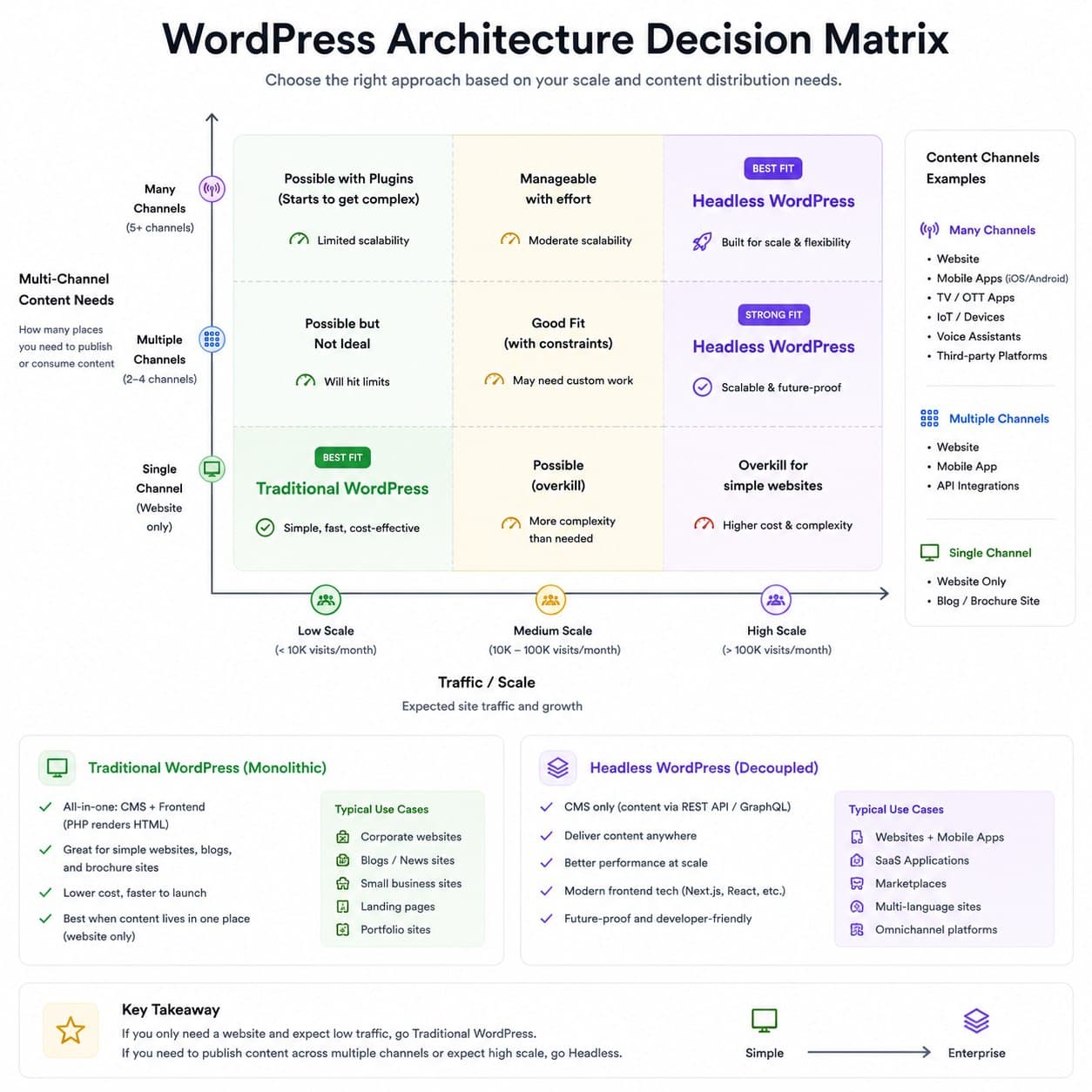
I default to traditional WordPress unless there's a specific, named reason to go headless, real traffic scale, multi-channel content delivery, or a performance requirement traditional WordPress genuinely can't hit even with proper optimization. Headless is a real upgrade for the right project and needless complexity for the wrong one.
What each one actually is
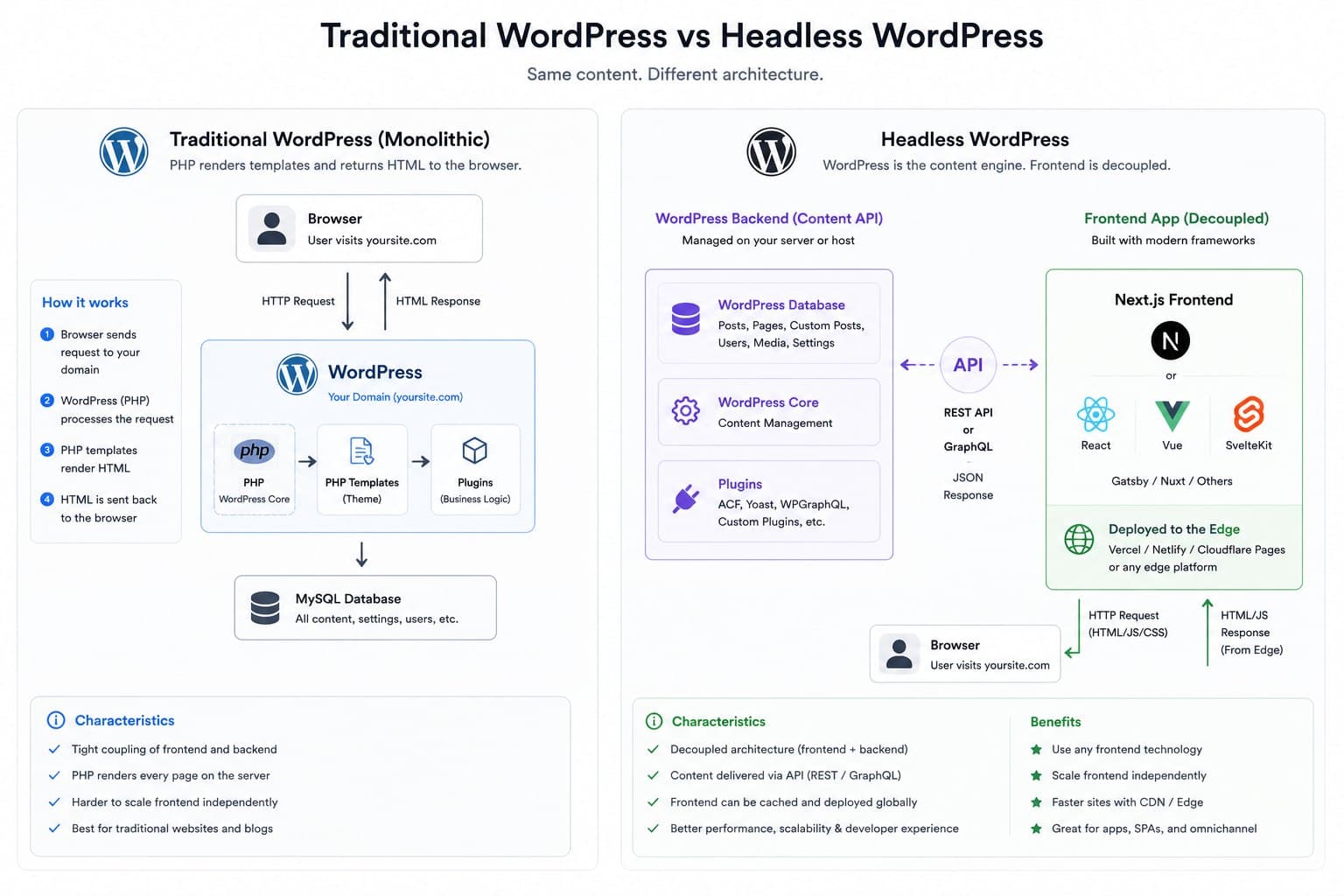
Traditional WordPress couples content and presentation in one system: the same install stores your content and renders your pages through PHP templates. A visual editor, a huge plugin ecosystem, and a single hosting environment come as one package. With a quality theme, decent caching, and a real CDN in front of it, traditional WordPress scores well on Core Web Vitals for a fraction of what a headless build costs, and it remains far easier for non-technical staff to manage day to day.
Headless WordPress separates the two: WordPress stays the content backend, but a separate frontend, typically Next.js or a similar modern framework, pulls content through the REST API or WPGraphQL and renders it independently, often as static pages or edge-rendered on a CDN. This buys real architectural flexibility: the same WordPress content can feed a website, a mobile app, and other channels from one source, and frontend and backend teams can work independently without blocking each other.
Head-to-head
Raw performance
Headless generally wins here, and the gap is real, not marketing. Edge-rendered or statically generated headless pages typically achieve 50 to 150 millisecond time-to-first-byte from CDN edges, meaningfully faster than a typical traditional WordPress response even with good caching. That said, "traditional WordPress is slow" is a myth built on badly configured sites. A quality theme, proper page caching, and a real CDN gets traditional WordPress very close on Core Web Vitals for most content-driven sites, just not to the same ceiling headless can reach for the largest, most demanding use cases.
Editing and content workflow
Traditional WordPress wins decisively. The visual editor is genuinely what-you-see-is-what-you-get, and most non-technical teams can manage a traditional WordPress site with no developer involvement for day-to-day content work. Headless breaks that connection: previewing content on the actual live frontend requires a custom-built preview system connecting the WordPress editor to the JavaScript frontend, and without that investment, editors are publishing content without seeing how it will actually look. This is one of the most consistently underestimated costs of going headless.
Plugin ecosystem
Traditional WordPress wins outright. Its plugin ecosystem is the largest in the CMS industry, and most plugins are built assuming theme-based rendering, they output shortcodes or HTML directly into a template. In a headless setup, plugins that rely on that pattern simply don't work, and replacing their functionality means custom frontend development instead of installing a plugin. This is a real, recurring cost that headless proposals often understate.
Security
Headless wins here specifically. Because the public-facing site isn't directly connected to the WordPress database or admin, there's no direct path for automated bots to target wp-admin or exploit theme and plugin vulnerabilities through the public site. This meaningfully reduces the common attack surface, though backend security practices on the WordPress installation itself still matter regardless of architecture.
Multi-channel and scale
Headless wins clearly for this specific use case: large-scale enterprise sites serving global audiences, businesses that need to sync the same content across a website and a mobile app, or projects with genuinely demanding traffic that traditional WordPress, even well-optimized, starts to strain under. This is the scenario headless was actually built to solve, not a generic performance upgrade for a standard business site.
What WordPress 7.0 actually changes
WordPress 7.0, codenamed Armstrong, shipped on May 20, 2026, and it's the most structurally significant WordPress release in years. For the headless decision specifically, the relevant piece is the new Abilities API and the standardized AI Client and Connectors hub built into core. This gives WordPress a first-party, structured way for plugins, themes, and external AI agents to describe and access what a site can do, rather than every AI integration building its own custom, one-off connection. That's a real reduction in one specific kind of integration friction for both traditional and headless setups.
It's worth being precise about what this does and doesn't change. It does not replace the need for a dedicated GraphQL or REST layer to build a headless frontend, WPGraphQL and the REST API remain the standard way to pull structured content out of WordPress for a decoupled frontend, and that part of the headless setup cost hasn't gone away. What has changed is that WordPress core itself is now AI-aware in a standardized way, which matters more for how a site connects to AI tools and agents than for the fundamental headless-versus-traditional performance trade-off.
For a business evaluating this in the second half of 2026 specifically, the practical takeaway is: don't let WordPress 7.0's AI headlines push the headless decision one way or the other. Evaluate it on the same performance, budget, and content-workflow criteria that mattered before the release, then treat the new AI infrastructure as a separate, additive capability that benefits whichever architecture you land on.
Decision framework
Stick with traditional WordPress if:
The site is a standard business website, blog, or portfolio without extreme traffic demands
Non-technical staff need to manage content day to day without developer involvement
Budget favors a faster, cheaper launch over a higher performance ceiling
The plugin ecosystem (booking systems, membership tools, page builders) is doing real work you'd otherwise rebuild
Go headless if:
Traffic is genuinely at a scale where even well-optimized traditional WordPress struggles
The same content needs to reach multiple channels, web, app, other platforms, from one source
A dedicated development team can own both the WordPress backend and the custom frontend long-term
The performance requirement is specific and measurable, not a general feeling that headless is "more modern"
Real cost comparison
#
Traditional WordPress
Headless WordPress
Initial build
40,000 to 1,50,000 INR ($500 to $1,800) with a quality theme
2,00,000 to 6,00,000+ INR ($2,400 to $7,200+) for a custom frontend build
Ongoing maintenance
Lower, plugin updates and standard WordPress maintenance
Higher, two systems to maintain instead of one
Content editor tooling
Included
Requires custom preview build, a real added cost most quotes underprice
Hosting
Standard WordPress hosting
WordPress hosting plus separate frontend hosting (often edge/CDN-based)
Frequently asked questions
Not automatically. A well-optimized traditional WordPress site with a quality theme, proper caching, and a real CDN performs well on Core Web Vitals. Headless has a higher performance ceiling, particularly for large-scale or complex sites, but a badly built headless site can underperform a well-built traditional one.
Headless WordPress wins on raw performance ceiling, security surface, and multi-channel delivery. Traditional WordPress wins on cost, editing experience, and plugin ecosystem, and it remains the better, more cost-effective choice for most business websites in 2026, even with headless architecture more mature and better understood than it was a few years ago. WordPress 7.0's new AI infrastructure is a real, useful addition, but it changes how WordPress talks to AI tools, not the fundamental trade-off between these two architectures. Match the choice to a specific, named requirement, not to which one sounds more current, and revisit the decision if that requirement changes rather than treating it as permanent.
If you're deciding between headless and traditional WordPress for your next build, Flowagenz has shipped both and can assess which one your actual traffic, team, and content needs justify, not which one sounds better in a pitch. Happy to walk through your specific requirements on a short call.