n8n's AI nodes let a workflow make a judgment call instead of just moving data through fixed if-this-then-that logic. Before these nodes existed, "automation" meant every branch had to be anticipated in advance. Now a workflow can hand a decision, classify this ticket, decide whether to escalate, extract structured data from a messy email, to an LLM and act on the result. That is a real capability shift, not a marketing label slapped on the same old flows.
The catch is that n8n's AI nodes are not one node. They are a small ecosystem, root nodes plus attached sub-nodes for models, memory, tools, and retrieval, and picking the wrong one for the job is the most common reason an "AI workflow" turns out slower, more expensive, or less reliable than the deterministic version it replaced.
I default to the smallest node that does the job. An AI Agent looping through tool calls to classify a support ticket is over-engineering when a Text Classifier node does the same thing in one deterministic call, cheaper and faster. Reach for the Agent when the workflow genuinely needs to decide what to do next, not just to sound more advanced.
AI Agent: the node people mean by "n8n AI node"
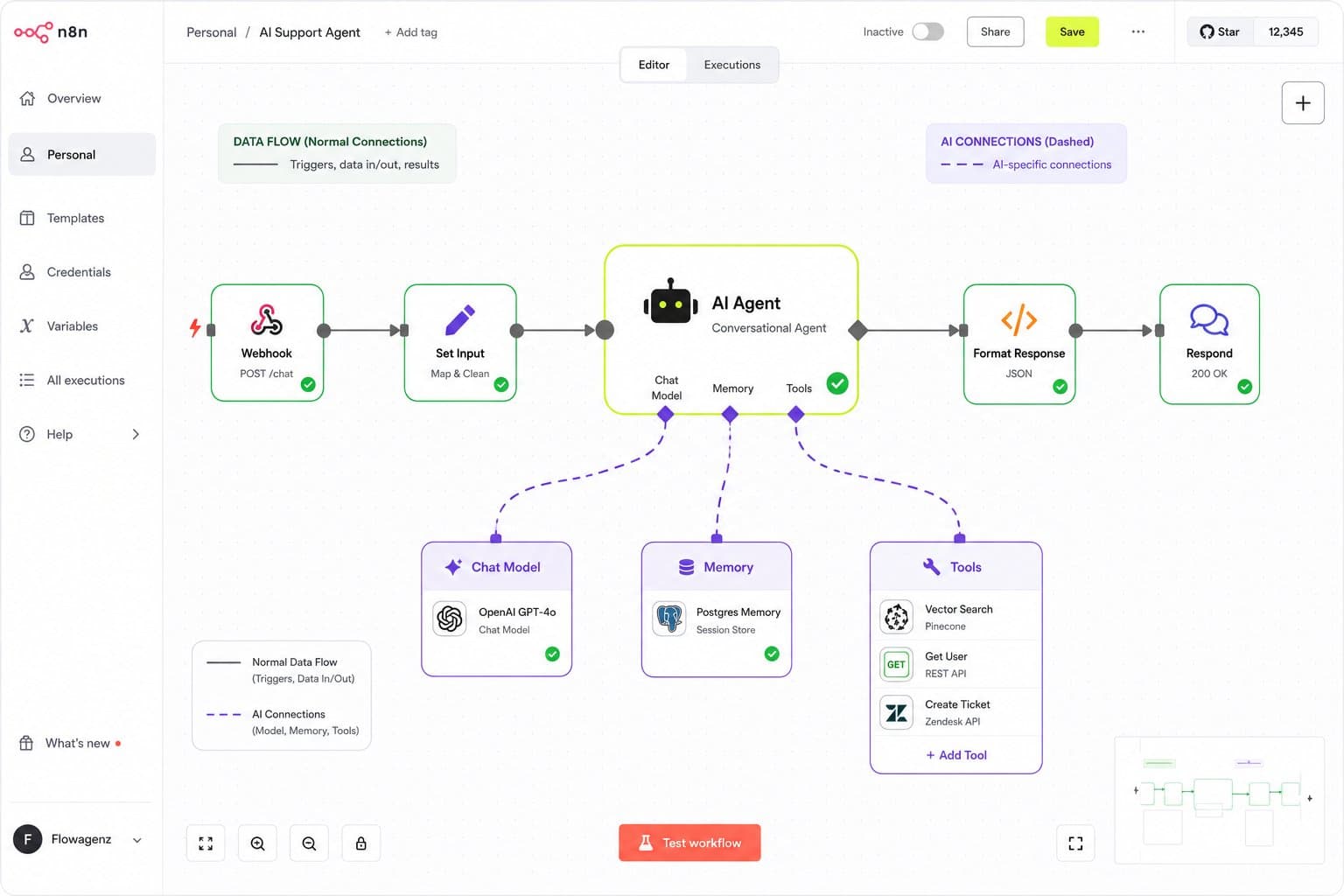
The AI Agent is n8n's core "decision-making" node. Give it a chat model, and optionally memory and a set of tools, and it decides which tools to call and in what order, looping until it has an answer. This is the node behind a support chatbot that can check an order status, search a knowledge base, and decide when to hand off to a human, all inside one node's configuration rather than a maze of IF branches.
The setting that determines whether an Agent actually behaves well is the system message, not the model. This is where the role, the rules, the tone, and the guardrails live, and it is the single field most builds under-invest in. A vague system message produces an agent that technically works in the demo and drifts off-script the moment a real customer phrases something unexpected.
Two settings worth knowing before shipping: max iterations, which caps how many tool-call loops the agent can run before stopping, and return intermediate steps, which surfaces what the agent actually did at each step, essential for debugging why an answer came out wrong instead of guessing.
The part most explanations skip: sub-nodes and connection types
An AI Agent is not a single box you configure and connect like a normal n8n node. It is a root node with sub-nodes attached through special AI-specific connection types, ai_languageModel, ai_memory, ai_tool, ai_embedding, ai_vectorStore, rather than the regular data-flow connections every other n8n node uses. Visually this shows up as dashed lines instead of solid ones on the canvas.
This matters for anyone importing or hand-editing workflow JSON: getting these connection types wrong is the most common reason an AI workflow fails to import cleanly or silently doesn't wire up the way the canvas suggests it should. If a workflow JSON is being generated or edited outside the UI, the connection type has to match the sub-node's role exactly, not just point in the right general direction.
Memory: the difference between a chatbot and a chatbot that remembers
Without memory attached, every message an AI Agent receives is treated as a fresh conversation with no history. For anything beyond a single-turn Q&A, that is a broken experience, the agent forgets what the customer said two messages ago.
Simple Memory (Window Buffer) keeps the last N turns in n8n's own process memory, keyed on a session ID. Zero setup, but it does not share reliably across queue-mode workers and grows with active sessions, fine for a prototype, not for production chat volume.
Redis Chat Memory is the production choice for anything with real concurrent chat traffic, external, fast, and supports expiry so old sessions clean themselves up.
Postgres Chat Memory trades some speed for a durable, queryable transcript, useful when the conversation history itself needs to be reviewed or analyzed later, not just referenced in the moment.
Whichever memory node is attached, the session ID expression is the setting that actually determines whether memory works correctly. Get the session key wrong, pull from the wrong field, and every user quietly shares one memory, or every message starts a new one.
Tools: what actually lets the agent take action
A model without tools can only talk. Tools are what let an AI Agent look something up or take a real action instead of just generating text about it.
HTTP Request Tool lets the agent call any API you define. The parameter descriptions are not documentation, they are the agent's only instructions for what each field means, so vague descriptions produce vague or wrong calls.
Call n8n Workflow Tool is the pattern worth building around: turn a deterministic action, create a CRM lead, check inventory, book a slot, into its own sub-workflow, then expose that sub-workflow to the agent as a tool. This keeps the risky or complex logic testable and deterministic on its own, and keeps the agent itself thin, deciding when to call the tool rather than trying to reason through the whole action inline.
Vector Store Tool gives the agent the ability to search a knowledge base on demand, letting it decide when retrieval is actually needed rather than retrieving on every single message regardless of relevance.
$fromAI() is the expression that lets the model fill in a specific parameter inside a tool call, {{ $fromAI('parameterName', 'description', 'string') }}, while everything else in that tool stays fixed by the workflow builder. This is the actual control knob for how much decision-making authority the agent has on any given action: fix what should never be the model's call, and let $fromAI handle only what genuinely needs judgment.
Fewer, precisely described tools consistently outperform a large toolbox of vaguely described ones. An agent choosing between two well-explained tools makes a better decision than one choosing between eight loosely described ones.
RAG inside n8n: the ingestion pipeline people rush
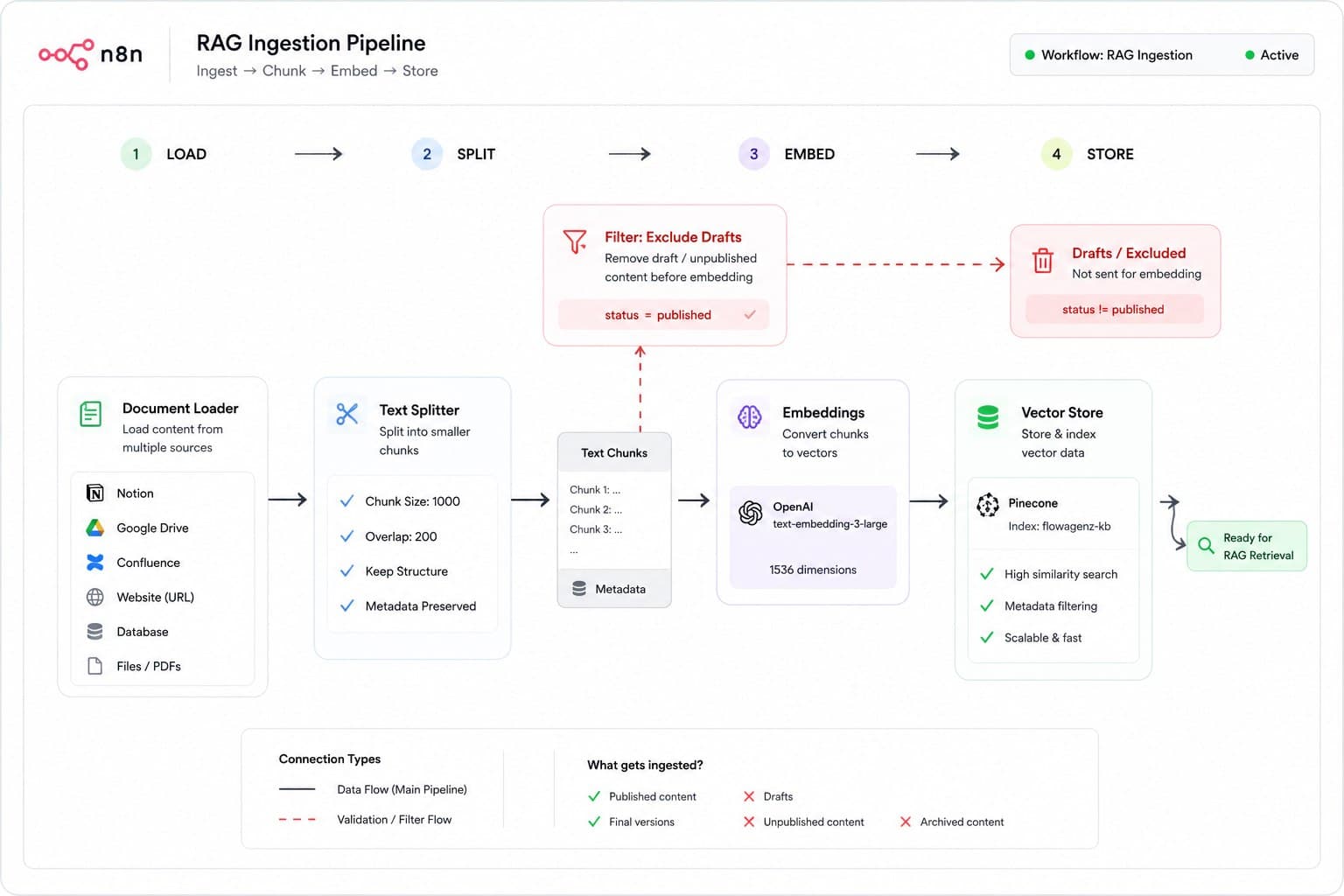
Retrieval-augmented generation inside n8n runs through a specific pipeline: a Document Loader pulls in content, a Text Splitter chunks it (Recursive Character splitting with roughly 500 to 1500 character chunks is the sane default), an Embeddings node converts each chunk to a vector, and a Vector Store node (Pinecone, Qdrant, or Supabase's pgvector are the real production options; the in-memory Simple Vector Store is prototype-only and wipes on every restart) stores it for retrieval.
The single hardest rule to violate safely: ingestion and query must use the exact same embedding model and dimension. Mismatch that and retrieval either returns garbage or the vector store throws a dimension error outright.
The mistake that shows up most in audits is not the pipeline architecture, it is what gets synced. Content that only lives inside a UI component, a footer contact block, an admin-only note, never reaches the index unless someone explicitly includes it in the sync, and draft or unpublished content needs to be filtered out before embedding, not after, or it starts surfacing as if it were live, published information. I have fixed exactly this issue on a real sync pipeline: content types that seemed obviously in scope were missing from the index, and draft-flagged records were getting embedded alongside published ones.
The bottom line
n8n's AI nodes turn a workflow from "moves data through fixed branches" into "can retrieve, reason, and decide," but that power comes with real configuration surface: the right root node for the task, correctly wired sub-nodes, memory keyed correctly, tools described precisely, and a RAG pipeline that syncs the right content and filters the wrong content out. Get those right and the workflow genuinely handles what a rule-based flow could not. Skip them and it is a slower, more expensive version of the automation it was meant to replace.
If you're scoping an n8n workflow that needs to make real decisions, not just move data, Flowagenz builds these end to end, agent design, RAG pipelines, and the guardrails that keep them reliable in production. Happy to look at your actual workflow on a short call.