Native vs hybrid vs cross-platform apps: the real 2026 comparison
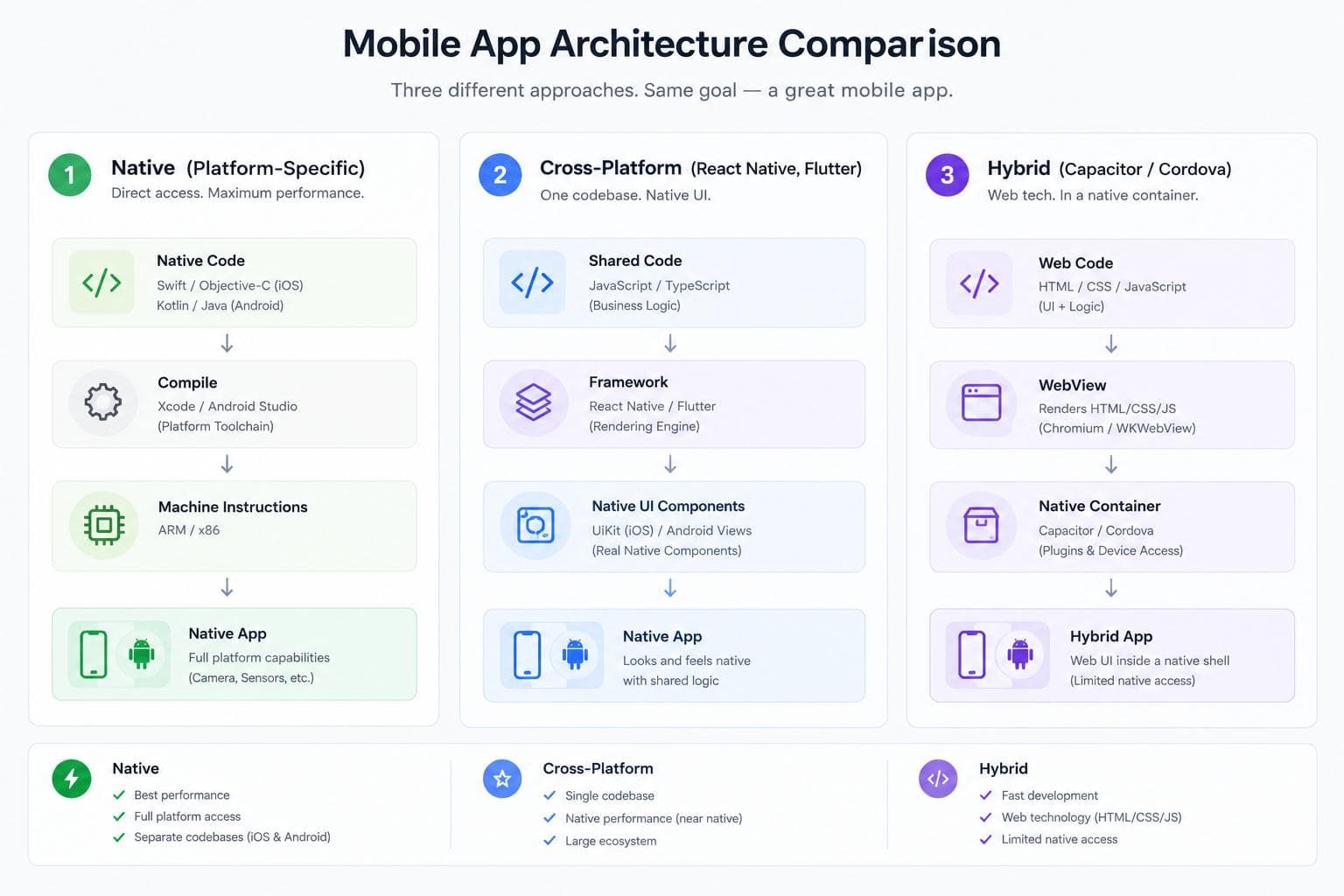
These three terms get used loosely enough that "cross-platform" and "hybrid" are often treated as synonyms, and they're not. The actual technical difference matters more than the terminology: native code compiles directly to machine instructions for each platform, cross-platform frameworks like Flutter and React Native compile to real native UI components, and hybrid apps render inside a WebView, a browser embedded in a native shell. That third category is a meaningfully different architecture from the other two, not just a cheaper version of cross-platform.
Hybrid's popularity has genuinely declined as cross-platform frameworks matured, many apps that would have been built hybrid in 2018 get built in Flutter or React Native today. That doesn't make hybrid obsolete, it makes it a narrower, more specific fit than it used to be. This post covers what each approach actually is, mechanically, and when each one is the right call in 2026.
For most businesses building a standard product in 2026, cross-platform is the sensible default, which is why our own Flutter and React Native guides go deeper on that specific choice. This post exists for the decision one level up: whether cross-platform is even the right category, or whether native's performance ceiling or hybrid's speed and cost actually fit your specific project better.
What each one actually is, mechanically
Native development means writing separate code for each platform, Swift or SwiftUI for iOS, Kotlin or Jetpack Compose for Android, using each platform's own toolchain. That code compiles directly to machine instructions with no interpretation layer, no bridge, no abstraction between your code and the platform. This is why native sets the performance ceiling every other approach gets measured against, and why it remains the only real choice for 3D-heavy applications, AR/VR products, or anything needing continuous, immediate access to the newest platform-specific hardware capabilities the moment they ship.
Cross-platform frameworks, Flutter and React Native being the two real options in 2026, use a single shared codebase that compiles down to genuine native UI components at build time (or, in React Native's case since the New Architecture, communicates with native components directly through JSI rather than a serialized bridge). This is the critical distinction from hybrid: a cross-platform app's buttons, lists, and navigation are real native platform components, not web elements rendered inside a browser. That's why cross-platform apps in 2026 get close enough to native performance that the difference is imperceptible to end users on standard business apps.
Hybrid apps embed HTML, CSS, and JavaScript inside a native container, rendered through a WebView, WKWebView on iOS, WebView on Android, which is functionally a specialized embedded browser. Plugins, most commonly through Ionic Capacitor or the older Apache Cordova, provide bridges to native device features like the camera or GPS. Capacitor represents a real, modern improvement over Cordova specifically: direct native project access, a cleaner plugin architecture, and the ability for native mobile developers and web developers to collaborate on the same codebase, native developers building UI or logic in Swift or Kotlin and exposing it to the web layer through Capacitor's native bridge. The defining constraint remains the WebView itself: performance is fundamentally capped by browser rendering, which is fine for content-heavy or form-driven apps and a real limitation for anything demanding smooth, complex, high-frequency interaction.
Performance
Native wins outright, by definition, it's the standard everything else is compared against. For most real applications, though, this ceiling is far higher than the app actually needs, a shopping app, a content app, a standard business tool doesn't require native's absolute performance ceiling to feel good to use. Cross-platform closes most of that gap for standard apps. Hybrid is where the real, persistent performance gap remains, since WebView rendering is a genuinely different, more limited execution model than either native or cross-platform's native-component rendering.
Cost and development speed
Hybrid wins decisively when a web app already exists: wrapping an existing React, Vue, or Angular application with Capacitor requires no new framework to learn and reuses code directly, typically landing in the $40,000 to $80,000 range for adding native features on top of an existing app. Cross-platform greenfield builds run higher, React Native commonly $80,000 to $150,000 and Flutter $90,000 to $170,000 for a comparable full build (Flutter tends to land slightly higher due to a smaller plugin ecosystem sometimes requiring more custom native code). Native development, building and maintaining two separate codebases, sits highest of all three, and that gap compounds every time a feature needs building twice instead of once.
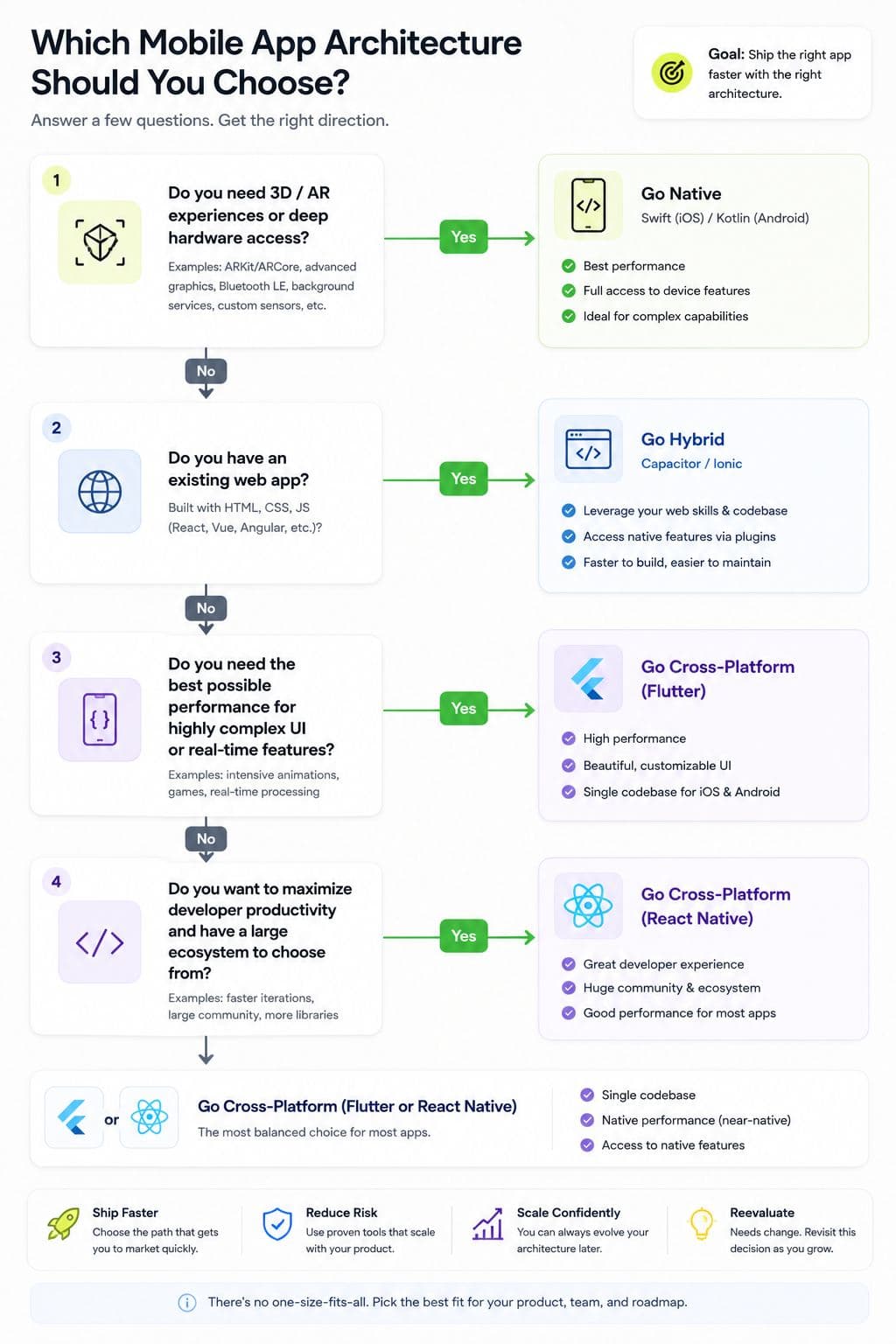
Choose hybrid (Capacitor) if: you already have a web application and want to extend it to mobile with minimal new framework investment, or you're building an internal tool, content-driven app, or fast MVP where the WebView's performance ceiling genuinely doesn't matter for the use case.
These ranges assume a real, moderately complex business app. A narrow MVP costs meaningfully less in any category; heavy custom native module work or genuinely enterprise-scale requirements push any of these ranges higher.
The bottom line
Native sets the performance ceiling and costs the most to reach it. Cross-platform gets close enough to that ceiling for the vast majority of business apps at meaningfully lower cost, which is why it's the right default for most new products in 2026. Hybrid remains a real, valid choice specifically when an existing web app already exists to extend, or when the use case genuinely doesn't need more than a WebView can deliver. The mistake isn't picking any of these three, it's picking one without being honest about which constraint, performance ceiling, existing codebase, or budget, actually describes your project.
If you're deciding which of these three actually fits your product, Flowagenz can assess your real performance needs, existing codebase, and budget before recommending an approach. Happy to walk through your specific requirements on a short call.
Let's create something together
Get in touch with us today.