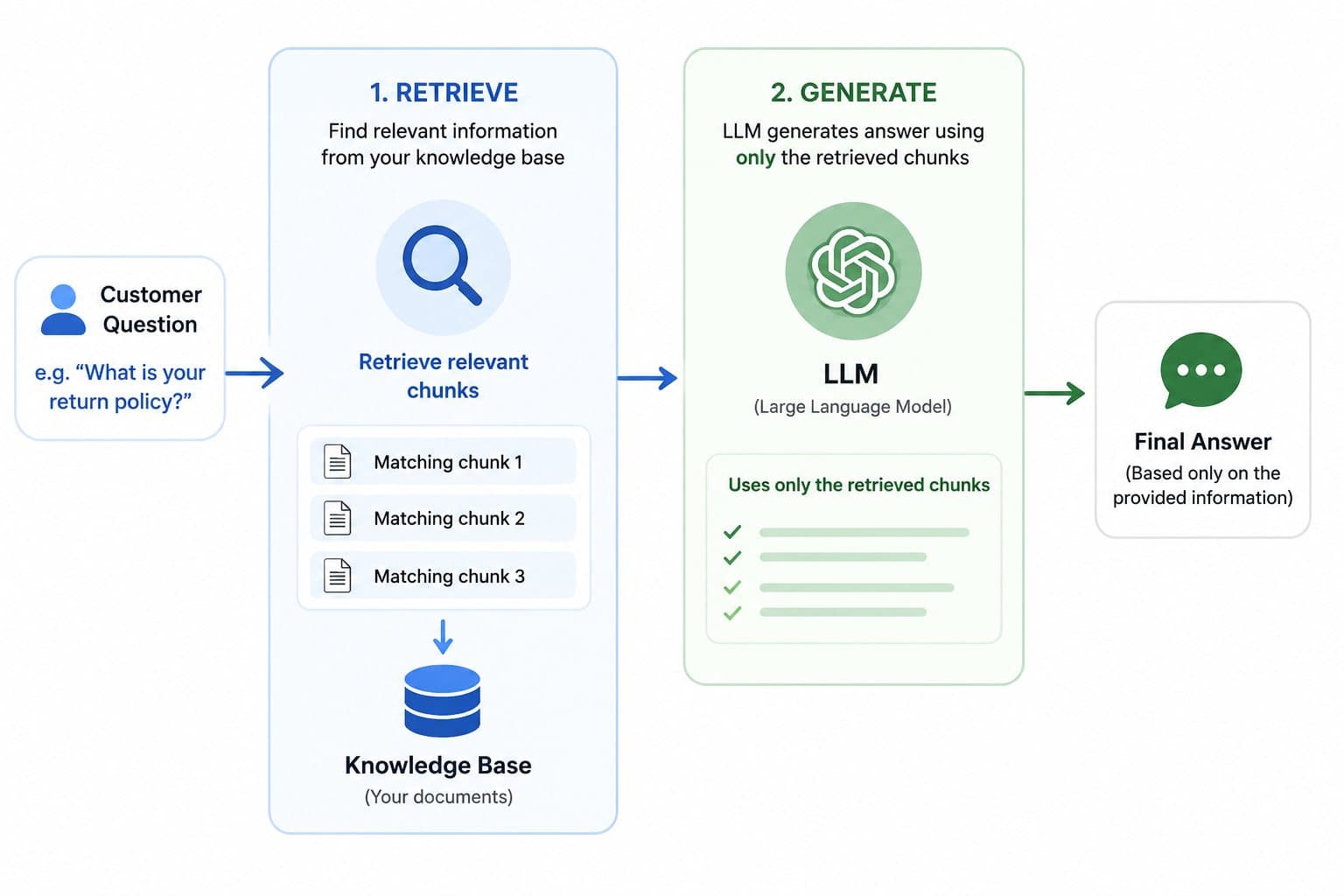
RAG stands for retrieval-augmented generation. Strip the jargon and it means one thing: before the AI answers, it goes and looks something up, then writes the answer using what it found. It is closer to an employee checking the manual before replying than to the AI "knowing" your business.
That distinction matters because most people evaluating an AI agent assume the model has somehow learned their company. It has not. It has a general language model underneath, and a search step bolted in front of it that decides what the model gets to see before it answers. Everything about whether the agent is useful or embarrassing lives in that search step, not in which LLM you picked.
I default to RAG for any agent that needs to know something specific to a business: pricing, policies, product catalog, internal documentation. I skip it for agents that only need general reasoning or conversation, since bolting on retrieval for no reason just adds a failure point.
The librarian analogy
Picture a librarian who has read a huge number of books in general but has never read your company's specific policy manual. Ask that librarian a general question and they answer fluently from everything they have absorbed. Ask them something about your return policy and, without RAG, they will guess, confidently, based on what return policies usually look like elsewhere. That guess sounds correct. It is often wrong.
Give the same librarian access to your actual policy manual and tell them to check it before answering. Now, when you ask about returns, they flip to the right page, read the actual clause, and answer from that. They are not smarter. They are checking a real source instead of guessing from general knowledge. That is the entire mechanism. Retrieval finds the right page. Generation writes the sentence based on what is on it.
What actually happens, step by step
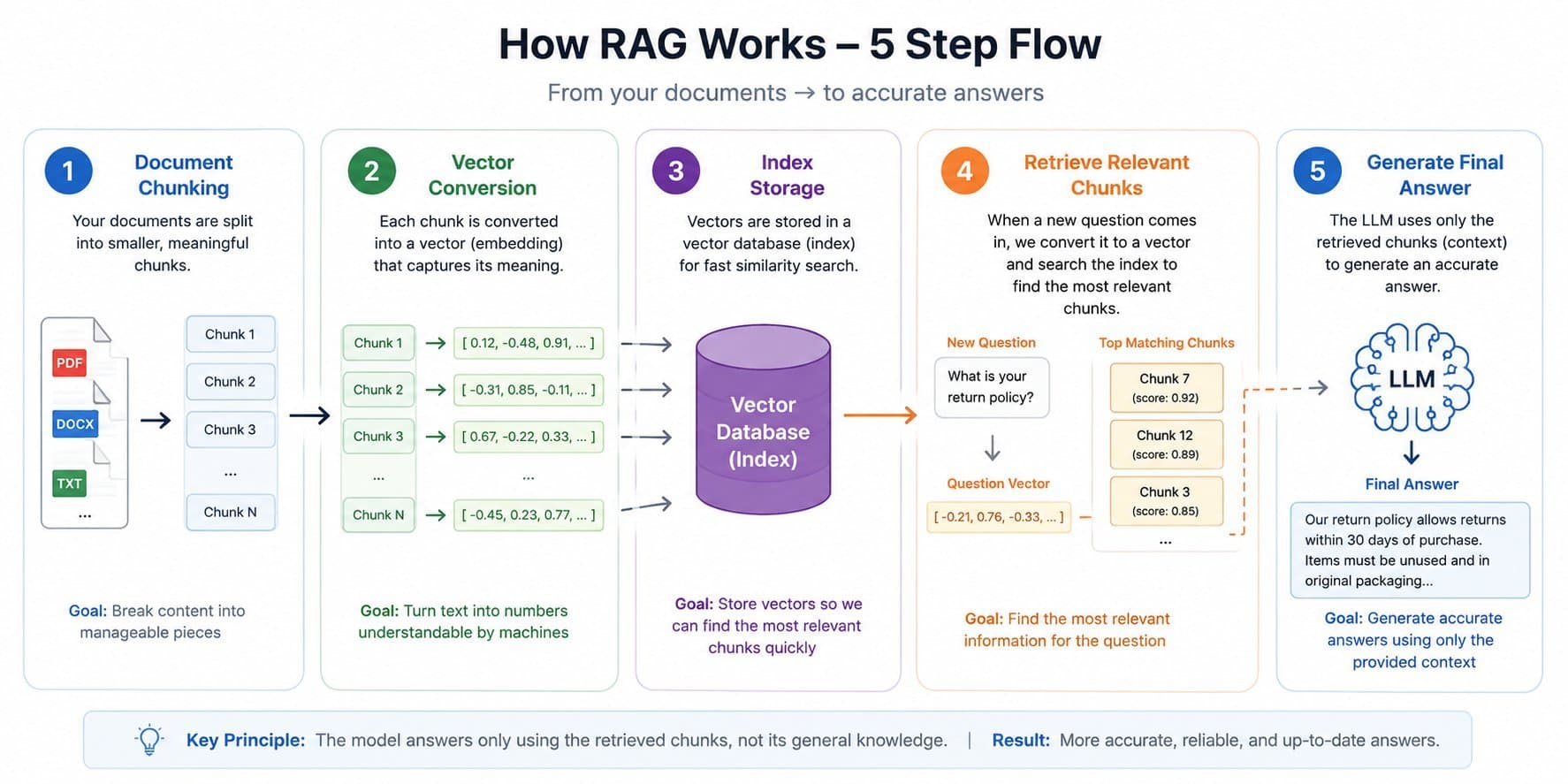
Your documents get broken into chunks. A policy page, a product spec, a help article, each gets split into smaller pieces, usually a few hundred words each. This step matters more than most people think. Split badly, mid-sentence or mid-clause, and the chunk that gets retrieved later is missing context or cut off mid-thought.
Each chunk gets converted into a vector. This is a list of numbers representing the meaning of that chunk, not the literal words. It is what lets the system match "how do I get my money back" to a chunk titled "refund policy" even though none of the words overlap.
Those vectors get stored in an index. Think of it as a searchable library built specifically from your content, separate from anything the underlying LLM was trained on.
A question comes in and gets converted to a vector the same way. The system compares it against every chunk in the index and pulls back the ones that are the closest match, usually three to eight chunks.
Those chunks get handed to the LLM along with the question, with an instruction to answer using only what was retrieved. The model writes the final answer from that material, not from its own general training.
I fixed a support-facing knowledge base where step one was the actual root cause of every bad answer downstream. The content had been chunked by a fixed character count instead of by logical section, so a policy clause got split across two chunks and neither half made sense on its own. Draft content and internal lead-capture form text were also getting indexed alongside real customer-facing content, so the agent occasionally surfaced draft copy as if it were a published answer. Re-running the sync with proper section-based chunking and filtering out anything not meant to be customer-facing fixed both problems, and neither problem was visible from the chat interface. It only showed up when I checked what step four was actually retrieving for specific test questions.
Why "just use a bigger model" doesn't fix this
A common instinct when an agent gives a wrong answer is to swap in a more powerful model. That helps with reasoning quality, not with knowledge. If retrieval hands the model the wrong chunk, or no chunk, a better model will write a more fluent wrong answer, not a correct one. The fix lives in steps one through four, not in which LLM does the writing in step five.
This is also why RAG generally beats fine-tuning for business-specific knowledge. Fine-tuning bakes information into the model's weights, which is expensive to update and does not tell you where an answer came from. RAG keeps the knowledge in documents you can edit directly, and every answer can be traced back to the specific chunk that produced it.
Naive vector search isn't the whole story
Most explanations stop at "convert to vectors and find the closest match," which is naive vector search, and it has a real weakness: it matches on meaning, not on exact terms, so it can miss a query that includes a specific product code, an order number, or an exact policy name. Ask "what's the SKU for the blue variant" and a pure vector search may return a chunk that is semantically close but does not contain that literal code, because "SKU" and "blue variant" don't vectorize as distinctly as a keyword match would catch them.
Hybrid search fixes this by running two searches at once: a traditional keyword search alongside the vector search, then combining and reranking the results. This is why a well-built RAG pipeline is not just "add a vector database." I default to hybrid search for any knowledge base that includes exact identifiers, product codes, model numbers, ticket IDs, since pure semantic matching quietly fails on exactly the queries where precision matters most.
A reranking step on top of that helps further: retrieve a wider set of candidate chunks first (say twenty), then run a second, more precise model over just those twenty to pick the best three to five before handing them to the LLM. This two-stage approach catches cases where the fast first-pass search returns a plausible but not-quite-right chunk near the top.
How to know if your RAG is actually working
A chatbot answering fluently is not evidence retrieval is working. The two look identical from the chat window. Checking it properly means testing retrieval on its own, separate from the final answer.
Build a test set from real questions, twenty to fifty from actual tickets or chat logs, each with the document or chunk that should be retrieved for it, decided by a human beforehand.
Run retrieval only, without the LLM step, and check whether the correct chunk actually comes back in the top three to five results. This is retrieval precision, and it is the single most diagnostic number in the whole pipeline.
Sample real conversations weekly once live, and manually check a handful for whether the answer traces back to a real, correctly retrieved chunk versus the model blending in outside knowledge.
Watch for silent drift, where retrieval quality degrades as more documents get added to the index without corresponding review of chunk quality on the new content.
This is the step most builds skip because it does not show up in a demo. A demo with five hand-picked questions will look perfect regardless of retrieval quality. Production traffic with real, messy questions is where retrieval quality actually gets tested.
It is worth being honest about the failure modes instead of only selling the upside.
Ambiguous questions retrieve the wrong chunk. "What's your policy" with no context might pull the wrong one of several policies, and the model will answer confidently from whichever it got.
Information that spans multiple documents does not always get retrieved together, so an answer that needs two policies combined can come back half right.
Stale documents produce stale answers. RAG only fixes the "trained on old data" problem if someone is actually keeping the source documents current. It is not self-updating.
Retrieval quality is invisible from the chat window. A wrong answer looks the same whether the model reasoned badly or retrieval handed it the wrong material, so debugging requires actually inspecting what got retrieved for a given question, not just reading the final answer.
Who this is right for, and who it isn't
RAG is the right approach for a support agent, an internal knowledge assistant, or any agent that needs to answer from a business's specific, changing content: policies, product catalogs, documentation, ticket history. If the underlying facts change often and correctness matters, RAG keeps the model answering from current material without retraining anything.
It is the wrong tool if the agent only needs general reasoning, creative writing, or conversation with no dependency on private or current information. Adding a retrieval layer there is extra infrastructure with nothing to retrieve, and it adds a failure point for no benefit.
The bottom line
RAG is retrieval before generation: look something up, then write the answer from what was found. The quality of the lookup step decides the quality of the entire agent, far more than which LLM sits at the end of the pipeline. Most "the AI gave a wrong answer" complaints trace back to chunking, filtering, or retrieval, not to the model being unintelligent.
If you're evaluating whether a RAG-based agent fits your support or internal knowledge use case, Flowagenz builds these pipelines end to end, chunking, indexing, retrieval tuning, and the guardrails around them. Happy to look at your actual document set on a short call.