The real question in "self-hosted vs cloud n8n" is not which is cheaper on paper, it's whether your team has someone who can own a Docker deployment, or whether that time is better spent building workflows instead of maintaining infrastructure. Both answers are legitimate. The wrong answer is picking self-hosted because it sounds cheaper without anyone actually owning the server, or picking Cloud without checking what execution volume does to the bill once client workflows scale past a handful.
Flowagenz runs n8n self-hosted on our own infrastructure, so this comparison is grounded in actually operating both models day to day, not just reading pricing pages.
I default to self-hosted for any agency running client workflows at real volume, because unlimited executions on a fixed server cost becomes the cheaper option quickly once you're past a few thousand executions a month. I recommend Cloud without hesitation for a solo operator or small team validating whether n8n is even the right tool, where paying for convenience beats spending a weekend on server setup for uncertain volume.
What each one actually is
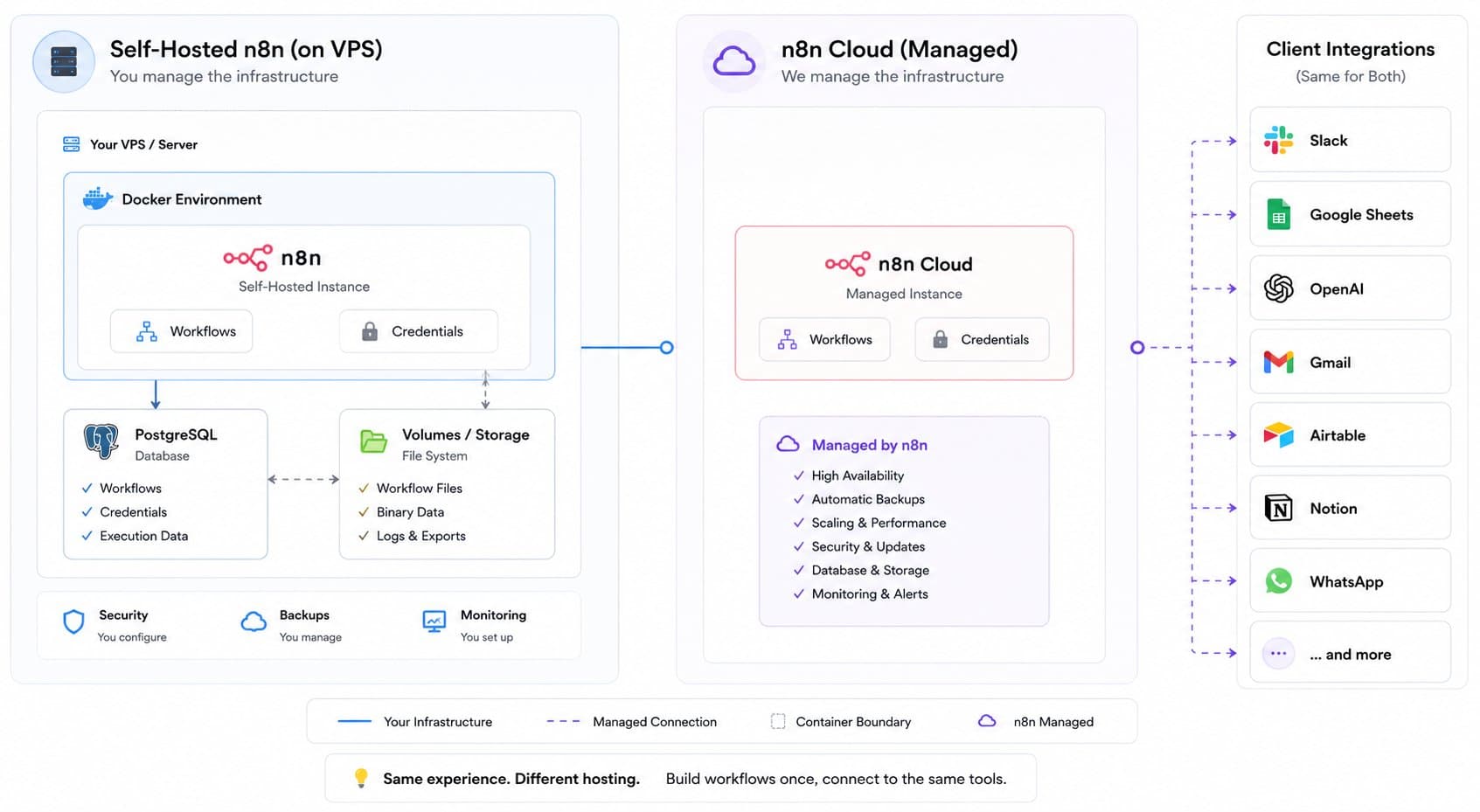
Self-hosted n8n runs on infrastructure you control, a VPS, a Docker container, your own Kubernetes cluster. You own the update cycle, the backups, the uptime, and the security patching. In exchange, you get unlimited workflow executions for a fixed infrastructure cost, full control over data residency, and no artificial ceiling on how many workflows or how much execution volume you run.
n8n Cloud is the managed, hosted version: sign up, get an instance, start building. n8n handles updates, uptime, and infrastructure. Pricing is tiered by execution count and active workflows, which means the cost scales directly with usage rather than staying fixed.
Cost at low volume
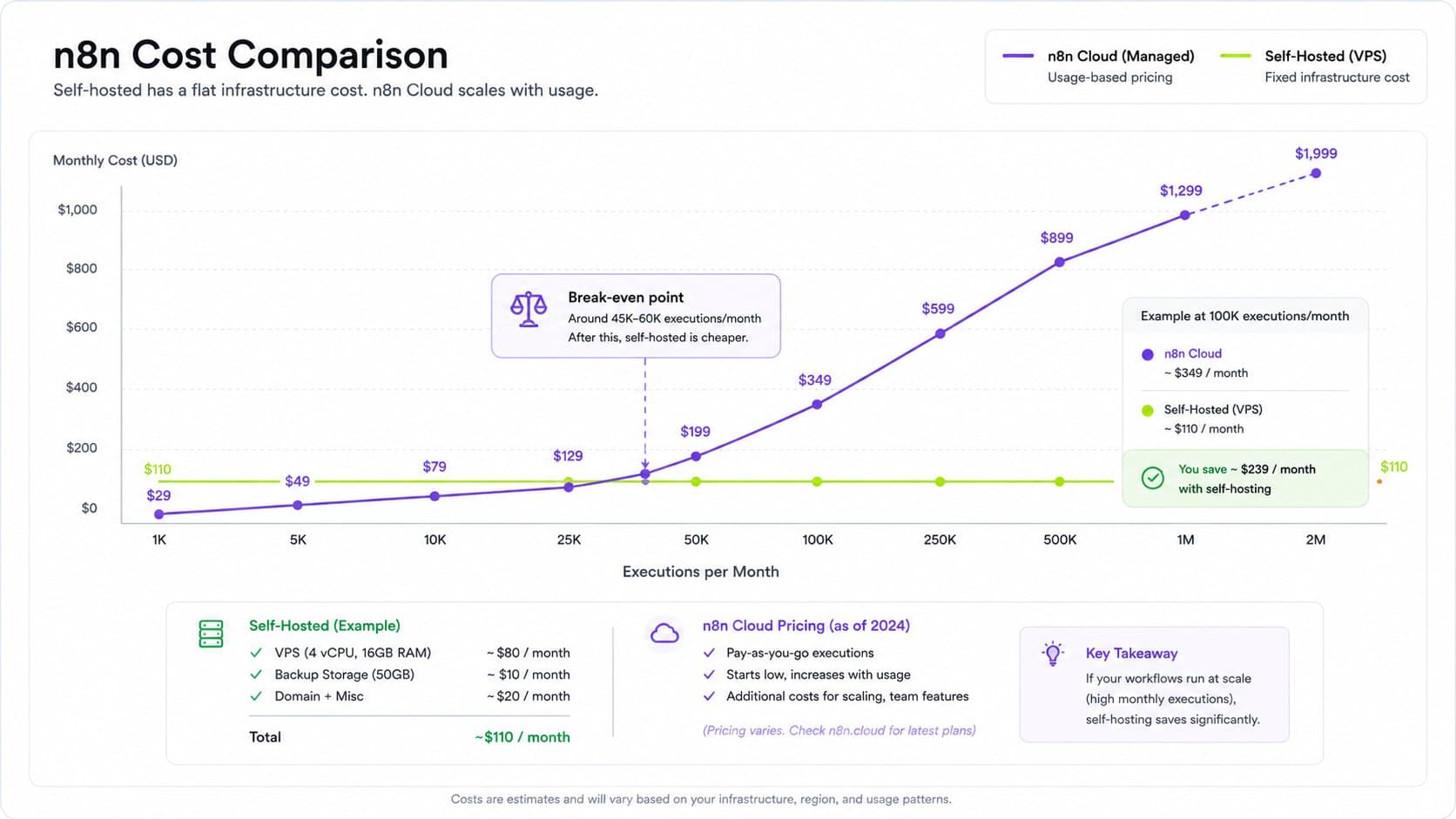
At low execution volume, a handful of workflows running occasionally, Cloud's entry tier is often cheaper than paying for a VPS that sits mostly idle. This is where Cloud genuinely wins on cost, not just convenience.
Cost at real agency volume
This flips once execution volume climbs. A single polling trigger checking every minute alone generates roughly 43,000 executions a month, and that is one workflow, not a whole client roster. An agency running automation for multiple clients, webhooks firing on every order, form submission, or CRM update, hits meaningful execution counts fast, and Cloud's tiered pricing means the bill grows with that volume. A self-hosted instance on a fixed-cost VPS runs the same volume for the same monthly server cost whether it's 10,000 executions or 500,000.
Setup and ongoing maintenance
Self-hosting is not a one-time setup cost, it's an ongoing commitment: keeping n8n itself updated, patching the underlying OS, managing SSL certificates, running backups that actually get tested, and being the person who gets paged when the server goes down at 2 AM. Cloud removes all of that. This is the real trade being made, and any cost comparison that ignores the value of that removed maintenance burden is incomplete.
Scaling for high concurrent volume
Self-hosted n8n has a real answer for scale: queue mode, where a main instance hands work to Redis-backed worker containers, letting concurrent executions scale horizontally. This is a meaningful scaling path, but it is not something to reach for by default, it adds real operational complexity and is worth setting up only once sustained concurrent execution volume actually demands it. Cloud handles this scaling transparently on n8n's side, at the cost of the plan tier climbing with it.
Data residency and control
For clients with data residency requirements, healthcare, finance, or anything with contractual or regulatory data-location clauses, self-hosted is often the only option that satisfies the requirement outright, since the data never leaves infrastructure you control. Cloud's data lives on n8n's infrastructure, which is a dealbreaker for a specific but real subset of client work.
Common self-hosting mistakes that erase the cost savings
The cost advantage of self-hosting only holds if the setup is done properly. I have seen the savings disappear entirely through a handful of repeatable mistakes:
No tested backup strategy. A backup that has never been restored is not a backup. Losing workflow data or credentials because a backup script silently stopped running months earlier costs far more than the server ever saved.
Skipping updates for too long. n8n ships regular updates, including security patches. Falling multiple versions behind turns a routine update into a risky, multi-step migration instead of a five-minute upgrade.
Undersized infrastructure for actual load. n8n holds all items of a running execution in memory, so a workflow processing tens of thousands of heavy items on an undersized VPS can crash the instance mid-run. Chunking large workloads into sub-workflow batches avoids this, but only if someone designs for it up front.
No monitoring or alerting. Self-hosted means nobody tells you the server is down except your clients noticing their automation stopped. Basic uptime monitoring is not optional infrastructure, it's the difference between catching a failure in minutes versus a support ticket the next morning.
Reaching for queue mode before it's needed. Setting up Redis and worker containers adds real operational surface area. It's the right move at sustained high concurrent volume, and unnecessary complexity below that, adding failure points for a scaling problem that does not yet exist.
A realistic setup checklist
Before committing to self-hosted for a client-facing automation practice, the setup should genuinely cover:
A VPS sized for expected execution volume and item counts, not the cheapest available tier
Automated backups of the database and workflow data, tested with an actual restore at least once
A reverse proxy with SSL properly configured, not a bare HTTP instance
An update cadence, monthly at minimum, so the instance never falls dangerously far behind
Basic uptime monitoring with alerting to a channel someone actually watches
A documented recovery process, what to do specifically if the server goes down, not tribal knowledge in one person's head
Skipping any of these does not show up as a problem on day one. It shows up as an incident three months in, at which point the "cost savings" of self-hosting has already been spent on the outage.
Let's create something together
Get in touch with us today.
The bottom line
Self-hosted n8n wins on cost at real volume and on data control, but it is a genuine ongoing responsibility, not a free lunch. Cloud wins on convenience and is the right call for low or uncertain volume, or for a team that would rather spend its time building workflows than patching servers. The decision comes down to actual execution volume and who, specifically, is going to own the infrastructure if you self-host, not which option looks cheaper on a pricing page. Run the numbers against your real volume before deciding, not against a generic estimate.
If you're deciding between self-hosted and Cloud for your own or a client's n8n setup, Flowagenz runs and maintains self-hosted n8n infrastructure as part of our automation builds. Happy to walk through what fits your actual volume on a short call.