Your leads land in HubSpot, Zoho or Pipedrive deduplicated, scored and assigned before anyone has to check a shared inbox. Flowagenz builds the n8n workflows behind it, and you keep full ownership of every one.
CRM automation with n8n: clean data, fast follow-up
The problem, reframed
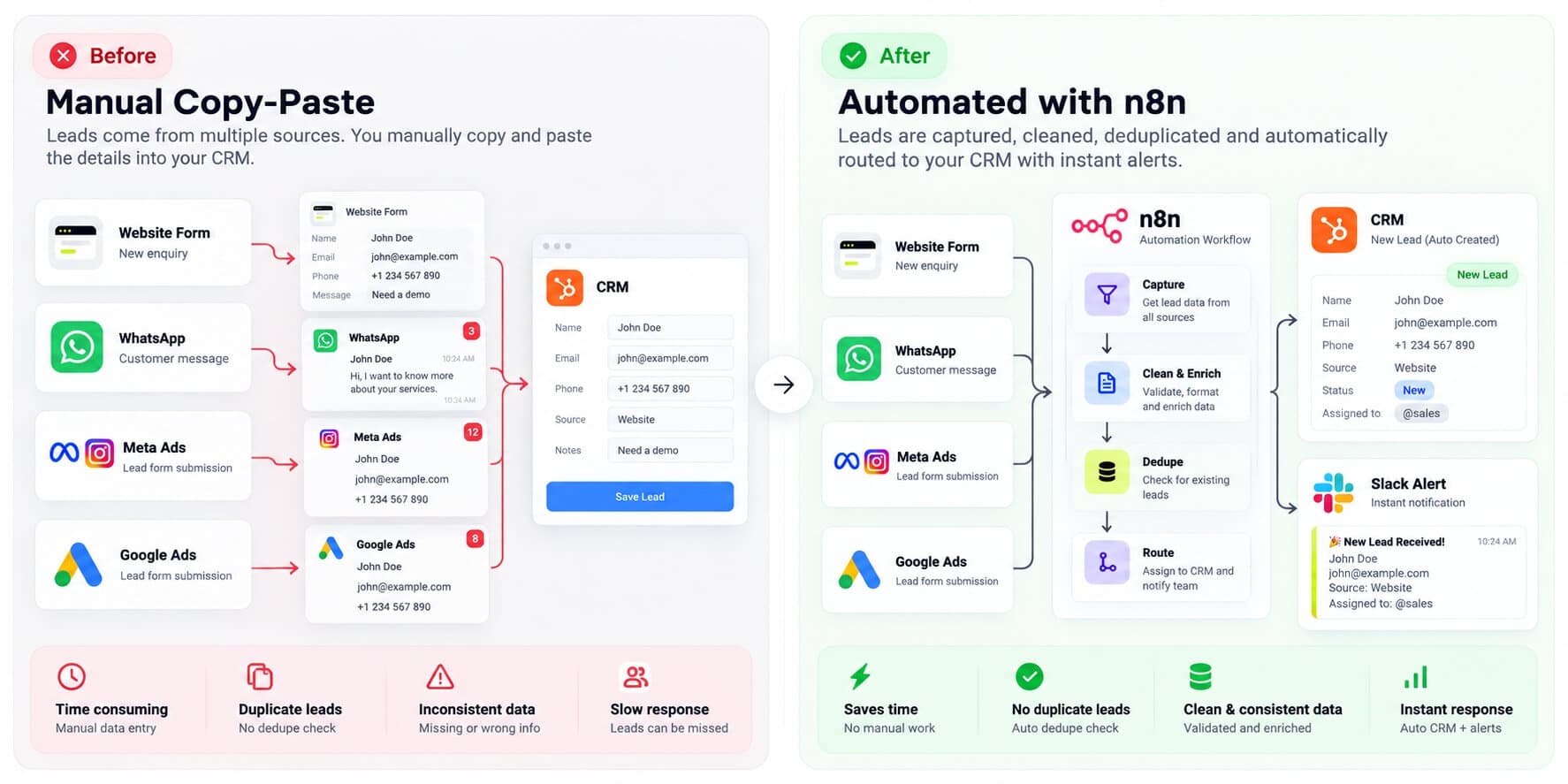
Most CRMs do not have a software problem. They have a handoff problem. A lead arrives in one tool, gets copied by hand into another, and waits for someone to notice it. By the time the record exists, the best moment to reply has passed.
The answer is rarely a bigger CRM plan or one more plugin. It is a small set of well-built automated workflows that sit between your lead sources and your CRM, and handle capture, deduplication, routing and follow-up the same way every time.
A workflow can only enforce a definition you have agreed on. If "qualified" means one thing to one rep and something else to another, I will ask you to settle that on the scoping call before I build anything. Automating an undefined pipeline only moves the confusion faster.
What we build
Flowagenz does not sell a CRM. It connects the one you already have to everything around it.
01
Lead capture into your CRM
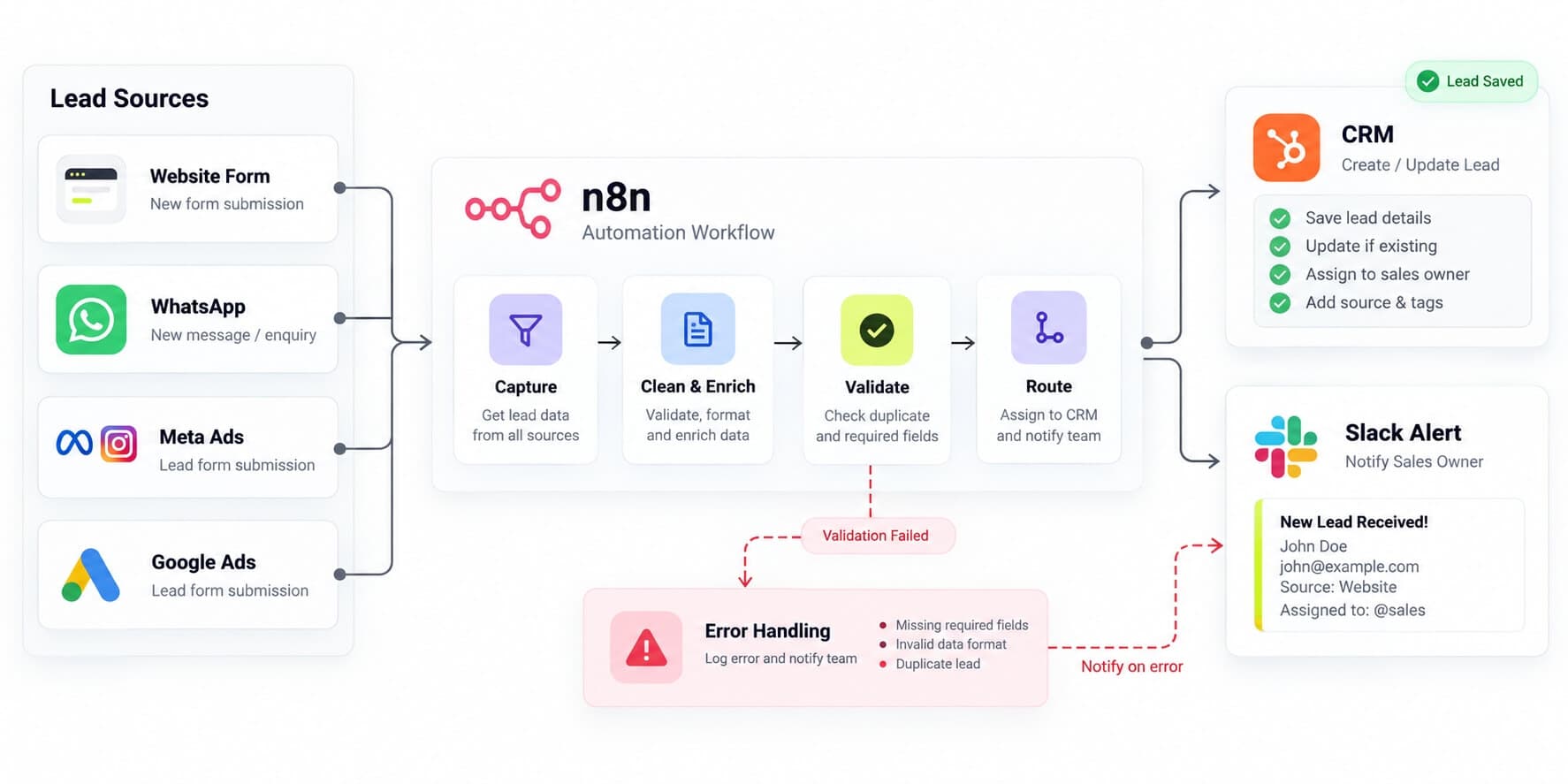
Website forms (WordPress, Next.js), WhatsApp Cloud API messages, Meta lead ads and Google Ads lead forms all arrive through webhook automation. Each lead is written with an upsert keyed on email, with phone as the fallback, so a second form fill updates the existing contact instead of creating a duplicate. Incoming webhook signatures are validated, so a stray POST to your endpoint cannot create a record.
02
Routing and assignment
Round-robin or rule-based assignment by territory, deal size or service line. The owner gets a Slack or email message with the full enquiry, and a follow-up task is created in the CRM at the same moment. If the task sits untouched past your window, it escalates to a manager.
03
AI lead qualification and AI routing
An LLM node reads the enquiry text and returns structured JSON: budget band, service interest, urgency. That output maps to CRM properties, and the original text is stored beside the score so a human can always see why a lead was rated the way it was. Anything that changes a deal stage stays behind a human decision.
04
Follow-up sequences
Email or WhatsApp template sequences with explicit stop conditions. A reply, a booked meeting or a stage change ends the sequence, so nobody gets a reminder about a call they already booked. A booked meeting moves the deal to the right stage on its own.
05
Two-way sync with the rest of your stack
Invoice paid in your accounting tool marks the deal closed-won. A WooCommerce or Shopify order lands on the contact timeline. Support tickets show up next to the deal. Bulk operations run through batching and wait nodes, so a large import stays inside the CRM's API rate limits.
06
Data hygiene jobs
Scheduled workflows that find duplicates, normalise phone numbers to E.164, fill in missing country and timezone fields, and flag deals with no activity past a threshold you set.
07
CRMs we work with
HubSpot (private apps, since API keys were retired), Zoho CRM and Pipedrive through native n8n nodes, plus any CRM with a REST API through HTTP Request nodes. One Zoho detail worth knowing early: accounts on the India data centre (zoho.in) use different OAuth endpoints from zoho.com accounts, and getting that wrong is the most common reason a first connection fails.
Built on a modern, future-proof stack
n8n runs either self-hosted (Docker, PostgreSQL, and Redis queue mode when volume calls for it) or on n8n Cloud. I default to self-hosting for clients who want their lead data to stay on infrastructure they control, and to n8n Cloud for small teams who would rather not run a server.
Every build includes an Error Trigger workflow that posts failed executions to Slack with a direct link to the run, and retries on transient API errors.
From there, the stack can grow with you:
A RAG chatbot that answers from your CRM records and knowledge base.
A voice AI agent that handles inbound calls and logs transcripts and summaries to the right contact.
A custom Next.js dashboard on top of your CRM data through its REST API, for reporting the CRM's own views cannot do.
These are upgrades matched to your stage, not requirements.
Who this is for
Growing businesses doing roughly $500K to $10M in annual revenue, where manual lead handling now costs real hours every week. Below that range, a ready-made template is usually the better spend.
Sales-led SMBs: inbound leads from several sources, a CRM that is only half up to date, and no one owning the handoff.
Agencies: a white-label dev team to build CRM automations for your clients under your brand.
Service businesses: contractors, clinics and real estate teams taking enquiries by form, phone and WhatsApp.
Teams moving systems: leaving spreadsheets or switching CRMs and needing the data mapped and migrated cleanly.
Why Flowagenz
You own all of it.
Workflows are delivered as exported JSON, credentials are created in your own accounts, and hosting access is in your name. No vendor lock-in is a contract term, not a talking point.
One senior engineer, start to finish.
You speak to the person writing the workflows. I give the engineering opinions, and we handle deployment, handover and support.
Safe by default.
Everything is built and tested against a CRM sandbox first. Every workflow writes a run log of what it changed, so any automated write can be traced and reversed.
Based in Salem, Tamil Nadu.
Western-grade execution at offshore rates. Calls land in a workable window for you: US East Coast mornings are my evening, UK mornings are my afternoon, and Australian afternoons are my morning. Day to day, work moves asynchronously with written updates, so you are never waiting on a meeting to learn where things stand.
How it works
01
01
Scoping call and CRM audit.
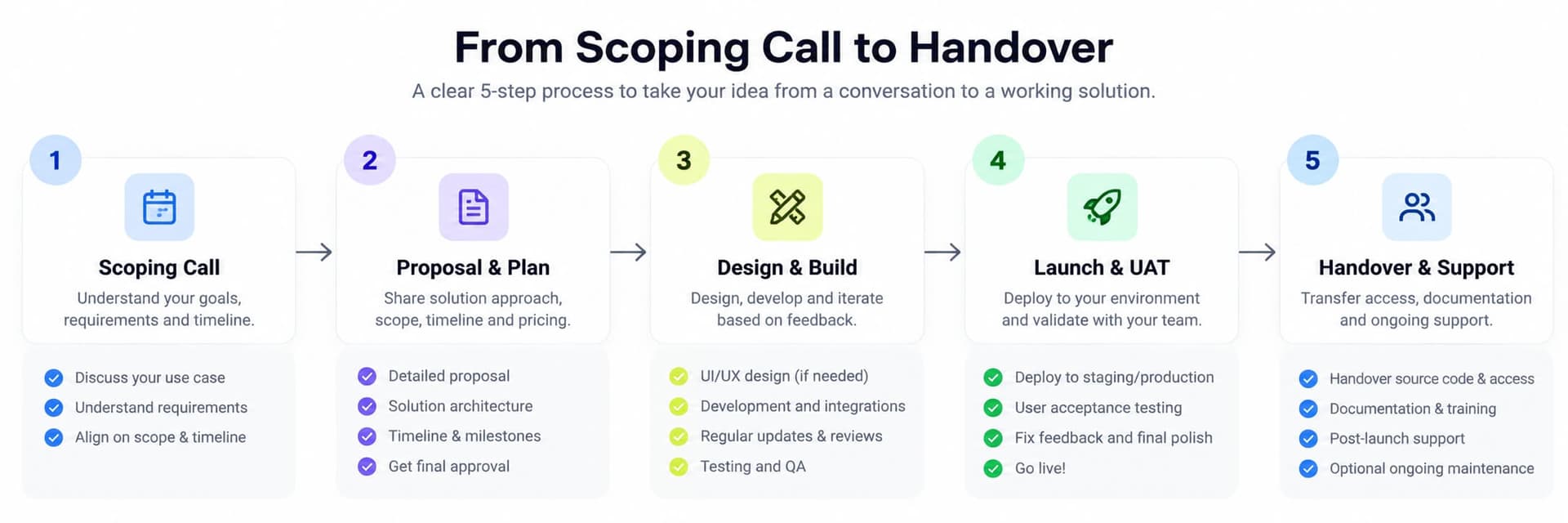
Thirty minutes on your sources, pipeline stages, properties and current duplicates. You get a fixed quote after this call, in INR or USD.
02
02
Workflow design.
A written spec and diagram of every workflow, which you approve before the build starts.
03
03
Sandbox build and testing.
Built against a sandbox CRM with test records, with review checkpoints so you see progress as it happens.
04
04
Go-live in parallel.
The automation runs beside your current process for a short period, then takes over once the numbers match.
05
05
Handover.
Workflow exports, documentation, a recorded walkthrough, and 30 days of post-launch support.
A standard lead-to-CRM set (capture, dedupe, routing, follow-up) typically takes 2 to 4 weeks. Multiple systems or a data migration add to that, and the scoping call gives you a firm date.
FAQ
Frequently Asked Questions
Everything you need to know about our process and digital systems.
It depends on scope, and I would rather quote it properly than give you a "starting at" number that means nothing. The things that move a quote are the number of lead sources, how many systems need to sync, whether a data migration is involved, and how much AI qualification you want. You get a fixed price after the scoping call, in INR or USD.
Book a CRM automation scoping call
Tell me which CRM you use and where your leads come from. In 30 minutes I will map what can be automated, what should stay manual, and what it would take to build. No pitch deck, no obligation.