Your contacts, companies, deals and notes move into the new CRM deduplicated, mapped to the right fields and validated against the old system, with the old one kept as a safety net until you are sure. Flowagenz does the migration and the cleanup, and you own the scripts and the mapping.
CRM migration and data cleanup without losing history
The problem, reframed
A CRM migration is usually described as moving data. That is the smaller half. The larger half is deciding which data deserves to move at all.
Most CRMs that are five years old hold three kinds of records: people you work with now, people you might work with again, and records that stopped being useful years ago. Moving all three into a new system carries the mess across, and you pay for the new CRM with your old problems already inside it.
So the first job is triage. The second is moving what remains so that nothing meaningful is lost: relationships between records, owners, history, and opt-out status. A migration is only done when your team opens the new CRM and trusts what they see.
What we do
Flowagenz does not sell a CRM. It moves your data between systems and brings it up to a standard you can run on, whether you are going to HubSpot, Zoho CRM, Pipedrive, a custom CRM, or tidying the one you have.
01
Audit and triage
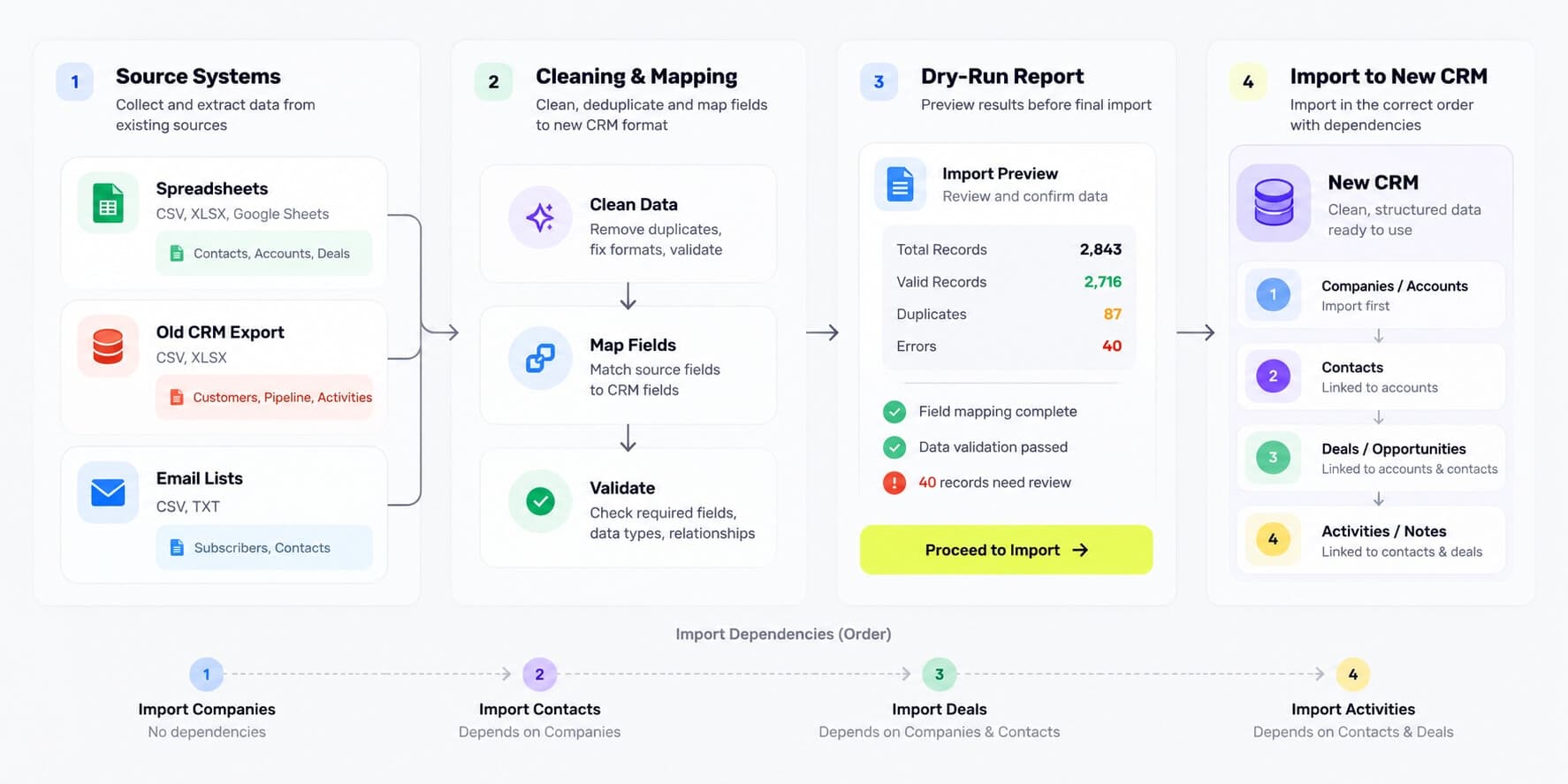
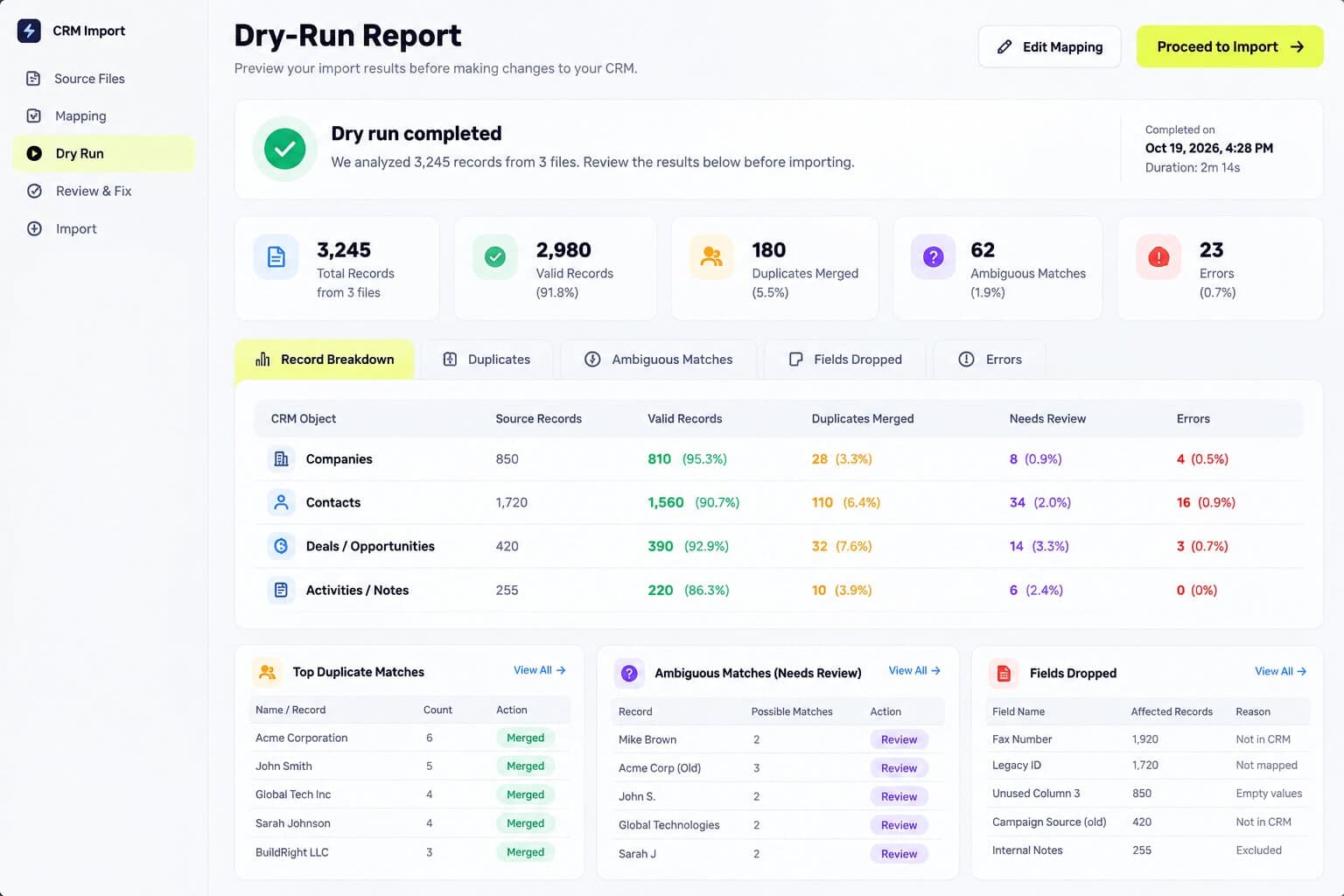
We profile the source data: record counts, empty fields, duplicate rates, inconsistent values and orphaned records. Records are sorted into active, dormant and dead. Dead records are exported to an archive file and kept, but not loaded, so the new CRM starts lean.
02
Field and value mapping
A written mapping from every source field to its target, including how picklist values translate ("Hot", "A-lead" and "Priority" may all become one stage), how owners are matched to users, and which fields are dropped. You approve the mapping before anything moves.
03
Deduplication with human review
Records are matched on normalised keys: lowercase email, phone in E.164 format, company domain, and similar-name checks for the rest. Clear matches are merged by rule. Ambiguous ones go to a review list for your team to decide, because a wrong merge is harder to undo than a leftover duplicate.
04
Standardisation
Names, phone numbers, countries, states and job titles are brought into a consistent format, so searches, segments and routing rules in the new CRM work as expected.
05
Relationships and history
Contacts are linked to the right companies and deals, and activity history such as notes, calls and emails moves across where the target CRM supports it. Where it does not allow original dates or authors to be set, the originals are kept in a dedicated field or note, so the information survives even if the display differs.
06
Consent and opt-out status
Unsubscribes, do-not-contact flags and consent records are carried over exactly. A contact who opted out of the old system is never quietly resubscribed in the new one. This is the part of a migration that can cause legal trouble, so it is checked separately.
07
Staged loading in dependency order
Companies load first, then contacts, then deals, then activities, so every link has something to attach to. An ID mapping table records the old ID and new ID of every record, which makes validation, corrections and any later reconciliation possible.
08
Validation and reconciliation
After each stage, counts are compared between source and target, a random sample of records is checked field by field, and a report shows exactly what loaded, what was skipped and why. Nothing is declared done on a feeling.
Built on a modern, future-proof stack
Migration scripts and workflows are built in n8n and Python, using each CRM's REST API for loading so rate limits and error responses are handled properly. Intermediate data sits in PostgreSQL, which gives us a place to run matching queries, hold the ID mapping table and produce the validation reports.
Safety steps are standard on every project:
Snapshot first. A full export of the source and of the target is taken before any load, so there is always a known state to return to.
Dry run. Every load is first run in a mode that writes nothing and produces a report of what would happen. Real loading starts after you have reviewed it.
Delta sync at cutover. Changes made in the old system while the migration runs are caught and applied at the end, so your team does not have to stop working.
Old system kept read-only. For an agreed period after go-live, usually 30 to 90 days, the old system stays available for reference before it is retired.
After the migration, the same pipeline can feed ongoing work: lead capture, deduplication on entry, routing and follow-up through n8n, so the data stays clean once it is clean.
Who this is for
Growing businesses doing roughly $500K to $10M in annual revenue that are switching CRM, merging two systems after an acquisition, or sitting on a CRM nobody trusts. Below a few thousand records and a single source, a careful self-service import is often enough.
Teams changing CRM: moving from spreadsheets, or between Zoho, HubSpot, Pipedrive and others.
Agencies: a white-label dev team to run migrations for your clients under your brand.
Merged businesses: two sales teams, two CRMs, one customer list that should exist only once.
Teams with a distrusted CRM: keeping the tool, but needing the data fixed and rules put in place to keep it fixed.
Why Flowagenz
You own all of it.
Mapping documents, migration scripts, workflow exports and archive files are delivered to you, and new-CRM connections are created in your own accounts. No vendor lock-in is a contract term.
One senior engineer, start to finish.
You speak to the person doing the work. I give the engineering opinions, including which records are not worth migrating.
Safe by default.
Snapshots, dry runs, ID mapping and validation reports on every project, so every change is traceable and reversible. Your old data is never deleted by us.
Based in Salem, Tamil Nadu.
Western-grade execution at offshore rates. US East Coast mornings are my evening, UK mornings are my afternoon, and Australian afternoons are my morning. Day to day, work moves asynchronously with written updates.
How it works
01
01
Scoping call and data audit.
Thirty minutes on your systems, record volumes and goals, followed by a profile of a data export you share. You get a fixed quote after this, in USD or INR.
02
02
Triage and mapping.
A written triage plan and field mapping, which you approve before anything moves.
03
03
Cleaning, dry run and review.
Deduplication and standardisation run, with a dry-run report and a review list of ambiguous records for your team.
04
04
Staged load and validation.
Data loads in dependency order into the new CRM, with validation after each stage.
05
05
Cutover and handover.
Final delta sync, a go-live date you choose, documentation and 30 days of post-launch support, with the old system kept read-only.
A migration from one system with up to tens of thousands of records typically takes 2 to 5 weeks, depending on how messy the source is and how much review your team can do. The scoping call and data audit give you a firm date.
FAQ
Frequently Asked Questions
Everything you need to know about our process and digital systems.
It depends on scope, and I would rather quote properly than give a "starting at" figure that means nothing. What moves a quote: the number of source systems, record volumes, how messy the data is, how much activity history must come across, and how many custom objects exist. You get a fixed price after the data audit, in USD or INR.
Book a CRM migration scoping call
Tell me which systems you are moving from and to, and roughly how many records you have. In 30 minutes I will tell you what is realistic, what should not be migrated, and what it would take. No pitch deck, no obligation.