Every customer, order and refund in your WooCommerce store appears on the matching CRM contact, with lifetime value and last-order date kept current. Flowagenz builds the n8n workflows that do it, and you own every one of them.
WooCommerce CRM sync: every order on the contact
The problem, reframed
A WooCommerce store usually ends up with two customer lists that never meet. The store knows who bought what and when. The CRM, where marketing and sales work, knows who enquired and who replied. Neither knows the other's half of the story.
So a rep calls a customer who bought last week and asks if they are interested. A repeat buyer with ten orders gets the same email as a stranger. A refund lands, and nobody on the sales side hears about it until the customer complains.
The fix is to treat the store's order data as the source of truth and write it into the CRM automatically, so everyone who talks to a customer sees the same history.
What we build
Flowagenz does not sell a CRM. It connects your WooCommerce store to the CRM you use: HubSpot, Zoho CRM, Pipedrive, or any CRM with a REST API.
01
Customer and order sync
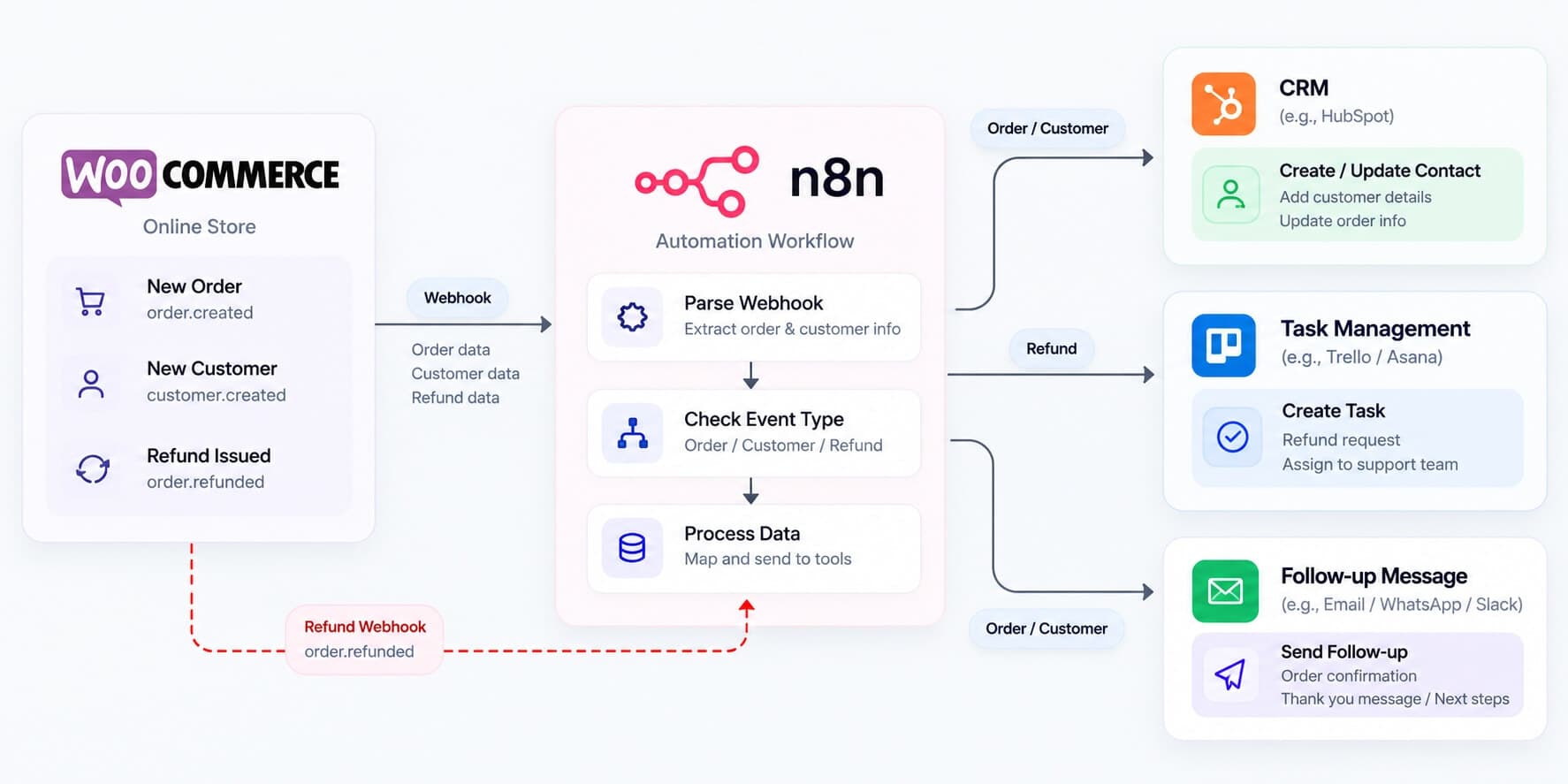
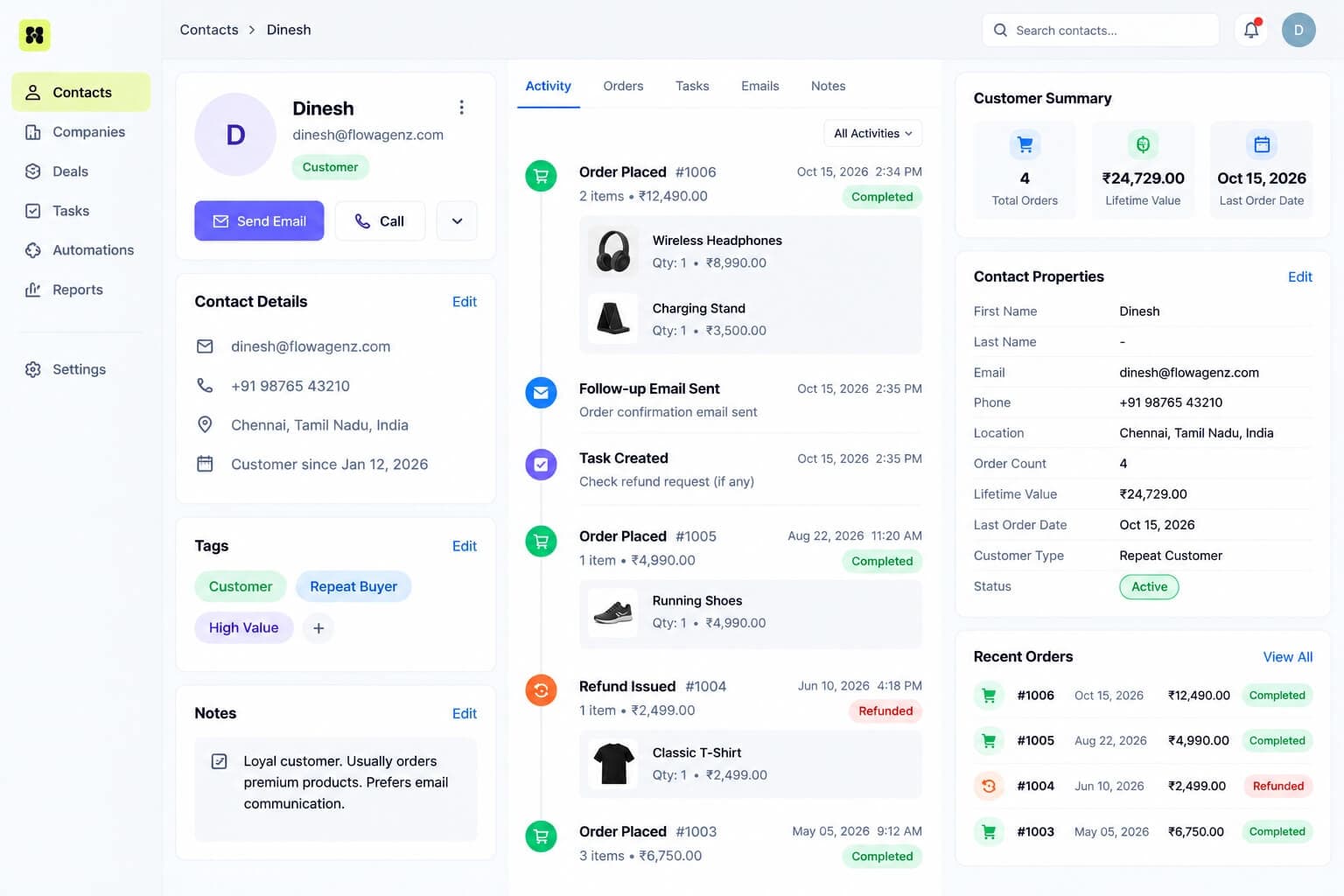
When an order is placed, WooCommerce sends a webhook to n8n. The workflow finds or creates the matching contact, matched on email so guest checkouts are handled too, and writes the order to the contact's timeline with items, value and status. Order status changes (processing, completed, refunded, failed) update the record as they happen.
02
Customer value properties
Order count, lifetime value, average order value, first and last order dates, and favourite product category are calculated and kept on the contact as properties. These are the fields that make segments useful: "customers with two or more orders and nothing in 90 days" becomes a saved list instead of a spreadsheet exercise.
03
Refunds, failures and subscriptions
A refund creates a task for the owner of the account and updates the customer's value. A failed payment starts a recovery sequence. If you sell subscriptions through WooCommerce Subscriptions, a failed renewal raises a task before the subscription lapses.
04
Post-purchase and win-back sequences
Order-triggered messages by email or WhatsApp: delivery follow-up, review request, reorder reminder timed to your product's use cycle, and win-back after a lapse you define. Each sequence stops when the customer orders again or replies.
05
Abandoned carts
WooCommerce does not record abandoned carts by default, so this needs a cart-tracking plugin or a small custom hook that sends cart events to n8n. Once those events exist, a reminder sequence runs with a stop condition when the order completes. I will tell you at scoping whether your current setup already captures them.
06
B2B and wholesale enquiries
Wholesale applications and quote requests create a deal in the CRM instead of a plain contact, with the company details and requested products attached, and route it to the right account manager.
07
Two-way: CRM actions back to the store
A tag or stage change in the CRM can create a single-use coupon in WooCommerce and send it to the customer. A customer who becomes a wholesale account in the CRM can be given the matching role in the store.
Built on a modern, future-proof stack
The store sends webhooks signed with a secret, and n8n verifies the signature on every request before doing anything, so only genuine events from your store are processed. Other data is pulled through the WooCommerce REST API with keys scoped to what each workflow needs.
WooCommerce webhooks have some behaviours worth planning around, and I plan for them:
Retries and duplicates. An event can be delivered more than once. Each event is checked against the order ID and status before it is processed, so a duplicate changes nothing.
Auto-disabled webhooks. WooCommerce disables a webhook after repeated failed deliveries. If your n8n instance is down for a while, orders stop syncing without any warning in the store. A daily check confirms every webhook is still active and alerts you in Slack if one has been switched off.
Delayed delivery. Webhooks are queued by the store's background scheduler, so a slow WordPress cron can delay them. A nightly reconciliation compares recent store orders with the CRM and fills any gap.
n8n runs either self-hosted (Docker, PostgreSQL, and Redis queue mode when volume needs it) or on n8n Cloud. Every build includes an Error Trigger workflow that posts failures to Slack with a link to the run, and retries on transient API errors.
From there, it can grow into AI-written follow-ups based on what the customer bought, a RAG chatbot that answers product and order questions from your catalogue, or a custom Next.js dashboard for repeat-purchase and cohort reporting.
Who this is for
Growing WooCommerce businesses doing roughly $500K to $10M in annual revenue that have a CRM, or are about to, and want repeat purchase and wholesale handled properly. Below that, a plugin that pushes orders to your CRM is usually enough.
Repeat-purchase stores: consumables, supplements, beauty, food and anything with a natural reorder cycle.
B2B and wholesale sellers: quote requests, account-specific pricing and account managers.
Agencies: a white-label dev team to build store-to-CRM integrations for your WooCommerce clients under your brand.
Stores with a sales team: high-value products where a rep follows up on orders and enquiries.
Why Flowagenz
You own all of it.
Workflows are delivered as exported JSON, API keys and CRM connections are created in your own accounts, and hosting access is in your name. No vendor lock-in is a contract term.
One senior engineer, start to finish.
You speak to the person building the integration, who also builds and maintains WordPress and WooCommerce sites. I give the engineering opinions, including when a plugin is the better choice than a custom workflow.
Safe by default.
Built and tested against a staging copy of your store and a CRM sandbox first, so test orders never touch live customers. Every workflow writes a run log of what it changed, so any automated write can be traced and reversed.
Based in Salem, Tamil Nadu.
Western-grade execution at offshore rates. US East Coast mornings are my evening, UK mornings are my afternoon, and Australian afternoons are my morning. Day to day, work moves asynchronously with written updates.
How it works
01
01
Scoping call and store audit.
Thirty minutes on your store setup, plugins, order statuses, CRM and what each team needs to see. You get a fixed quote after this call, in USD or INR.
02
02
Sync design.
A written spec of which events sync, which fields and properties are created, and which sequences run, which you approve before the build starts.
03
03
Staging build and testing.
Built against a staging store and CRM sandbox, with test orders covering guest checkout, refunds, failed payments and subscriptions, and review checkpoints along the way.
04
04
Backfill and go-live.
Historical customers and orders are imported into the CRM and validated, then the live sync is switched on and runs beside your current process until the numbers match.
05
05
Handover.
Workflow exports, documentation, a recorded walkthrough, and 30 days of post-launch support.
A standard order and customer sync with a couple of sequences typically takes 2 to 4 weeks. A large historical backfill, subscriptions or a B2B flow add to that, and the scoping call gives you a firm date.
FAQ
Frequently Asked Questions
Everything you need to know about our process and digital systems.
It depends on scope, and I would rather quote properly than give a "starting at" figure that means nothing. What moves a quote: which CRM, the number of order events and sequences, the size of the historical backfill, and whether subscriptions, wholesale or abandoned carts are involved. You get a fixed price after the scoping call, in USD or INR.
Book a WooCommerce CRM scoping call
Tell me which CRM you use and what you would like your team to see about each customer. In 30 minutes I will map what can be synced, what needs a plugin, and what it would take to build. No pitch deck, no obligation.