Your customers already message you on WhatsApp. This turns those messages into automated order lookups, lead routing, and CRM updates, running on n8n workflows you own outright and can open, edit, and extend yourself, no chatbot platform standing in between.
WhatsApp automation built to run unattended
The problem, reframed
Most "WhatsApp automation" on the market is a chatbot builder with a monthly seat price and a black box in the middle. You can drag in a few reply blocks, but the moment you need to check an order status against your own database or push a lead into HubSpot, you hit the platform's ceiling.
The right question isn't which chatbot tool has the nicest interface. It's whether the automation layer can reach your actual systems, Postgres, your CRM, your order database, without a middleman platform sitting between you and Meta's API and charging rent for the privilege.
What we build
01
Webhook-driven message handling on the Meta Cloud API.
Every inbound WhatsApp message lands on a verified webhook endpoint, gets matched against Meta's message ID to dedupe retries (Meta resends a webhook if your server doesn't return a 200 fast enough), then routes by intent, keyword, or a light LLM classification step where free-text actually needs interpreting.
02
Session window logic.
WhatsApp only lets you send free-form replies inside the 24-hour customer service window after their last message. Outside that window, the workflow automatically falls back to a pre-approved template message instead of silently failing or, worse, getting your number flagged for policy violations.
03
Order and account lookups against your own database.
A customer texts "where's my order," the workflow queries Postgres or your order table directly by phone number, and a formatted status reply goes back in seconds, no agent involved.
04
Lead capture and CRM push.
Inbound leads get parsed for intent and contact detail, written into HubSpot or your CRM as a new record, and tagged with the WhatsApp thread ID so a human can pick up the conversation with full context, not a blank slate.
05
Human handoff on a Slack notification.
When the workflow can't confidently resolve a message, it posts the conversation to a Slack channel with a "reply from WhatsApp" action, so a real person takes over inside the same thread instead of the customer having to repeat themselves.
06
Media handling.
Incoming images and documents (a payment screenshot, an ID for KYC) get pulled via the media ID and access token, then stored to S3 or Drive with the sender's phone number and timestamp attached, not left sitting in Meta's temporary media store.
A real workflow example
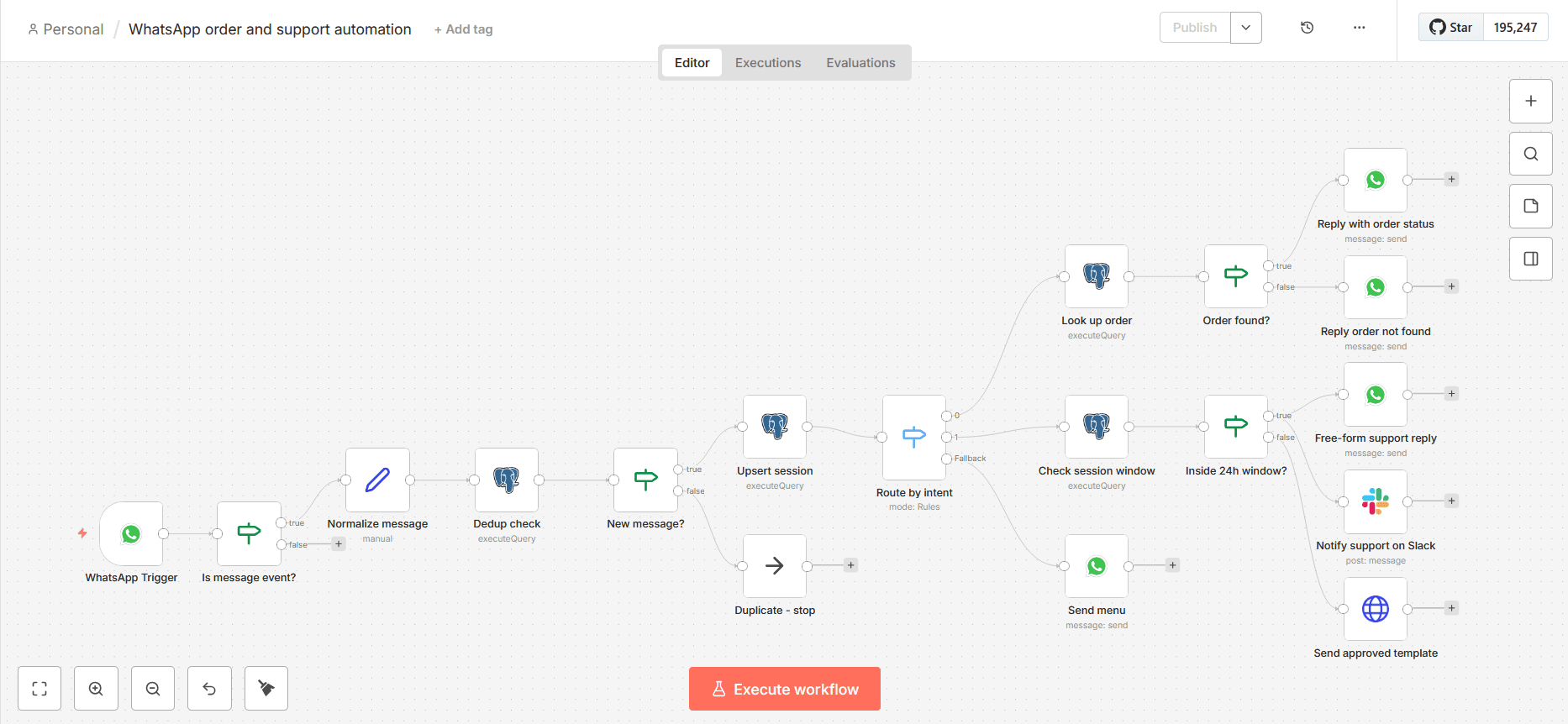
Below is the actual n8n workflow, corrected against the failure modes a first-pass version misses. It handles three message types on one number: an order status query, a support request that checks the 24-hour session window before deciding how to reply, and everything else falling through to a menu message.
How it's wired
WhatsApp Trigger receives the inbound webhook from the Meta Cloud API.
Is message event? (IF node) filters out Meta's status callbacks (sent, delivered, read) before anything downstream touches the payload. Meta fires those on the same webhook URL with no
messages[]array, and skipping this check is the single most common reason a "working" WhatsApp workflow throws a null-reference error in production within the first day.
Normalize message (Set node) extracts phone, text, message ID, and timestamp into flat fields the rest of the workflow can reference.
Dedup check (Postgres node) inserts the message ID into a
processed_whatsapp_messagestable withON CONFLICT DO NOTHING RETURNING message_id. Meta resends a webhook if your server doesn't answer fast enough, and this is what stops a retried delivery from re-running the whole workflow a second time.
New message? (IF node) reads whether the insert actually returned a row. No row means the message ID already existed, so that branch dead-ends at a No Operation node and nothing downstream fires twice.
Upsert session (Postgres node) writes the sender's phone number and current timestamp into
whatsapp_sessionson every genuine inbound message, which is what the 24-hour window check further down actually reads from.
Switch node routes on keyword match against the message text:
order,support, or default.
Order branch: a Postgres node looks up the latest order row by phone number, then an IF node checks whether a row actually came back. Found routes to a WhatsApp node with the formatted status. Not found routes to a separate WhatsApp node that tells the customer plainly instead of leaving them without a reply.
Support branch: a Postgres node checks the session window, wrapped in
COALESCE(..., false)so a phone number with no session row yet still returns exactly one row instead of starving the next node. An IF node then checks the result. Inside the window, a WhatsApp node sends a direct reply and a Slack node notifies the support channel. Outside the window, an HTTP Request node calls the Cloud API directly to send an approved template message, since free-form replies are blocked at that point.
Default branch: a WhatsApp node sends a short menu of valid commands. The dedup and session-upsert steps aren't cosmetic additions. Without step 4, a slow webhook response from your server makes Meta retry delivery, and the workflow runs the entire order lookup or template send a second time for the same message. Without step 6, the session-window check in the support branch has no data to read, so it either always fails open or always fails closed depending on how the query is written.
Built on a modern, future-proof stack
The workflow runs on self-hosted n8n, so the logic, retries, and credentials live in an instance you control, not inside a third-party chatbot platform's account. Message delivery goes straight through Meta's WhatsApp Business Cloud API (or Twilio's WhatsApp API where a client already has infrastructure there), with Postgres for order and session data, HubSpot or your existing CRM for lead records, and Slack for human handoff. Where free text genuinely needs interpreting rather than keyword matching, a Claude API classification step slots into the same Switch node without changing anything downstream.
Who this is for
E-commerce brands sending shipping and order updates through WhatsApp because open rates beat email and customers already expect it.
Service businesses (clinics, real estate, education) qualifying and routing inbound leads through WhatsApp before a human ever picks up the phone.
Agencies needing a white-label WhatsApp automation build wired into a client's own Meta Business Manager account, not a shared reseller number.
Startups adding WhatsApp as a support channel without hiring a night shift to sit and watch a chat platform.
The fit is about how many manual WhatsApp replies your team is typing by hand each day and how many systems those replies should be touching, not a revenue cutoff. A single clinic drowning in appointment queries needs this as much as a funded startup does.
Why Flowagenz
I default to building on the Meta Cloud API directly instead of routing through a BSP reseller layer wherever a client can get their own Meta Business verification done, because it removes a billing middleman and a support layer that isn't Meta's own. Where a client already has Twilio infrastructure for SMS, the workflow adapts to Twilio's WhatsApp API instead, since ripping out an existing integration to satisfy a preference isn't good engineering.
We are based in Salem, Tamil Nadu, and open about it: Western-grade automation engineering at rates that don't carry a US or UK agency's overhead. Every build ships with full ownership of code and hosting access on completion. The n8n instance, the workflows, and the Meta Business Manager account stay in your name, so there's no dependency on us to keep it running.
We keep hours that overlap real business hours in the US, UK, and Australia, communicating async by default so a decision doesn't stall waiting on a single live call.
Process
How it works
01
01
Discovery call and system audit.
We map your current message volume, which systems a reply needs to touch (orders, CRM, support queue), and whether you're on the Meta Cloud API, Twilio, or another BSP already.
02
02
Meta Business verification and template approval.
If you don't already have a verified WhatsApp Business Account, this step runs on Meta's own timeline, not ours, and can take anywhere from a few days to a few weeks depending on your business documentation. Template messages also need Meta's approval before they can send outside the 24-hour window.
03
03
Custom scope and fixed quote.
You get a proposal scoped to your actual integrations and message volume, not a generic starting price.
04
04
Build on staging with review checkpoints.
Workflows get tested against a sandbox number before touching your live WhatsApp Business Account.
05
05
Go live and handover.
Full documentation of every workflow, credentials transferred to your accounts, and a walkthrough so your team knows exactly what each node does.
FAQ
Frequently Asked Questions
Everything you need to know about our process and digital systems.
Pricing is scoped per project based on message volume, how many systems a reply needs to touch, and whether custom nodes or an LLM classification step are involved. You get a fixed quote from a scoping call, not a generic starting price.
Ready to put WhatsApp on autopilot
If your team is typing the same order and support replies by hand every day, a scoping call is the fastest way to find out what a custom n8n workflow would look like against your actual message volume and tools. Bring your current numbers; we'll tell you plainly what's worth automating first.