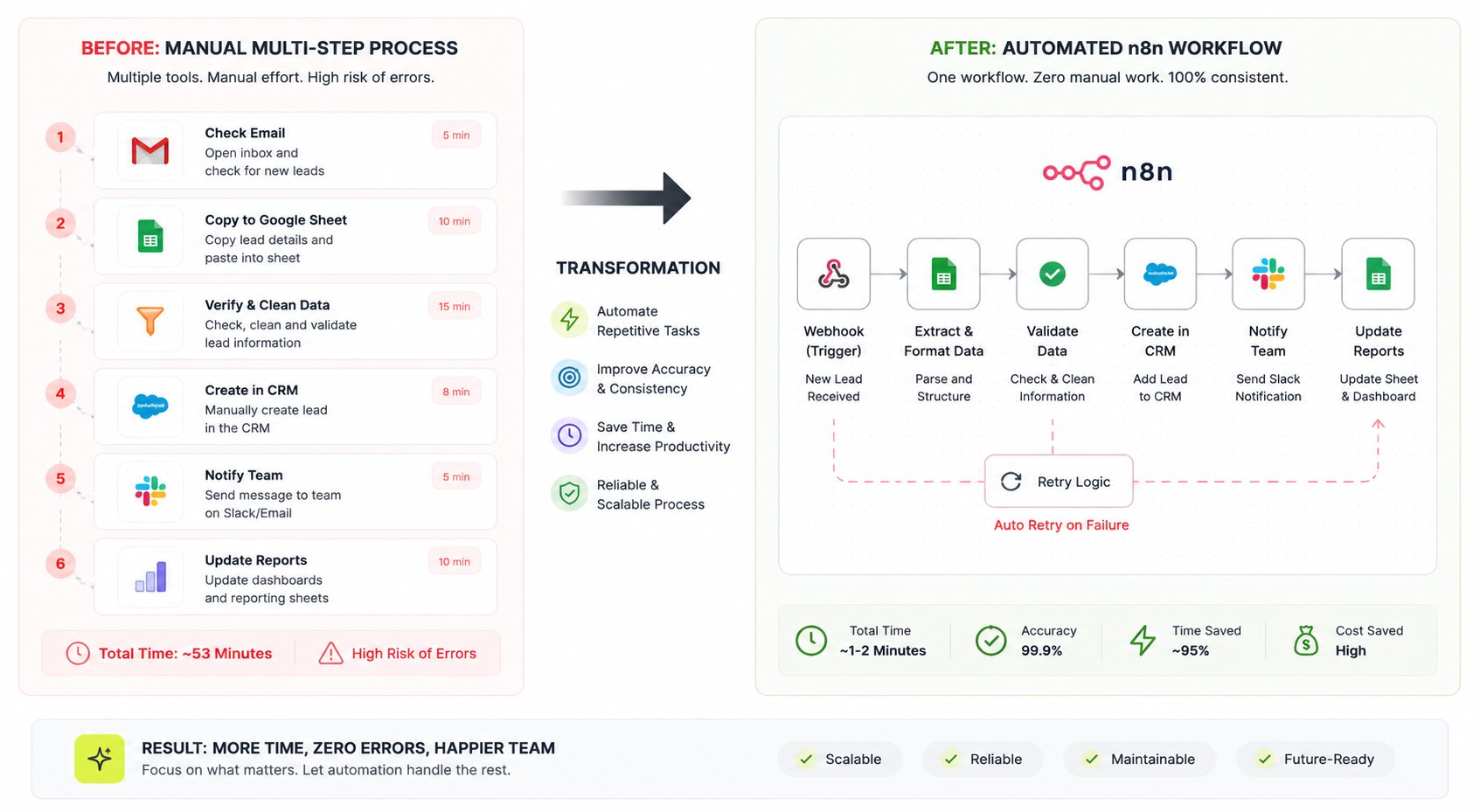
A lead sits in your inbox until someone copies it into the CRM by hand. Custom n8n workflow automation replaces that manual chain with one system that runs it correctly every time, including retries and error handling.
Custom n8n workflow automation without the manual handoffs
The problem, reframed
Most businesses don't have a technology problem. They have an integration depth problem: ten to thirty tools that each do their job well and none of which talk to each other on their own.
The instinct is to hire someone to manage the manual steps, or to stack another no-code tool on top of the ones you already have. Neither one fixes the actual gap, which is that your data needs a system moving it, not a person or a patchwork of triggers held together with hope.
The real fix is architectural, not administrative. One properly built automation engine, running on infrastructure you control, replaces the manual layer entirely and gives you a system you can audit, extend, and hand to a new hire without retraining them on tribal knowledge.
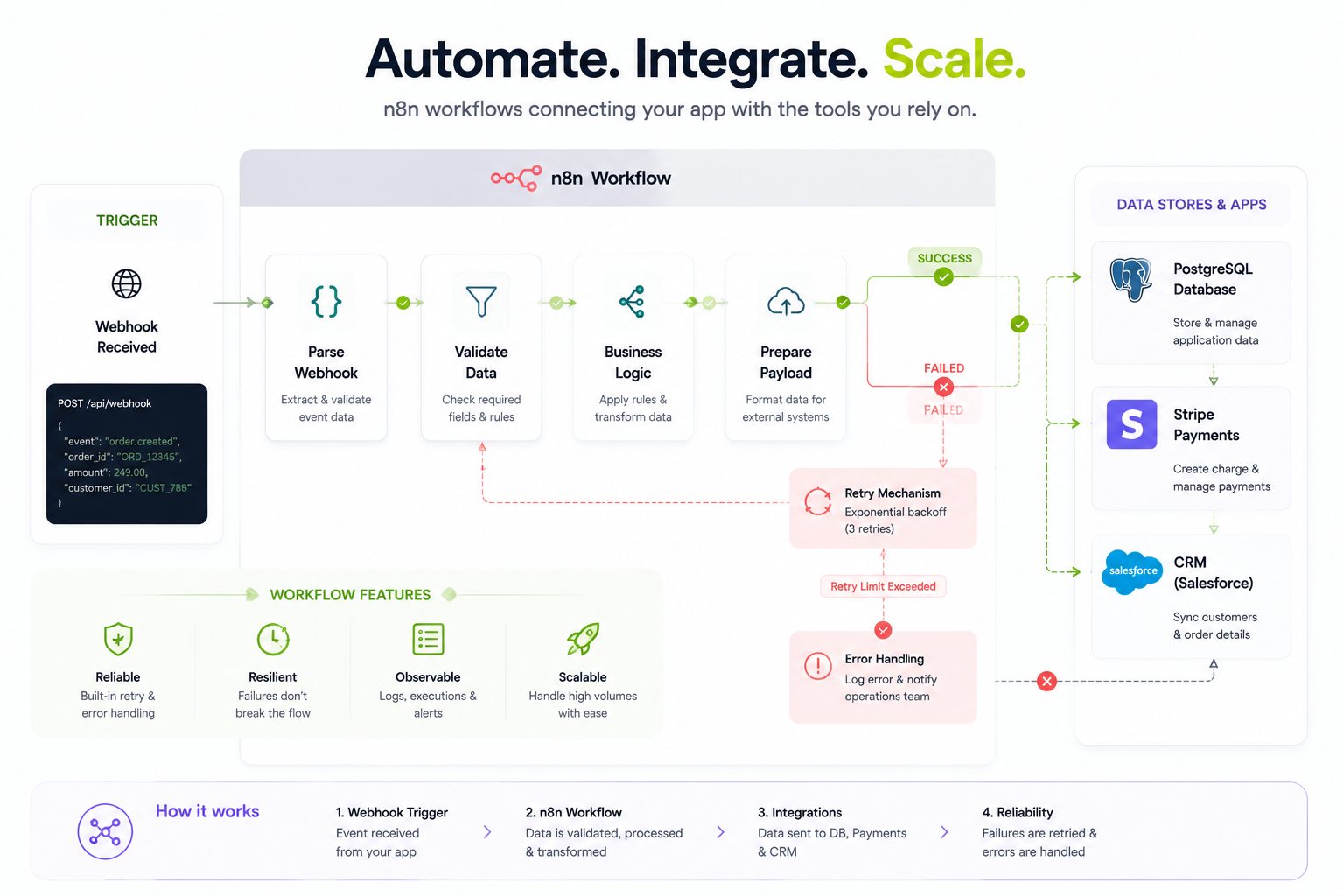
What happens when a workflow cannot finish
A useful automation needs a path for bad data, expired credentials and unavailable services. We define which failures can retry, which need review and who receives the alert. The handover explains how to inspect a run and recover without creating duplicate records.
What we build
Self-hosted n8n on infrastructure we run Your workflows run on our own servers, not a shared SaaS instance with someone else's rate limits and someone else's outages. We already operate our own MCP server for internal tooling, so running production n8n infrastructure for client workflows is the same discipline applied to your stack.
Custom nodes and function steps Not every integration has a pre-built node, and the ones that exist often don't match how your business actually works. We write custom nodes and JavaScript function steps for the logic that's specific to you: a discount calculation, a data transform your CRM's schema doesn't natively support, a validation rule your last freelancer's Zapier setup couldn't handle.
Webhook triggers with retry and error handling A webhook that fires once and gives up if the receiving service times out isn't automation, it's a single point of failure with extra steps. We build retry logic with backoff, dead-letter routing for the calls that still fail, and alerts that tell a human when a workflow genuinely needs one, instead of staying silent while data quietly stops flowing.
Queue mode for heavy workflows Once a workflow is processing hundreds or thousands of executions a day, running everything on a single instance starts to choke. Queue mode splits the trigger from the execution across separate workers, so a spike in webhook volume doesn't take down the workflows that have nothing to do with it.
Real integrations, not connector demos Postgres for the data layer that needs to be queryable and indexed properly, not buried in a spreadsheet. Stripe for payment and subscription events. HubSpot or your CRM of choice for lead and deal sync. Xero or QuickBooks for the accounting side. Slack for the notifications your team actually needs to see, routed to the right channel instead of one firehose everyone mutes.
LLM steps where they earn their place An LLM step is the right call when a task genuinely needs judgment: classifying an inbound email by intent, drafting a first-pass reply for a human to approve, extracting structured fields from an unstructured PDF. It's the wrong call when a plain rule or a lookup table does the same job for a fraction of the cost and none of the latency. I add an LLM node when the alternative is a person making a judgment call, never as a default because it's available.
Built on a modern, future-proof stack
n8n is the automation core, but it rarely stands alone. A Postgres or Supabase layer holds state the workflow needs to reference across runs. A Next.js front end gives your team a clean internal dashboard instead of asking them to read execution logs. Where a workflow needs to reach outside your existing tools entirely, we can expose it as its own MCP server, so other systems (including an AI assistant your team already uses) can call it directly instead of you building yet another point-to-point integration.
None of this is required on day one. It's what's available once the first workflow is stable and the next bottleneck becomes obvious.
Who this is for
01
Operations-heavy SMBs
running 10 or more tools where the same data gets re-entered by hand in two or three of them every day.
02
Funded startups
past the stage where a founder manually stitching Zapier zaps is sustainable, moving into a phase where a broken automation actually costs revenue or a customer.
03
White-label agency partners
who need a reliable automation build behind their own brand, delivered on a timeline they can commit to a client.
04
Teams with an existing n8n setup that's outgrown its own scope
too many workflows built ad hoc, no error handling, and nobody confident enough to touch it anymore.
The qualifying question isn't your revenue. It's how many tools you're running, how many of the handoffs between them are still manual, and how deep the integration needs to go. If that number is small, a no-code tool is probably still the right call. If it isn't, this is.ff
Why Flowagenz
Infrastructure we run, not a shared instance.
Your n8n deployment lives on servers we control, the same way our own MCP server does. That means no noisy-neighbor rate limits, no forced migrations when a SaaS vendor changes its pricing tier, and full visibility into execution history for as long as you want to keep it.
Full ownership on handover.
Every workflow, every custom node, every credential and the infrastructure it runs on transfers to you at completion, or stays hosted with us if you'd rather not manage it. Either way, there's no lock-in: the workflows are yours, exportable in n8n's native format, not trapped behind a platform you can't leave.
Based in Salem, Tamil Nadu, running senior engineering hours against US, UK, and Australian business days.
You get async updates and live calls scheduled against your working hours, not ours, at a cost structure that reflects where we're based, not a discount on the quality of the build.
I default to self-hosted n8n over Make or Zapier once execution volume gets high enough that per-run SaaS pricing stops being predictable, or once a workflow needs execution history you can actually query later instead of a rolling log that ages out. Below that point, a no-code SaaS tool is often the right call, and I'll say so on the scoping call rather than sell you infrastructure you don't need yet.
Process
How it works
01
01
Scoping call.
You walk me through the tools involved and the manual steps between them. I map the actual data flow, not the flow you assume is happening.
02
02
Workflow design.
I spec each workflow: triggers, transforms, error paths, and where a human checkpoint still belongs versus where it can be fully automated.
03
03
Build on staging.
Workflows get built and tested against real data (anonymized where needed) before anything touches production traffic.
04
04
Handover and monitoring setup.
You get execution logs, alerting on failure, and documentation written for whoever inherits this after you, not just for me.
Delivery timelines depend entirely on how many workflows are in scope and how deep the integrations go, so they're set on the scoping call against your actual tool stack, not quoted generically here.
FAQ
Frequently Asked Questions
Everything you need to know about our process and digital systems.
You do. Every workflow, custom node, and credential transfers on handover, and the infrastructure either transfers to your own servers or stays hosted with us on your terms. There's no proprietary format locking you to Flowagenz after the build ends.
Replace the handoff that keeps slowing work down
Tell us which tools are involved and where your team still copies, checks or chases information. We will help scope the workflow and the recovery steps it needs.