Most comparisons of these three tools ask which one has the most integrations or the nicest canvas. For CRM automation, that is the wrong axis. The question that decides your bill, your reliability and how painful the first rebuild is: how does each tool count work, and how much logic can it hold before it becomes a mess?
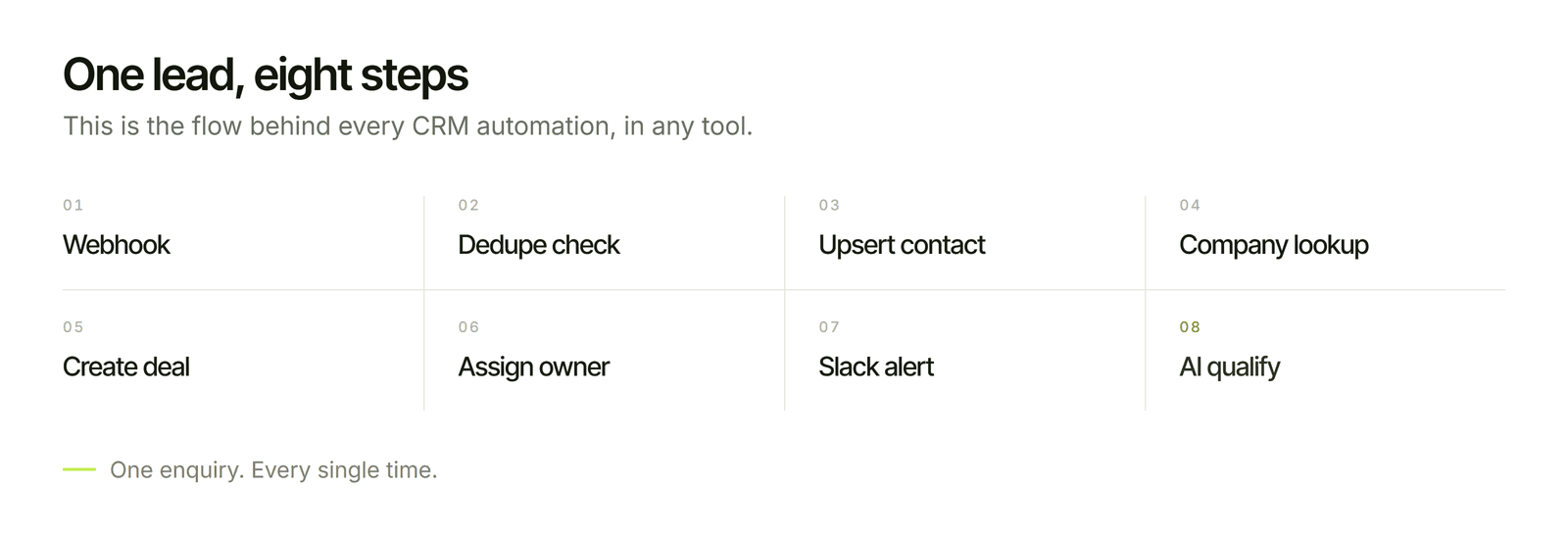
CRM workflows are not two-step zaps. A single new lead can mean a webhook, a duplicate check, a contact upsert, a company lookup, a deal creation, an owner assignment, a Slack alert, an AI qualification step and a log entry. That is eight or nine steps for one enquiry, and it runs on every lead. A tool that charges per step and a tool that charges per run give you very different invoices for the same job.
One disclosure before we start: Flowagenz builds CRM automation on n8n, so I have a bias. I have tried to write this the way I would advise a client who has not chosen yet, including the cases where n8n is the wrong answer.
My read: For CRM automation you plan to run for years, n8n is usually the best fit, because the bill stays flat as flows get longer and you keep full control of the logic. Zapier wins for a small, simple flow that a non-technical person must set up today. Make sits between them and is the best value for people who want a visual builder and will never touch code. There is no universal winner, and the section on choosing below is where the real decision happens.
What each one actually is
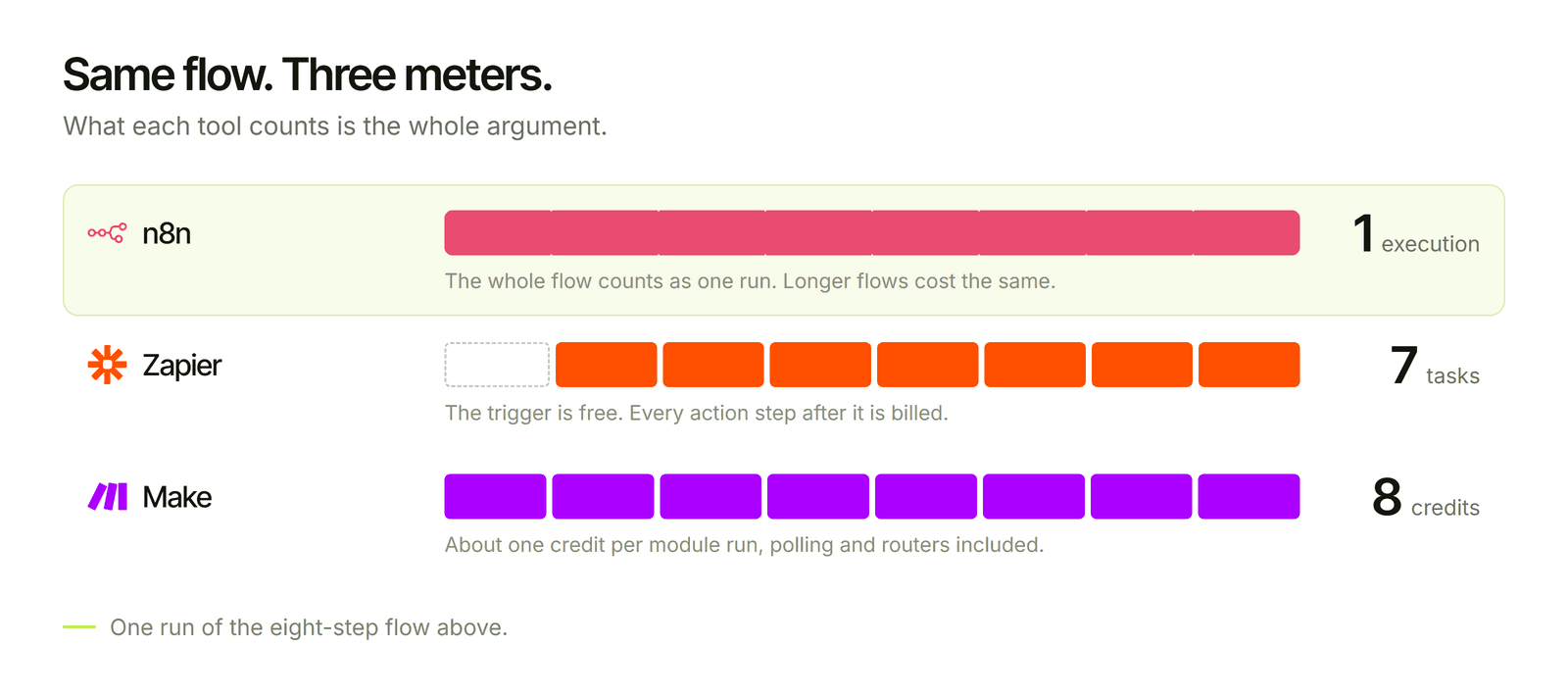
Fact: Zapier is a hosted automation platform built around "Zaps", linear sequences of a trigger and actions, with the largest catalog of app connections of the three. Each action step in a Zap counts as a task against your plan.
Fact: Make (formerly Integromat) is a hosted visual builder where you draw scenarios as connected modules, with routers, iterators and error-handling routes. It bills in credits that are consumed as modules run.
Fact: n8n is a workflow tool you can use as a hosted service (n8n Cloud) or run yourself. Its Community Edition is free to self-host under the Sustainable Use License. It bills cloud plans by executions, where one execution is one full workflow run regardless of how many steps it contains.
Head-to-head for CRM work
1. Pricing model: the difference that matters most
Fact: Zapier counts every action step. A flow with eight steps (one is the trigger, which does not count) that runs 2,000 times a month uses about 14,000 tasks. n8n counts that as 2,000 executions. Make counts roughly one credit per module run, so about 16,000.
My read: CRM flows get longer over time. Someone adds an enrichment step, then an AI score, then a Slack alert. On a per-step tool, each addition raises your bill, so people start avoiding useful steps to save money. On a per-run tool, a longer flow costs nothing extra. That quietly shapes how good your automation gets.
Debatable: n8n's own pricing has a sharp jump between its mid and upper cloud tiers, and sub-workflow calls count as separate executions. If you split a big flow into many small ones, your execution count rises. Per-run billing is friendlier, not magic.
2. Handling messy CRM logic
Fact: Real CRM data is untidy: duplicate contacts, missing fields, one lead arriving through three channels. Handling that needs branching, loops, merging and proper error handling.
My read: n8n handles this best. It has native nodes for HubSpot, Zoho CRM and Pipedrive, an HTTP Request node for any API, code nodes for the awkward cases, and an Error Trigger workflow that catches failures in one place. Make is strong here too, with routers and iterators that make branching easy to see. Zapier can do it with Paths and code steps, but long conditional flows get hard to read and expensive fast.
3. Webhooks, reliability and failure handling
Fact: CRM automation should be driven by webhooks where possible, with signature checks, deduplication and a retry path. Polling triggers are slower and, on usage-metered tools, can consume quota even when nothing arrives.
My read: All three can receive webhooks. What separates them is what happens on failure. In n8n you can build a dedicated error workflow that alerts you, queues the failed lead and retries. Zapier offers auto-replay and notifications. Make has error-handling routes per module. The thing to check is not whether a tool can fail gracefully, but whether you actually built that path. Most broken CRM automations were never designed to fail visibly.
4. AI steps: qualification, summaries and routing
Fact: n8n has built-in AI nodes for calling language models, structured output parsing and agents. Zapier and Make both offer AI actions too.
My read: For lead qualification with stored reasoning, structured JSON output and a human review path, n8n gives you the most control, and the cost of an AI step does not multiply your task count. On usage-metered tools, check how AI steps are counted before you build, since some plans meter them differently from ordinary steps.
5. Ownership, hosting and data control
Fact: Only n8n can be self-hosted. Zapier and Make are cloud-only.
My read: If your lead data has to stay on infrastructure you control, or you simply do not want a per-run fee at scale, this settles the question. If you have no one to maintain a server, it counts against n8n, and n8n Cloud is the middle path.
Debatable: The Sustainable Use License allows internal business use but restricts reselling the software as a service. If you are an agency planning to host n8n for clients, read it carefully rather than assuming it is open source in the usual sense.
6. App coverage and ease of setup
Fact: Zapier has the largest catalog of app connections, and its setup is the quickest for simple flows.
My read: If your CRM and the tools around it are mainstream, all three will connect. Where Zapier genuinely wins is the long tail of niche apps and the speed to a first working automation. n8n covers the CRM cases here well, and anything with a REST API can be reached through HTTP Request, at the cost of some setup work.
My read: The mistake I see most often is starting on Zapier for a flow that was always going to grow, then rebuilding it on another tool a year later when the bill and the complexity have both climbed. If you can already see it getting long, start where it can grow.
Real cost comparison
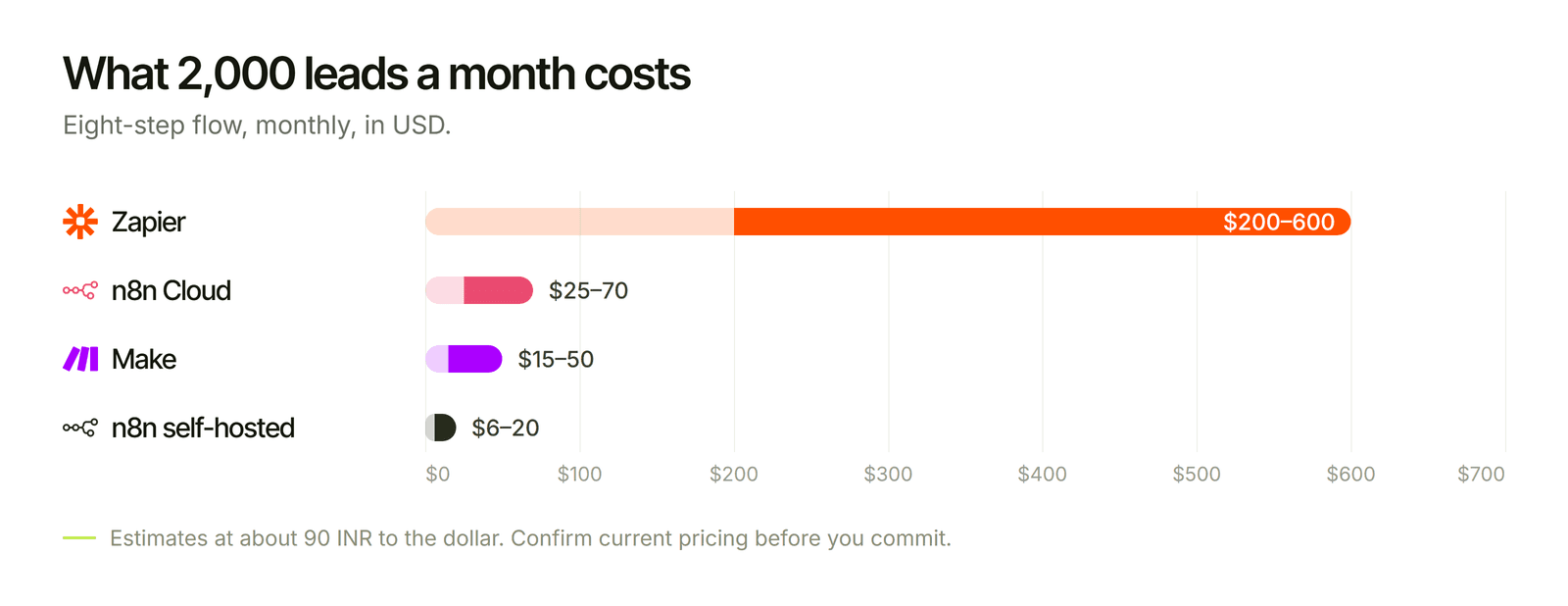
The workload for this table: a CRM lead flow with eight steps (webhook, duplicate check, upsert, company lookup, deal creation, owner assignment, Slack alert, AI qualification), running for 2,000 new leads a month.
These are estimates, rounded at about 90 INR to the dollar. Public pricing pages and third-party trackers disagree with each other, vary by billing cycle and currency (n8n lists euro prices), and change often, so confirm current numbers before you commit. Tool cost is also usually the smaller part of a CRM automation project. Building it properly, testing it against a sandbox and keeping it running cost more than the subscription on any of these platforms, and a cheap tool does not rescue a poorly designed flow.
The bottom line
Pick on how the tool counts work and how long your flows will get, not on the length of the integration list. Zapier is the fast start for small flows, Make is the visual middle ground, and n8n is the best home for CRM automation that has to grow, handle messy data and stay affordable. Whichever you choose, build the failure path before you build the happy path.
Let's create something together
If you want CRM workflows built on n8n and owned by you, see our CRM Automation with n8n service. I am happy to do a 30-minute call to tell you which tool fits your flow, even if the answer is Zapier.