Every business that pays for leads has the same quiet leak. The enquiry arrives at 6:40 pm, someone sees it at 9:15 the next morning, and by the time a human replies the lead has already spoken to two competitors.
The usual advice is "respond faster". That is not a plan. Nobody can stay at a desk all day, and shouting at your team about response times works for about a week. A plan is a system that acknowledges every lead in seconds, puts it in front of the right person, and escalates when nobody picks it up.
That system is simple enough to build in n8n in a couple of weeks. This post covers what the research does and does not say, the workflow design that works, and where it goes wrong.
What the research actually says
Fact: The statistic everyone quotes comes from a 2007 study by InsideSales.com and Dr James Oldroyd. It found that contacting a web lead within 5 minutes, instead of 30 minutes, was associated with about 100 times higher odds of making contact and 21 times higher odds of qualifying the lead.
Fact: The same data showed odds falling steeply even within the first hour, and later industry audits repeatedly found that most companies took hours or days to respond to web enquiries.
Debatable: The numbers are old, they come from a vendor with an interest in the answer, and they are routinely misquoted. The 21 times figure is often attributed to "5 minutes versus an hour" when the study compared 5 and 30 minutes, and the Harvard Business Review article that gets credited with the "5-minute rule" does not actually say five minutes. Treat the figures as a strong direction, not a law of nature.
My read: You do not need the exact multiplier to act. If a person submitted a form because they want something now, replying in minutes beats replying in hours, and almost every business can see this in its own data. Measure your own response time against your own close rate before you believe anyone else's number.
What "speed to lead" really means
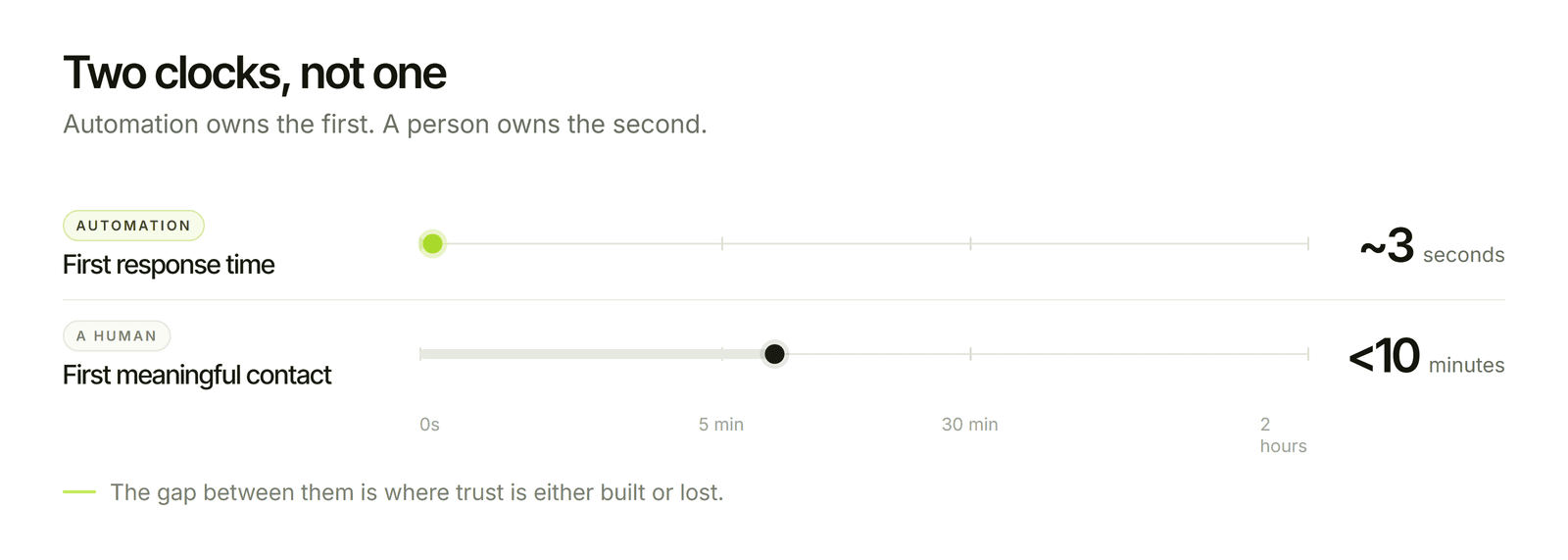
There are two different clocks, and mixing them up causes most of the confusion:
First response time: how long until the lead hears anything from you, including an automated acknowledgement.
First meaningful contact: how long until a human has actually spoken to or messaged them.
Automation owns the first clock. A person owns the second. The goal of the system below is to make the first one close to zero and to shrink the second by putting the right lead in front of the right person with a deadline attached.
My read: Do not automate the first conversation to hide a slow team. An instant "thanks, we got it" followed by silence for two days is worse than a slightly slower human reply, because you have made a promise and broken it.
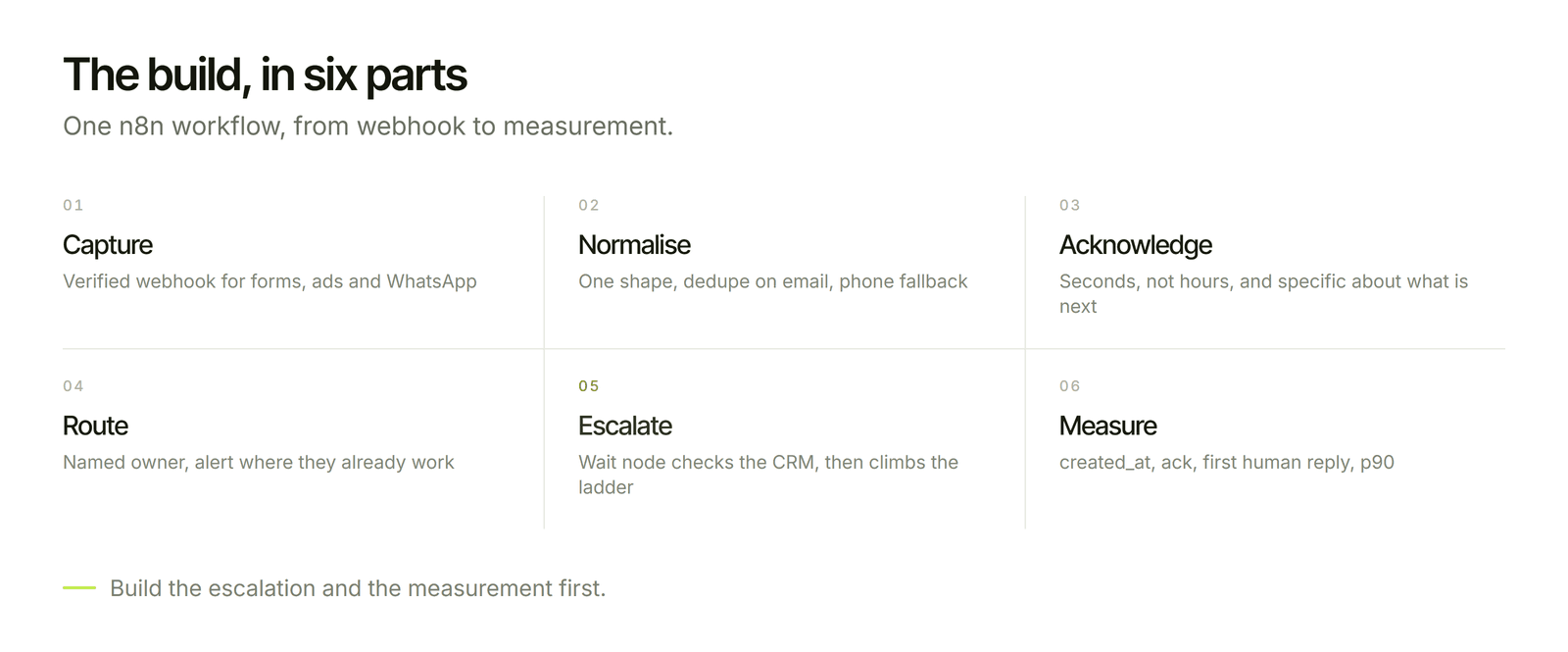
The workflow: six parts
Here is the design I would build in n8n for a business taking enquiries through forms, ads and WhatsApp, and writing to HubSpot, Zoho CRM or Pipedrive.
1. Capture through a webhook
Every source sends its lead to an n8n webhook: website forms, Meta lead ads, Google Ads lead forms, and the WhatsApp Cloud API. Verify the request signature or secret before doing anything, so a stray POST cannot create a lead. Acknowledge the webhook immediately and process afterwards, so the sender does not retry and create duplicates.
2. Normalise and deduplicate
Convert each lead into one standard shape: name, email, phone in E.164 format, source, campaign and timestamps. Then upsert to the CRM using email as the key, with phone as the fallback. A repeat enquiry updates the existing contact instead of creating another one, and it also means the same person never gets two acknowledgements.
Record created_at at the moment the webhook arrives. That timestamp is the start of your response-time clock, and you will want it later.
3. Send an instant acknowledgement that is actually useful
Send an email or WhatsApp message within seconds. The difference between a good acknowledgement and a canned one is specificity:
Say what happens next and when: "Priya from our team will call you by 11:00 today", not "we will be in touch soon".
Use the enquiry's own details, such as the service they asked about.
Outside working hours, calculate the next real slot and promise that, not a vague "shortly".
One WhatsApp rule matters here. Free-form replies are only allowed within 24 hours of the customer's last message. A lead who filled in a web form has not messaged you, so a business-initiated WhatsApp message needs an approved template and the person's opt-in. Capture consent on the form, and store it on the contact.
4. Route to an owner and alert them where they work
Assign the lead by round-robin or rules (territory, service line, deal size), then post a Slack or email alert to that person with the enquiry, the source, a link to the CRM record and a click-to-call link. Create a CRM task at the same time with a due time set by your response target.
The alert is the part that makes people actually act, because it lands in a tool they already have open.
5. Escalate if nobody acts
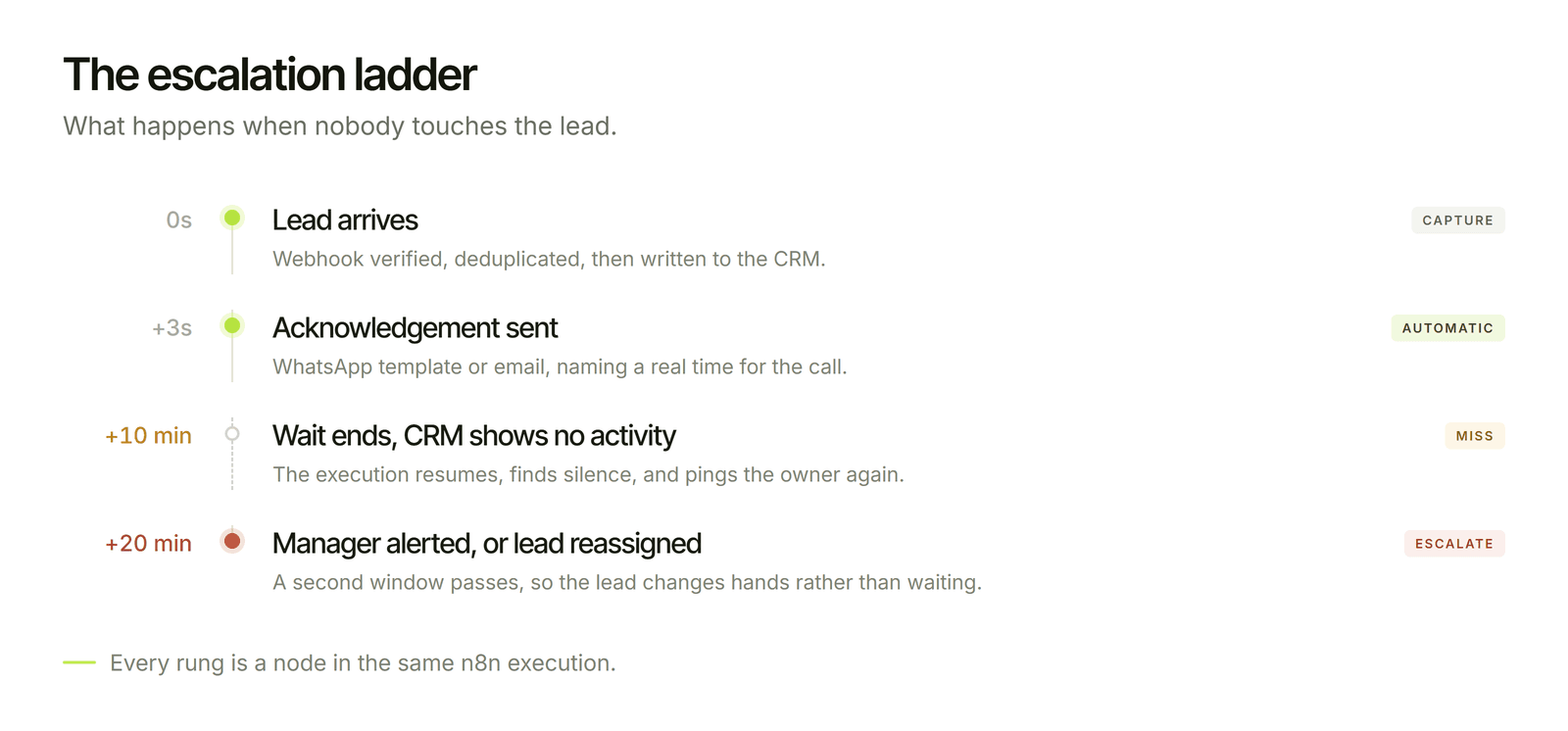
This is the step most DIY setups skip, and it is where speed-to-lead is won or lost. After the response target (say 10 minutes), a Wait node pauses the workflow, then checks the CRM for any logged activity on that lead. If there is none, escalate: ping the owner again, and after a second window alert a manager or reassign to the next available rep.
Fact: n8n stores longer waits in its database and resumes the execution afterwards, so a pending escalation survives a restart. Check n8n's current documentation for the exact behaviour on your version.
A small Code node (run once for each item) can compute the numbers you need:
6. Measure it
Store created_at, acknowledged_at and first_human_response_at on every lead. A simple view of the median and the 90th percentile response time, split by source and by rep, will tell you more in a week than the research above. Medians hide the slow tail, so look at the 90th percentile as well.
Where it goes wrong
Duplicate acknowledgements. Webhooks can fire more than once. Check a source ID and status before sending anything, so a retry does not produce two messages.
Promising what you cannot keep. An after-hours message that says "we will call in 10 minutes" at 11 pm destroys trust. Make the promise depend on the clock.
Alert fatigue. If every lead pings the whole team, people mute the channel. Alert only the owner, and escalate only on a miss.
Sloppy WhatsApp use. Sending marketing messages without opt-in risks your number's quality rating. Treat consent as a required field.
Speed without fit. Instant replies to junk leads waste your reps' attention. If spam or poor-fit enquiries are common, add a qualification step first, ideally one that stores its reasoning so a rep can check it.
No fallback when the CRM is down. Queue failed writes and alert someone, so a lead is never lost because an API was briefly unavailable.
What it costs to run
The software side is small. Self-hosting n8n on a VPS costs roughly $6 to $20 a month (about 550 to 1,800 INR), and n8n Cloud starter plans are in the range of $25 to $70 (about 2,200 to 6,300 INR), depending on execution volume. A lead flow like this is one execution per lead, so 1,000 to 2,000 enquiries a month is comfortably within a small plan. WhatsApp template messages are billed by Meta per message, with rates that vary by country and message category, so check the current rate card. These are estimates, rounded at about 90 INR to the dollar, so confirm current prices before you plan.
The larger cost is the build and its upkeep, which depend on how many lead sources you have and which CRM you use.
When this is overkill
If you get fewer than around 20 enquiries a month, a person watching a shared inbox with a phone notification will do the same job for free. Automation earns its keep when volume, channels or after-hours demand mean a human cannot reliably be first.
The bottom line
Speed to lead is a system, not a mindset: capture every enquiry once, acknowledge it in seconds with something specific, put it in front of one named owner with a deadline, escalate on a miss, and measure the result. Build the escalation and the measurement first. They are what turn a fast auto-reply into faster sales.
Let's create something together
If you want this built and owned by you, see our Lead-to-CRM Pipeline Automation service. A 30-minute call is enough for me to tell you where your leads leak today.