"Auto-sync" is now a checkbox feature on nearly every AI chatbot platform's pricing page, and it means genuinely different things depending on the vendor. Some platforms detect and add new pages but never remove ones you've deleted, silently keeping outdated content live in the chatbot's knowledge base indefinitely. Others sync on a fixed weekly schedule regardless of how often your content actually changes. A few handle this properly, additions and deletions, on a cadence that matches your real publishing pace. The feature name tells you almost nothing about which of these you're actually buying.
This matters because the leading cause of poor RAG chatbot performance in production isn't the underlying AI model, it's the knowledge base feeding it, and a knowledge base that was accurate at launch degrades continuously and invisibly without an active, correctly built update lifecycle behind it. This post covers what auto-sync actually needs to do well, and the specific questions worth asking before buying one.
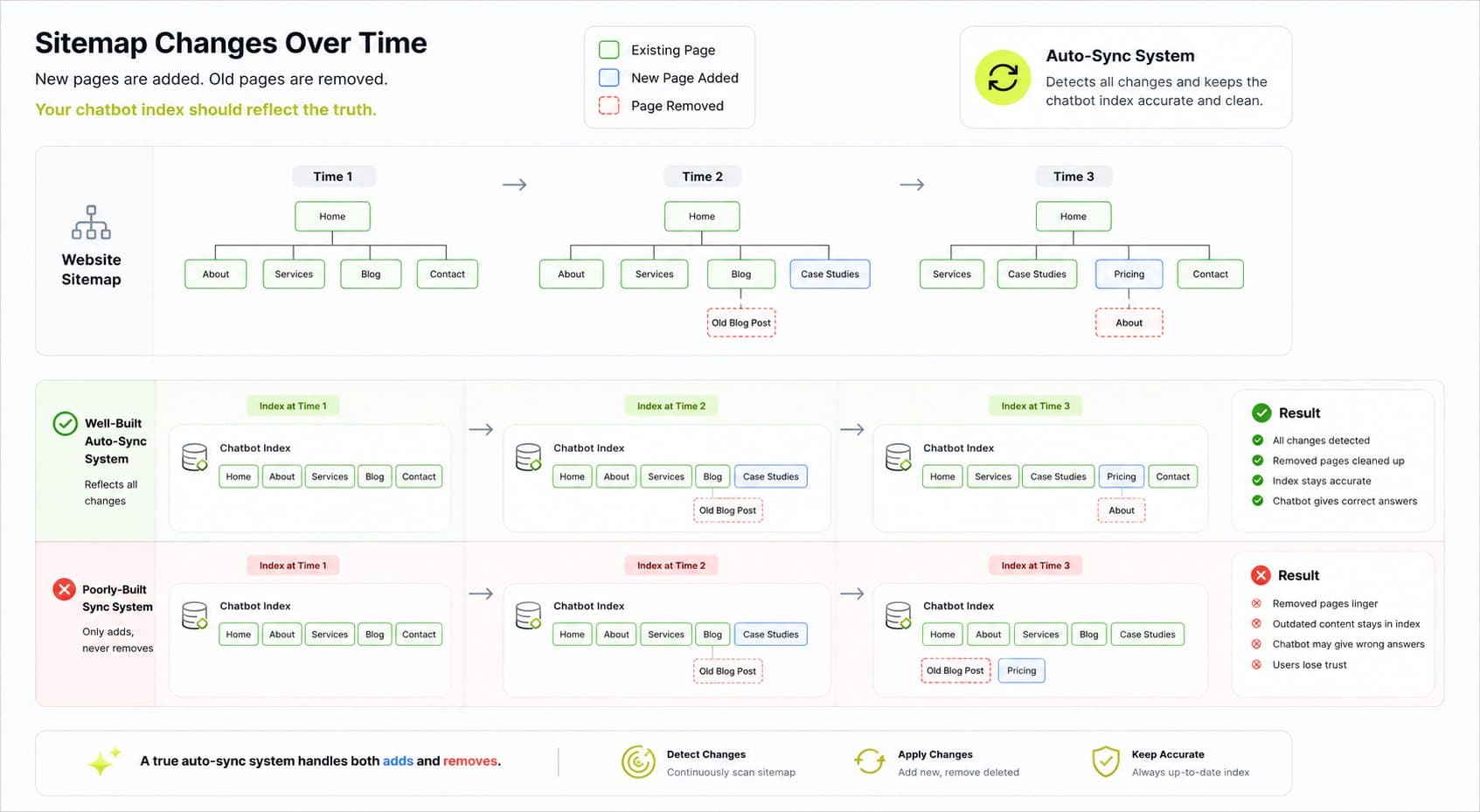
Detect additions and deletions, not just one direction.
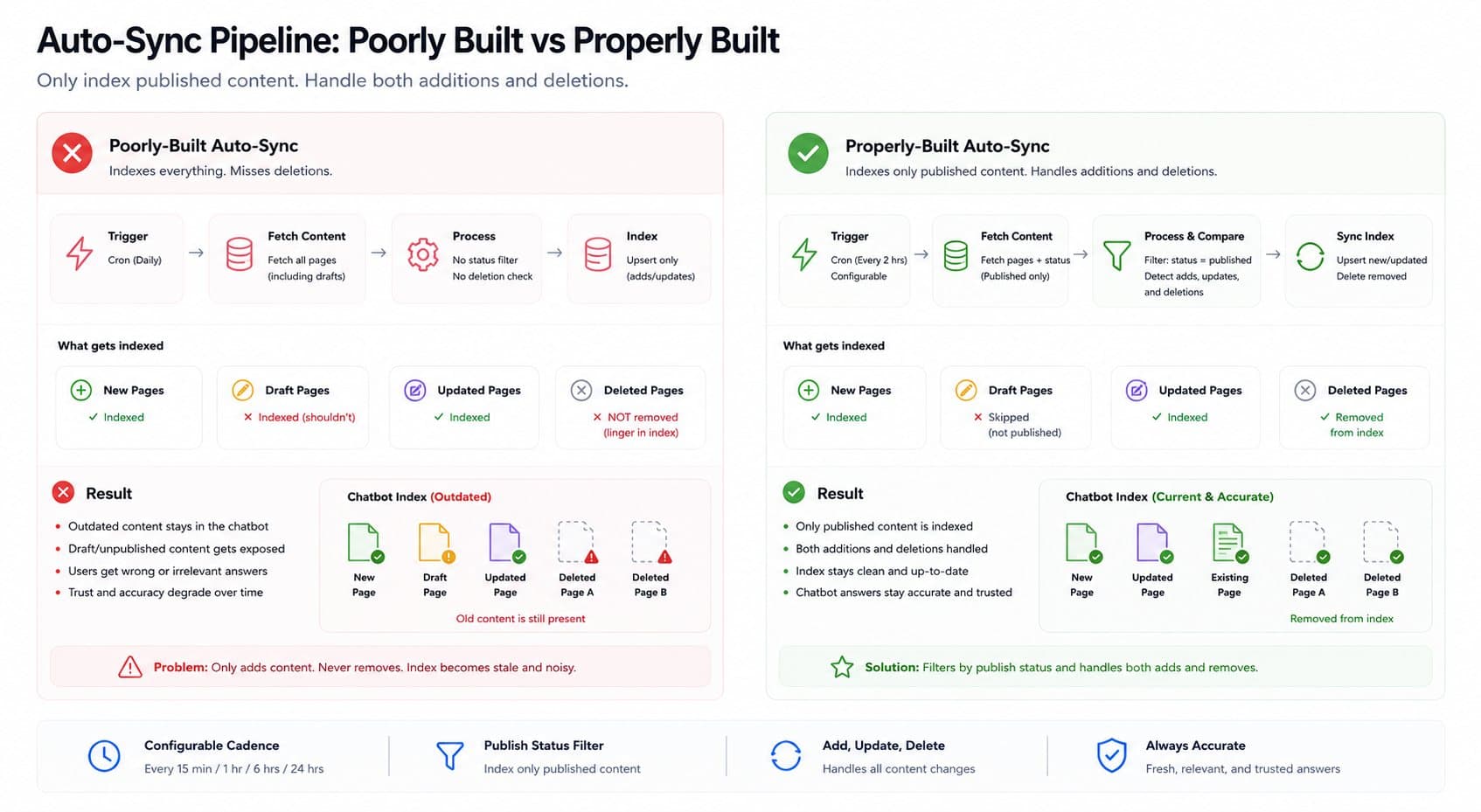
When you publish a new page, it should get crawled, chunked, and indexed. When you remove or unpublish a page, that content needs to be pulled from the index too, not left behind as a stale, retrievable answer. This sounds obvious, but it's the single most common gap between vendors: several popular platforms handle additions well and either ignore deletions entirely or treat them as a separate, manually triggered action.
Filter what shouldn't be customer-facing before it's indexed.
A website has content that was never meant to be a chatbot's answer: draft pages awaiting approval, internal notes left in a CMS, lead-capture form copy, admin-only sections. A naive crawl-and-sync pipeline treats all of this the same as published, customer-facing content, and it starts surfacing in chatbot answers with no warning. This is a real, common failure mode, not a hypothetical one, and it's worth asking any vendor directly how their sync distinguishes published content from everything else sitting in the same system.
Re-chunk on structural change, not just content change.
If a page's structure changes significantly, a policy that used to be one paragraph gets reorganized into three sections, a sync that only checks "has the text changed" can miss that the old chunk boundaries no longer make sense for the new structure, degrading retrieval quality without any obvious signal that something broke.
Match sync cadence to actual publishing pace.
A site that updates pricing or policy pages daily needs a faster sync cadence than one that publishes a blog post once a month. Fixed, non-adjustable sync schedules are a common corner cut, ask specifically whether cadence is configurable per content type, not just per account.
The failure mode that stays invisible
A chatbot with a stale or incorrectly synced knowledge base doesn't throw an error. It answers fluently, using whatever content it has indexed, correct or not, and there's no visible signal to the business owner that something's wrong until a customer reports being given outdated information, or worse, doesn't report it and just loses trust in the business quietly. This is the specific risk auto-sync is supposed to solve, and it's also the specific risk a poorly built auto-sync feature can create a false sense of security about, "it's on auto-sync" doesn't mean "it's definitely correct," it means "someone needs to have built the sync properly."
What good vendors actually offer
Some platforms in this category handle the mechanics well: detecting sitemap changes specifically, adding new URLs while removing ones deleted from the sitemap, rather than treating additions and deletions as separate features. Configurable sync cadence, daily, weekly, or on-demand, rather than a single fixed schedule, is another real marker of a properly built feature rather than a checkbox one. Vendor-reported results in this category (worth treating as a single company's case study rather than an industry-wide guarantee) include reductions in support ticket volume in the range of tens of percentage points for businesses that get the sync and knowledge base structure right, alongside more conservative, broadly cited deflection rate figures in the 40 to 70 percent range for well-implemented setups generally.
Questions worth asking before buying
"What happens when I delete or unpublish a page?" If the answer is vague or focused only on new content, that's the clearest signal of an incomplete implementation.
"Can I see exactly what's currently indexed?" You should be able to audit the chatbot's actual knowledge base, not just trust that sync is working correctly behind the scenes.
"How do you distinguish published content from drafts, internal pages, or admin sections?" This is the question most likely to expose whether the vendor has actually thought about this failure mode.
"What's the sync cadence, and is it configurable?" A fixed schedule that doesn't match your publishing pace either wastes indexing resources on content that hasn't changed or leaves genuinely updated content stale for longer than acceptable.
"What happens to retrieval quality when a page's structure changes significantly, not just its text?" This tests whether the sync re-chunks intelligently or just diffs raw text.
Real cost expectations
Auto-sync as a feature is usually bundled into a broader RAG chatbot platform's pricing rather than sold separately, so evaluate it as part of the full platform cost, not a standalone line item. For a standard SMB knowledge base, expect this capability within a chatbot platform's mid-tier plans, typically in the same $1,800 to $4,200 monthly-equivalent range covered in our broader AI chatbot cost breakdown, rather than as a premium add-on, though enterprise-scale sites with very high page counts or very frequent content changes may see this pushed into a higher tier specifically because of the added crawling and re-indexing load.
Decision framework
A properly built auto-sync is worth prioritizing if:
Your website content changes regularly, pricing, policies, product pages, and stale answers would be a real, costly problem
You don't have staff capacity to manually re-sync or audit the chatbot's knowledge base on a schedule
The business has content that should never be customer-facing (drafts, internal notes) living in the same system as published content
It matters less if:
Your content is genuinely static, changing rarely enough that manual re-sync a few times a year is a trivial operational cost
Your knowledge base is small and simple enough to audit manually without much effort
Beyond the website: what happens when content lives in multiple places
Most businesses don't keep all their customer-facing information on the website alone. Pricing might live in a spreadsheet, policies in a shared drive, product specs in a separate system. A website-only auto-sync solves part of the problem and leaves the rest as a manual gap, content that's just as capable of going stale as anything on the site itself, just without any sync mechanism watching it at all. Before committing to a website-focused sync tool, map out where your actual customer-facing information lives, and check whether the platform can extend to those sources too, or whether you'll need a second, separate process to keep them current. A chatbot that's perfectly synced with the website but blind to a frequently updated pricing sheet is only solving half the staleness problem.
The bottom line
"Auto-sync" is a real, necessary capability for any AI agent grounded in website content, and it's also a feature name that hides a wide range of actual implementation quality. The difference between a properly built sync and a checkbox one is invisible in a sales demo and very visible three months later, when a customer gets a confidently wrong answer from a page you deleted last quarter. Ask specifically about deletion handling, content filtering, and sync cadence before buying, not just whether the feature exists.
If you're evaluating a website-synced AI agent for your business, Flowagenz can walk through what a properly built sync pipeline should actually do before you commit to a platform. Happy to talk through your specific setup on a short call.
Let's create something together
Get in touch with us today.