Switching platforms is not itself a ranking signal. Google doesn't know or care whether a page is served by WordPress or Next.js, it evaluates the underlying signals, content, structure, speed, metadata, links, on a page-specific basis regardless of what generated the HTML. That reframe matters because it clarifies exactly what a migration actually needs to protect: not "WordPress-ness," but every individual SEO signal WordPress happened to be carrying, URLs, titles, canonicals, structured data, internal links, redirect history, none of which transfers automatically to a new stack.
One more thing worth knowing before starting: rankings rarely drop the moment you flip the switch. They erode three to four weeks later, once Google finishes reprocessing everything that changed. That delay is dangerous precisely because it hides mistakes, a broken redirect or missing canonical won't show up as a problem in the first few days, giving a false sense that the migration went cleanly right up until it didn't.
Phase 1: audit before touching anything
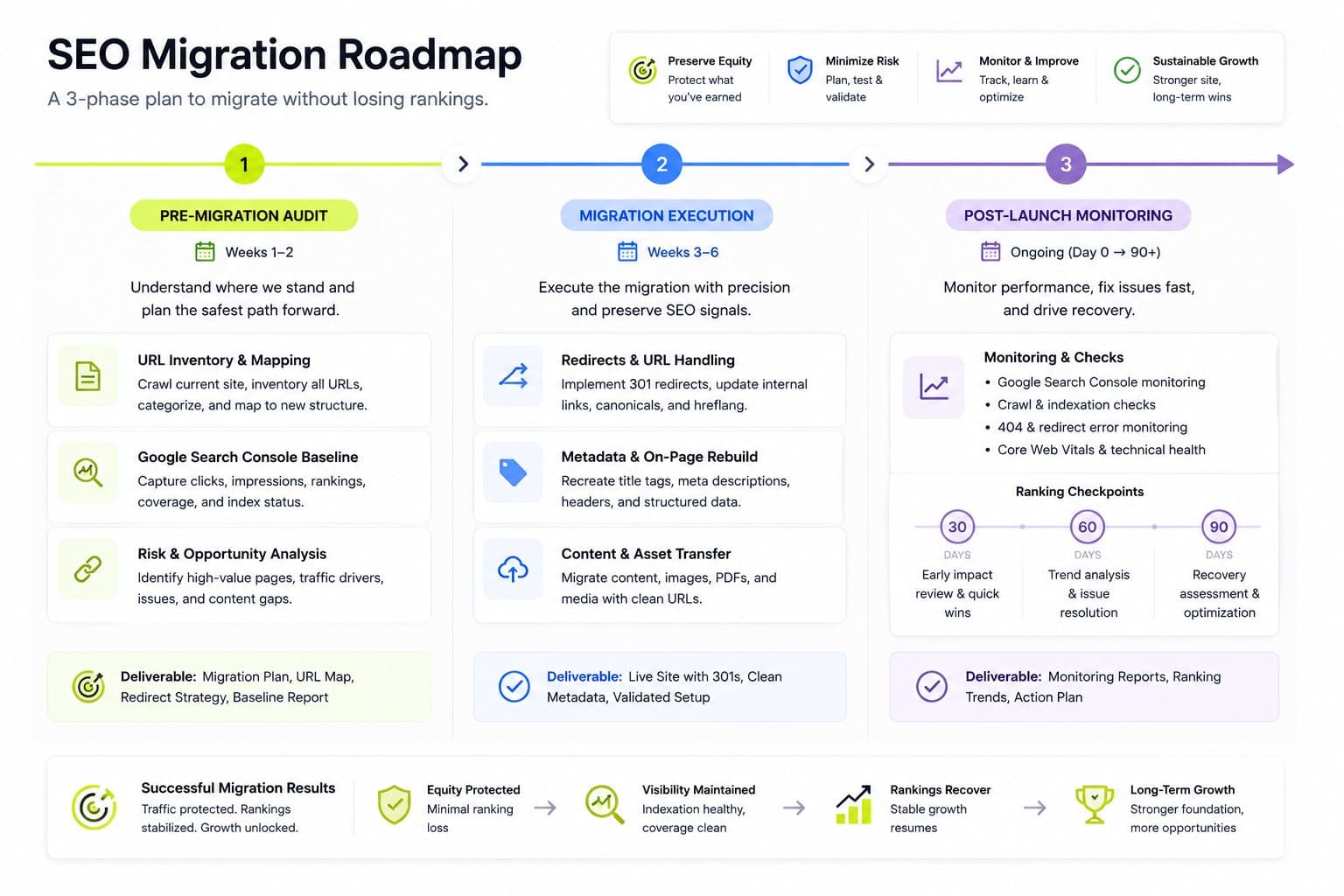
Before any code gets written, document exactly what the current site has, since you can't preserve or measure recovery of something you never baselined.
Crawl the entire live site with a tool like Screaming Frog or Sitebulb and export the full URL list, every indexable page, its title, meta description, and canonical.
Pull 12 months of Search Console data: your top 500 queries by impressions and top 100 pages by clicks. This tells you which pages are actually earning traffic and rankings, the ones that absolutely cannot break.
Identify your top 20 pages by traffic specifically and flag them as must-not-break URLs, these get manual verification after launch, not just automated redirect testing.
Document current Core Web Vitals (LCP, INP, CLS) from real CrUX field data, on both mobile and desktop, as your before number to compare against after launch.
Map the full site architecture: URL structure, navigation, internal linking patterns, and any filters, search functionality, or third-party integrations that need equivalents in the new stack.
Phase 2: redirects, the single biggest risk in the whole migration
Missing or incorrect redirects are the most common cause of post-migration ranking loss, and there's no safe middle ground: every URL from the old site needs either a redirect to its new location or a deliberate, documented decision to retire it. An old URL returning a 404 instead of redirecting doesn't just lose that page's traffic, it loses the accumulated link equity that page built up over years.
A few specifics worth getting right:
Never bulk-redirect everything to the homepage. Each old URL should map to its actual new equivalent. A blanket homepage redirect signals to Google that none of the old content still exists, which is far more damaging than a slower, more careful one-to-one mapping.
Set up redirects in next.config.mjs, not vercel.json. For App Router projects specifically, redirects defined in vercel.json are silently ignored, a genuinely easy mistake that produces broken redirects with no obvious error to catch it.
Keep the existing URL structure wherever possible. Every URL you can preserve exactly is one less redirect hop, and while Google passes close to full link equity through a 301, each additional hop still introduces some signal loss, so direct preservation beats even a well-executed redirect.
Removing .html extensions and cleaning up URL structure is one of the single biggest SEO wins available in this migration, if the old URLs had them. Just make sure every old .html URL still gets a proper redirect to its clean equivalent rather than being abandoned.
Phase 3: metadata and structured data don't migrate themselves
In WordPress, titles, meta descriptions, canonicals, and schema markup are typically managed by a plugin, Yoast or Rank Math, living in the plugin's own data layer, not in your actual content. When you move to Next.js and Strapi, none of that transfers automatically, it has to be extracted and rebuilt in the new stack deliberately.
Do not pass Yoast or Rank Math canonical values through unchanged. Rebuild canonical logic natively in Next.js against your new URL structure, since the old plugin's canonicals were built around WordPress's URL patterns, not your new one.
Render JSON-LD structured data server-side, not injected client-side after page load, so it's reliably present when Googlebot processes the page.
Block the WordPress backend's default sitemap and robots.txt from public access once the new site is live, to avoid duplicate indexing between the old backend and the new frontend if WordPress remains running as a headless content source.
Keep preview and draft routes explicitly noindexed in the new stack, a detail that was often handled by default in WordPress and needs deliberate configuration in Next.js.
Generate your sitemap and metadata natively in Next.js, rather than trying to proxy or reuse WordPress-generated sitemap XML, since URL structures and page sets will differ between the two systems.
Phase 4: migrating content into Strapi cleanly
This is the step specific to a Strapi-based migration rather than a generic headless move. WordPress's post types, pages, categories, and custom fields need to map onto Strapi's content-type system deliberately, not as a raw data dump.
Design Strapi content types around your actual content structure, not a literal copy of WordPress's schema. This is the right moment to clean up inconsistent field usage that accumulated in WordPress over years of ad hoc edits.
Extract WordPress content as JSON or MDX and import it into Strapi's content layer, preserving the specific fields that carry SEO weight: title, slug, meta description, featured image with alt text, and publish date.
Preserve internal links during the content transfer. WordPress content often links to other posts by their WordPress URL pattern; those need rewriting to the new URL structure during import, not left pointing at redirected, now-defunct paths.
Self-host images and serve them through the Next.js Image component rather than hotlinking from the old WordPress media library. This alone typically delivers a real, measurable 30 to 50 percent LCP improvement on image-heavy pages, one of the more significant performance wins available in this migration.
Rebuild category and tag taxonomies in Strapi as their own content types or relations, mapped explicitly to the URL structure they'll produce in Next.js, rather than assuming a one-to-one, automatic translation from WordPress's taxonomy system.
Phase 5: rendering strategy is a real ranking factor here
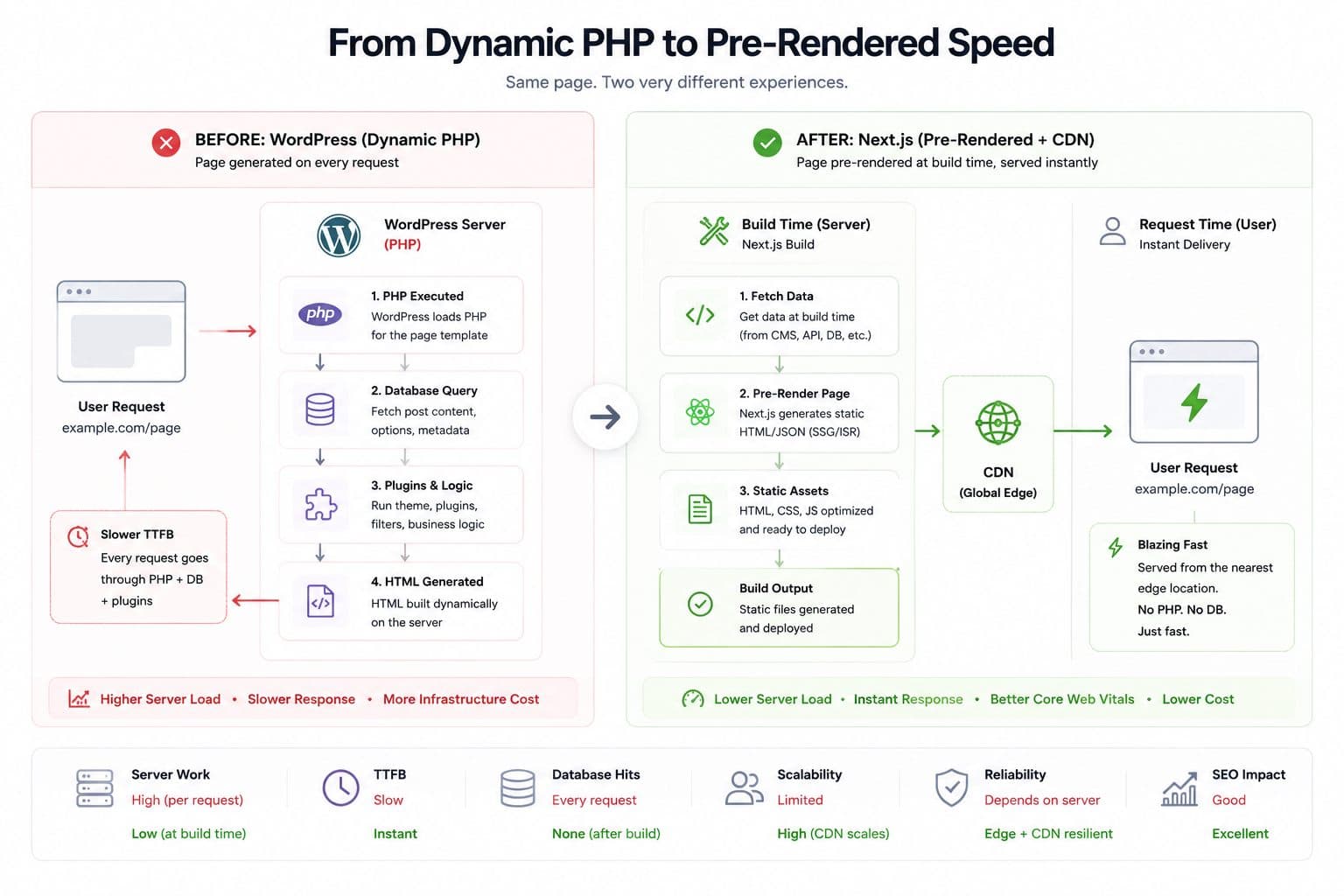
Google uses Core Web Vitals as a ranking factor, and this is where a properly executed Next.js migration earns real, measurable gains over WordPress rather than just matching it. WordPress serves pages dynamically through PHP on every request unless heavily cached; Next.js can pre-render pages at build time and serve them from a global CDN, a structurally different performance profile.
The rule that matters most: use static generation, server-side rendering, or incremental static regeneration for every indexable page, never client-side rendering alone. A page that renders its actual content only after JavaScript executes in the browser is a real crawlability risk, Googlebot can render JavaScript, but relying on it exclusively for core content is an unnecessary risk when SSG or SSR delivers the same content immediately in the initial HTML response.
Target Core Web Vitals thresholds at the 75th percentile on mobile: LCP under 2.5 seconds, INP under 200 milliseconds, CLS under 0.1. These aren't arbitrary, they're Google's actual ranking thresholds, and a migration that doesn't hit them has left real ranking potential on the table even if every redirect and metadata field was migrated perfectly.
Phase 6: after launch, the monitoring window matters as much as the migration itself
Since ranking impact shows up weeks later, not immediately, the post-launch period needs active monitoring, not a one-time check.
Run a 24-hour broken link sweep immediately after launch to catch redirect mapping errors before they compound.
Re-submit your sitemap in Search Console and request re-crawling for your top must-not-break pages specifically, rather than waiting for Google to discover the new structure on its own schedule.
Check rankings at 30, 60, and 90 day checkpoints, comparing against your pre-migration baseline data, since this is the actual window where problems, if any exist, will surface.
Verify Core Web Vitals against your documented before numbers once enough real-user data accumulates in CrUX, typically requiring a few weeks of traffic before the field data becomes statistically meaningful.
A properly executed migration, following this sequence closely, has a real, demonstrated track record of zero net ranking loss in practitioner case studies, though it's worth treating any single agency's "zero ranking drops across N migrations" claim as their own reported track record rather than a universal guarantee, since redirect and metadata quality vary enormously between actual executions of "the same" checklist.
The bottom line
A WordPress to Next.js and Strapi migration protects rankings by treating every SEO signal as something that has to be deliberately rebuilt, not something that comes along for free with the content. Redirects, metadata, structured data, and rendering strategy all need explicit attention, and the real test of whether it worked doesn't arrive until 30 to 90 days after launch, not in the first week when everything looks fine by default.
If you're planning a WordPress to Next.js and Strapi migration and want the redirect mapping and metadata rebuild done right the first time, Flowagenz runs this migration regularly as part of our headless CMS work. Happy to walk through your specific site on a short call.
Let's create something together
Get in touch with us today.