WordPress vs Webflow: which platform actually fits your site
WordPress still runs roughly 43 percent of the web, and Webflow has spent the last few years building a real, credible alternative for a specific kind of team: design-focused, without a developer on staff, building a marketing site or portfolio rather than a large content operation. Neither platform is broadly "better." They're built for different constraints, and the comparison only gets useful once you're honest about which constraint actually describes your project.
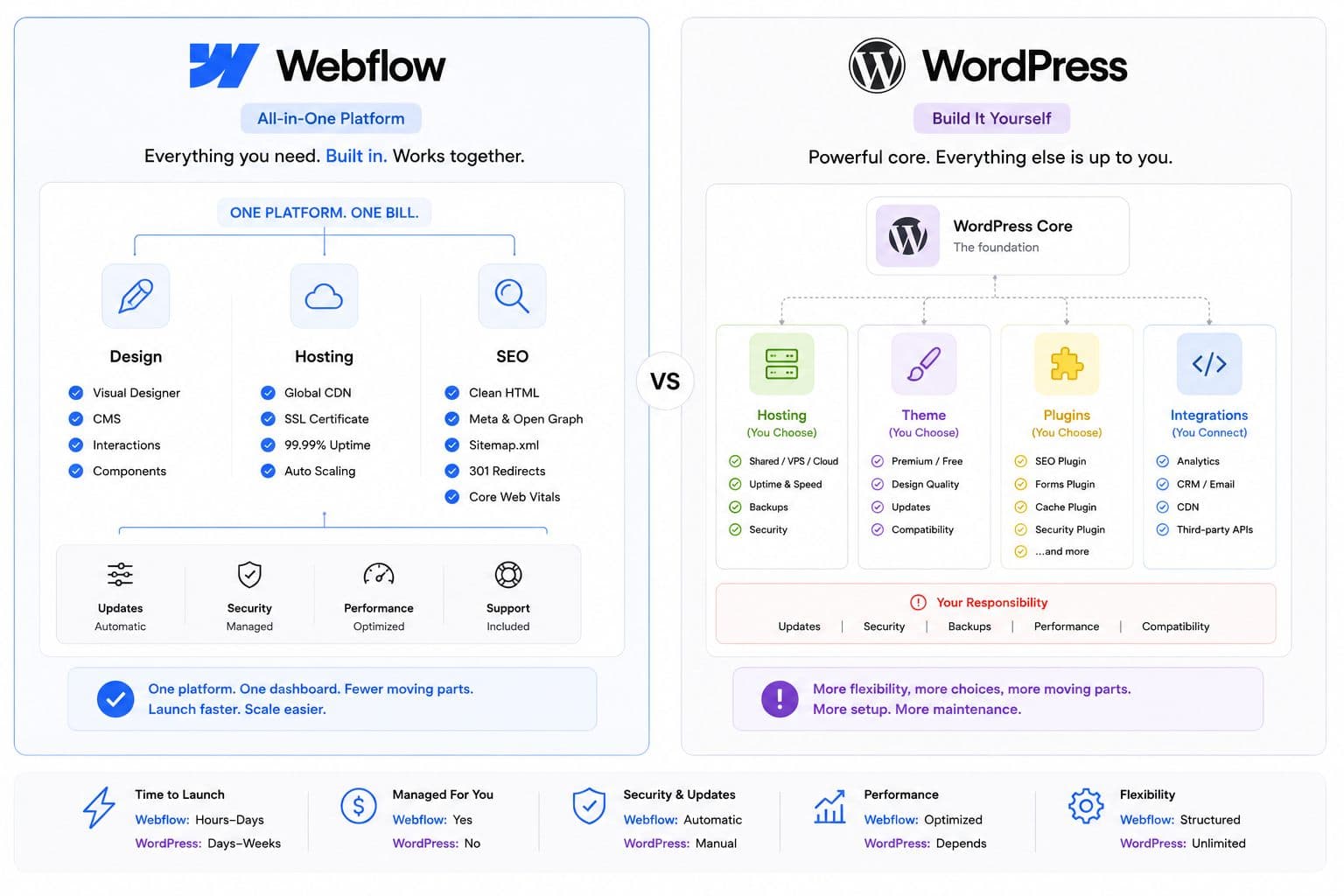
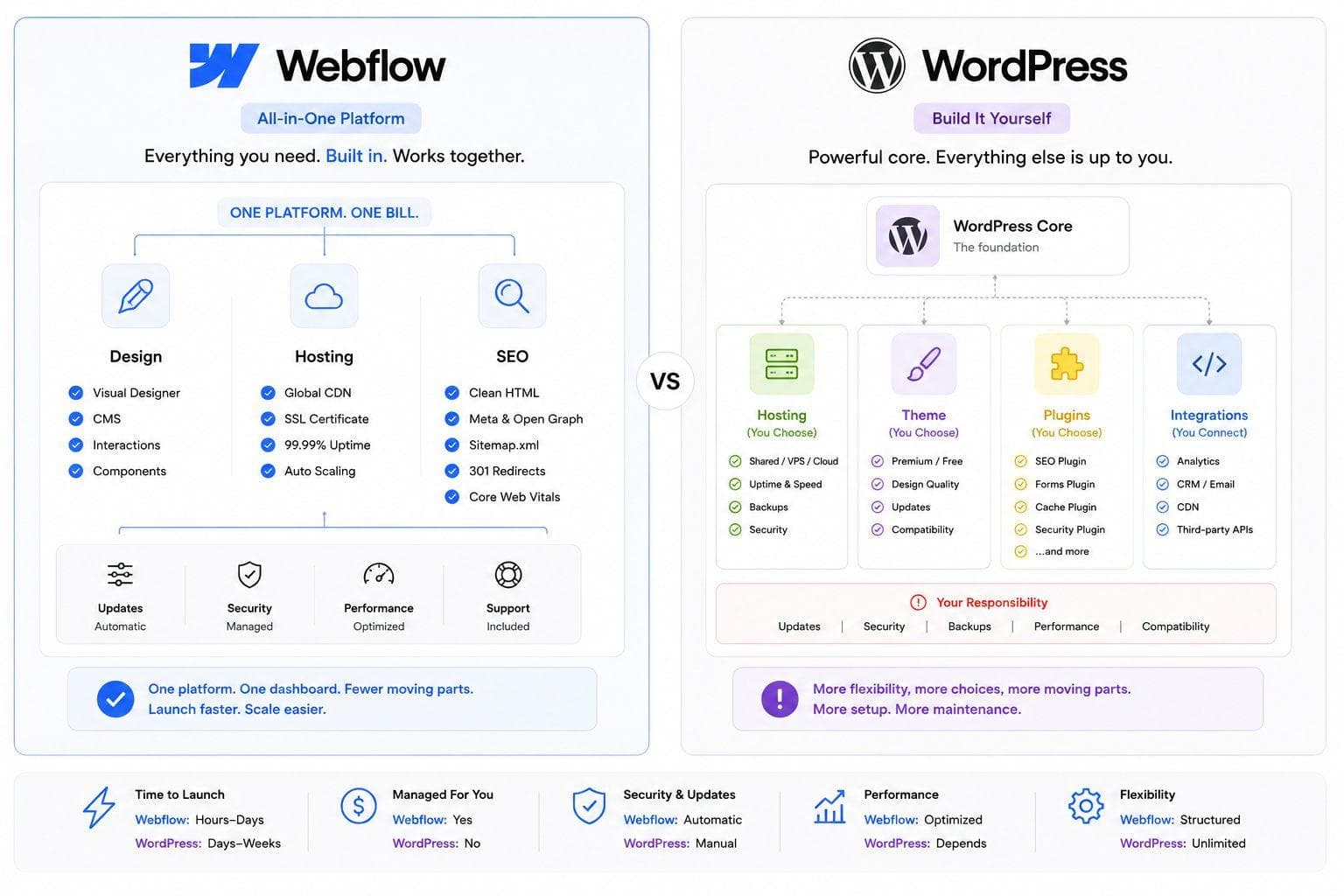
Webflow's own pricing has shifted enough in 2026 that older comparison posts are already stale on cost specifically, verify current plan pricing directly before finalizing a budget, since structures have changed within the year. What hasn't shifted much is the core trade-off: Webflow bundles hosting, security, and SEO tooling into one predictable subscription with a real content ceiling; WordPress is free at the core with no ceiling, and variable, harder-to-predict costs from hosting, plugins, and maintenance.
I default to Webflow for a business that needs a clean, fast-launching marketing site and has no in-house developer to maintain WordPress properly. I default to WordPress the moment content volume, ecommerce, or custom backend logic become real requirements, since Webflow's CMS item limits and platform boundaries start to bind exactly where WordPress has no ceiling at all.
What each one actually is
WordPress is free, open-source core software you host yourself, extended through tens of thousands of plugins and themes covering nearly any feature a site could need. The license cost is zero. The operating cost, hosting, plugin licenses, developer time for setup and maintenance, security patching, is real and easy to underestimate, especially for a team without technical staff on hand.
Webflow is a visual, no-code design tool with hosting, security, and SEO tooling bundled into a single managed platform. Meta editing, automatic sitemaps, 301 redirect management, and structured data all work natively, no plugin required, and the platform's clean output and CDN-backed hosting give it a real, structural performance edge out of the box compared to a typical WordPress build. In January 2026, Webflow added an AI-powered SEO audit panel directly in the editor, generating meta descriptions and alt text and flagging missing elements with a prioritized fix list, though it currently only operates on a site's primary locale, a real limitation for anyone running multilingual content.
Cost
This is the most misleading comparison in most existing content, because both platforms hide real costs behind a headline number. WordPress's "it's free" pitch obscures hosting ($120 to $600 a year for reasonable managed hosting), plugin licenses, theme costs, and developer time, real operating costs that show up regardless of the zero-dollar license. Webflow's bundled subscription looks more predictable on paper, but reported Business-tier pricing varies significantly across current sources, some cite roughly $39 a month, others cite figures closer to $2,500 a year for the same tier, which likely reflects Webflow's 2026 pricing restructure landing differently depending on when each source was published. Check Webflow's current pricing page directly before budgeting, rather than trusting any single comparison post's numbers, this one included.
For a standard 10 to 20 page business site with modest content needs, both platforms land in a similar total cost range over a year. The gap widens at the extremes: WordPress gets relatively cheaper at high content volume since there's no per-item pricing tier, while Webflow gets relatively more predictable and lower-maintenance at low-to-moderate volume where WordPress's plugin and hosting stack would otherwise need active management.
SEO
Webflow's SEO tooling works correctly on day one: meta tags, canonical tags, sitemaps, schema markup, and Open Graph data are all native, no plugin needed, which matters for a team without the technical comfort to configure Yoast or Rank Math properly. WordPress remains the stronger platform specifically for high-volume, authority-building content strategies, its two decades of blogging and content tooling, combined with no content ceiling, make it the better long-term choice when organic search growth depends on publishing a large, deep library of content across many topics. Webflow has a real, specific SEO gap worth knowing about: you can't apply a rel="nofollow" attribute to individual links inside CMS content without custom code or a third-party workaround, a genuine limitation for sites managing a lot of external or sponsored links.
Performance and security
Webflow wins by default here, not through superior engineering but through architecture: no plugins means no plugin-conflict attack surface, and CDN-backed hosting with clean generated code gives Webflow sites a real Core Web Vitals advantage over a typical WordPress build out of the box. WordPress can absolutely match or exceed that performance and security bar, but it depends entirely on hosting quality, plugin discipline, and ongoing maintenance, none of which are guaranteed by the platform itself. This is less "Webflow is inherently better" and more "Webflow removes an entire category of risk that WordPress leaves in your hands."
Scalability and content volume
WordPress wins decisively past a certain size. It has no content caps, handles large product catalogs and hundreds or thousands of pages without hitting a plan-tier wall, and supports multiple user roles and complex editorial workflows natively. Webflow's CMS plans are tiered by item count, workable for most marketing sites and even substantial blogs, but a real constraint for a business planning to scale into a large content library or complex multi-user publishing operation.
Ownership and platform risk
WordPress's open-source foundation means full ownership: every file, database record, and media asset is genuinely yours, hostable anywhere, with no vendor lock-in. Webflow's hosting and infrastructure are proprietary to the platform, which trades that ownership for the operational simplicity described above. Migrating from Webflow to WordPress is comparatively straightforward; migrating from WordPress to Webflow means rebuilding the design inside Webflow's editor and carefully managing redirects to protect existing search rankings either direction.
Decision framework
Choose WordPress if:
Content marketing and organic search growth are core to the business, not secondary
You're running or planning ecommerce, large product catalogs, or complex custom functionality
The site will scale past a few hundred pages or need multiple content editors with different roles
You have in-house development capacity, or a reliable relationship with one
Choose Webflow if:
You need a fast-launching, design-polished marketing site or portfolio with no developer on staff
Content volume is modest and not expected to scale into a large publishing operation
Predictable, bundled costs matter more than owning the underlying platform
Native SEO and security tooling without plugin management is a genuine priority
A newer consideration: AI-driven answer engines
Both platforms have started positioning around AEO, optimizing for AI-generated answers in tools like ChatGPT and AI search overviews, rather than only traditional search rankings. Webflow's clean, semantic HTML output and native schema generation are a reasonable structural fit for this, since AI systems parsing a page for an answer benefit from the same clean markup that helps traditional crawlers. WordPress can achieve the same semantic quality, but it depends on theme and plugin choices rather than being guaranteed by the platform, similar to the broader performance and security pattern described above. Neither platform has a settled, proven advantage here yet, this is genuinely new territory as of 2026, and it's worth treating any confident claim about one platform's edge in AI-answer visibility with some skepticism until more data exists.
The bottom line
Webflow wins on speed to launch, native SEO and security tooling, and predictable operating cost for a design-focused site without heavy content demands. WordPress wins on scalability, content ceiling, ownership, and total flexibility once a business's needs grow past what a bundled platform can comfortably hold. The right choice depends on which constraint actually describes your situation today, and realistically over the next two to three years, not on which platform sounds more modern or which one a design agency happens to prefer building on. When in doubt, weigh your content roadmap more heavily than your current page count, since that's the dimension most likely to force a costly migration later if guessed wrong.
If you're deciding between WordPress and Webflow for your next site, Flowagenz has built on both and can assess which one your actual content plans, team capacity, and growth trajectory justify. Happy to walk through your specific requirements on a short call.
Let's create something together
Get in touch with us today.