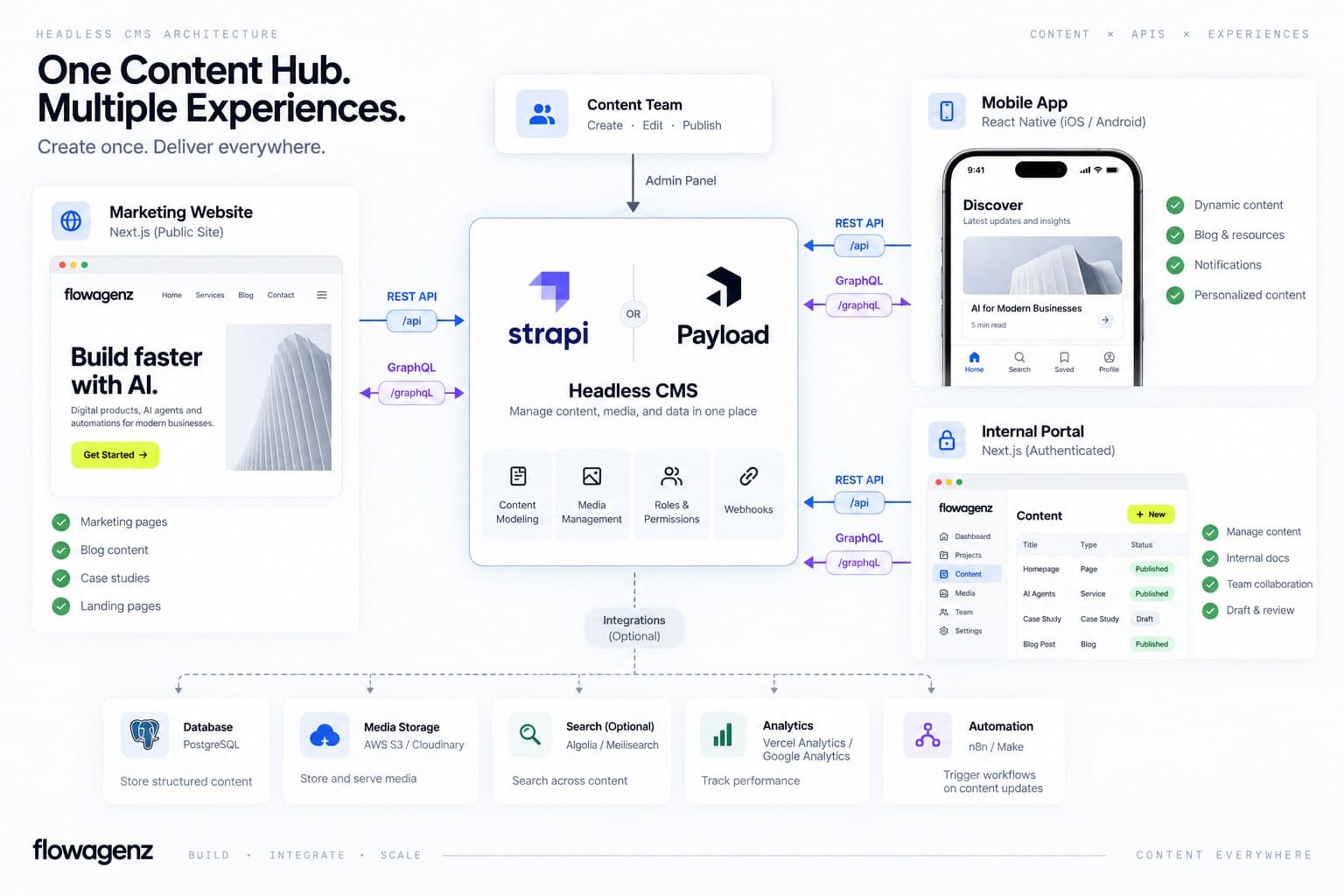
One content source feeding your marketing site, mobile app, and internal portal instead of three teams maintaining the same copy three times. We build the CMS layer and the Next.js frontend that consumes it, matched to how your team actually publishes content.
Headless CMS builds on Strapi, Payload, or Sanity
The problem, reframed
A traditional CMS ties your content to one rendering layer, which is fine until the same product needs to show up in a mobile app, a partner portal, and a marketing site that all pull from the same source of truth. Bolting an API onto WordPress after the fact usually means fighting the platform's assumptions about how content and presentation stay coupled.
I default to a real headless CMS, not a WordPress REST layer, whenever more than one frontend needs to consume the same content, because a purpose-built content API costs less to extend than a general-purpose CMS wearing an API as an afterthought. If you specifically need WordPress's editorial workflow and plugin ecosystem decoupled from its theme layer, that is a different build, our Headless WordPress Development page covers it directly.
What we build
01
CMS selection and content modeling.
We pick between Strapi, Payload CMS, and Sanity based on your team's actual constraints, not a default preference: Strapi and Payload are self-hosted and give you full database access (Postgres, MySQL, or MongoDB depending on platform), Sanity is a hosted studio with real-time collaborative editing and a generous free tier that gets expensive at volume. Content types, relations, and locales get modeled deliberately before any frontend code gets written, because a content model built to match your CMS's defaults instead of your actual editorial structure is the thing that makes every future feature request harder than it should be.
02
REST and GraphQL API design.
Strapi and Payload ship both REST and GraphQL endpoints out of the box; we configure field-level permissions so public and authenticated requests only ever see what they should, and we design the query shape around what your frontend actually needs rather than exposing every field on every endpoint by default.
03
Next.js frontend on the App Router.
Server Components fetch content directly, with static generation for pages that change rarely and on-demand revalidation wired to a CMS publish webhook for anything that needs to go live within seconds of an editor hitting publish. Draft Mode gives editors a live preview of unpublished content before it goes out.
04
Media and asset handling.
Image optimization through the Next.js Image component, with the CMS's native media library or an external provider like Cloudinary wired in when your asset volume or transformation needs outgrow the CMS's built-in storage.
05
Multi-consumer architecture where it applies.
If the same content genuinely needs to reach a React Native app and a partner-facing portal alongside the main site, we design the API surface once for all three consumers instead of building three separate integrations against the same CMS.
Recently shipped
Built on our own stack first. flowagenz.com runs on the same architecture we recommend to clients: a Next.js frontend consuming a headless CMS with server-rendered content, clean JSON-LD, and on-demand revalidation wired to publish events. When we scoped our own content model, we made the same calls we will make for yours: which fields are global, which are page-specific, and which content types should be reusable across the site. Dogfooding, not theory.
Built on a modern, connected stack
Strapi is already part of our standard stack, alongside Next.js on the App Router, Postgres for the database layer, and n8n for anything that needs to trigger off a CMS publish event; syncing a new product listing into a CRM, for instance, or firing a notification when a new case study goes live. If your content needs an AI-facing layer on top, a RAG chatbot pulling from the same content the CMS manages is a natural extension, not a separate system to maintain in parallel.
Who this is for
01
Growing businesses
whose content needs to reach more than one frontend and who are tired of copying the same product description into three different systems.
02
Startups
building a product with a marketing site, an app, and a documentation portal that should all draw from one editorial team's work.
03
Agencies
needing white-label headless CMS build capacity for a client project, delivered with a content model and API documented well enough to hand to the client's own developers.
04
Teams migrating off a legacy CMS
where the coupling between content and presentation has become the actual bottleneck on new feature work, not a hypothetical future problem.
Why Flowagenz
Code and content you own outright.
Full ownership of the CMS instance, the frontend code, and the database on completion. No vendor lock-in, no dependency on Flowagenz infrastructure to keep the content flowing.
Based in Salem, Tamil Nadu.
Western-grade engineering at a rate structure offshore delivery makes possible, not a discount on the architecture decisions that actually matter.
Real overlap, not vague promises.
Async-first communication with working hours that overlap US Eastern mornings, UK afternoons, and Australian business hours on the same day.
We pick the CMS to fit you, not the other way round.
Because Strapi, Next.js, and Postgres are already core to how we build, choosing Strapi over Payload or Sanity for your project is a real technical call based on your hosting preference and team size, not a default we reach for because it is the only one we know.
How it works
01
01
Content modeling call.
We map every content type your editors actually need, including relations between them, and confirm which CMS fits your hosting and collaboration requirements.
02
02
CMS setup and API design.
Content types built in the chosen CMS, field-level permissions configured, and the REST or GraphQL query shape designed around your frontend's real needs.
03
03
Frontend build.
Next.js App Router frontend consuming the API, with static generation, on-demand revalidation, and Draft Mode wired to your CMS's preview and publish flow.
04
04
Editorial handover.
A walkthrough with your content team in the actual CMS admin, not just documentation, so publishing on day one feels familiar rather than experimental. Typical builds run 3 to 6 weeks depending on the number of content types and frontend surfaces.
What you get on handover
Every headless CMS build ships with the following:
Full CMS source code and configuration (Strapi, Payload, or Sanity)
Next.js frontend source code on App Router with static generation and on-demand revalidation
Content model documentation with every content type, relation, and field explained
API documentation covering every REST and/or GraphQL endpoint with example queries
Database access and migration scripts if we provisioned the infrastructure
Draft Mode and preview workflow configured for unpublished content review
On-demand revalidation webhooks wired to CMS publish events
Editor walkthrough in the live CMS admin with your content team
30-day post-launch support for bug fixes and content model adjustments
Zero dependency on Flowagenz infrastructure; runs on your servers, your accounts, your control
FAQ
Frequently Asked Questions
Everything you need to know about our process and digital systems.
A typical headless CMS build runs INR 2,00,000 to 6,00,000 ($2,400 to $7,200) depending on the number of content types, whether you need multi-locale support, and how many frontends are consuming the same content. A single Next.js marketing site with 5 to 8 content types sits at the lower end. A multi-frontend architecture feeding a site, a mobile app, and a portal from one source, with 15-plus content types and custom editorial workflows, sits at the upper end. We scope on a call and quote in INR and USD together rather than anchoring to a generic starting price that will not hold for your actual scope. The range above is honest for planning; your actual quote comes after the content modeling call.
Book your headless CMS scoping call
Tell us how many frontends need to pull from the same content and what your editorial team's day-to-day publishing actually looks like. We map the content model, pick the right CMS, and give you a fixed quote on a short call. No generic pitch.